

Sift — Notes You Can Find
Muhammad Hasan Zafar Productivity iPhoneiPadiPod touch
Sift — Notes You Can Find is a free Productivity app for iPhone and iPad by Muhammad Hasan Zafar. Requires iOS 16.4. Updated October 1, 2026.
- Price
- Free
- on the App Store
- Size
- 29 MB
- Age 4+
- Updated
- Oct 1
- 2026 · v1.0.0
Screenshots


About Sift — Notes You Can Find
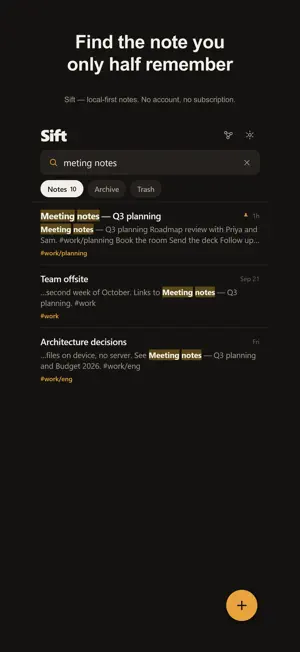
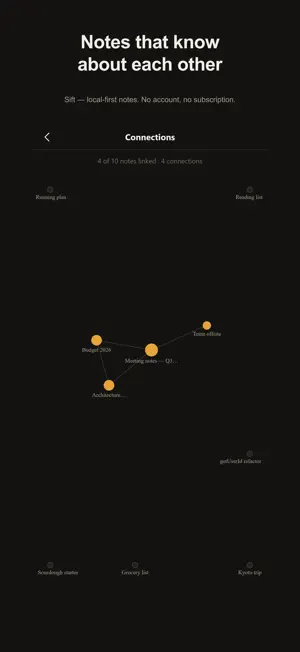
Sift is a notes app built around one question: can you find what you wrote? Most note apps can't. Their search matches text exactly, so it misses "lightbulb" when you typed "light bulb", misses "running" when you searched "run", and gives you nothing at all when your thumbs put an extra letter in a word. Sift is built the other way round. FIND WHAT YOU HALF REMEMBER • Typo tolerance — "meting notes" finds "Meeting notes" • Word endings — "run" finds "running", "city" finds "Cities" • Compound words, both directions — "light bulb" finds "lightbulb", and the other way round too • Accents ignored — "resume" finds "résumé" • Results as you type, with the matching words marked so you can see why something matched • Filters when you want them: tag:work/clients, is:todo, "exact phrase", -exclude, updated:>2026-01-01 NOTHING IS EVER LOST Every save is a revision. Open the history of any note, read any earlier version, and bring it back with one tap. Restoring is itself just another revision, so it can't destroy anything either. Notes are written one file at a time, and the history is written before the file is replaced — so even an interrupted write leaves your words recoverable. Deleted notes wait 30 days in the trash. NOTES THAT KNOW ABOUT EACH OTHER Type [[ to link one note to another. The link works both ways: the note you point at shows everything that points back. A connections view draws the shape of what you've been thinking about, and notes you've mentioned but not written yet become an invitation to write them. WRITING THAT FEELS RIGHT • Live Markdown — headings, bold, highlight, quotes, code, checklists • Lists continue themselves; Return on an empty item ends the list • Tap any line to put the cursor exactly there • Tick checkboxes without entering edit mode • Nested tags like #work/clients/acme • Pin, archive, and lock notes behind Face ID • Light and dark, six accent colours, three writing fonts, four text sizes YOUR NOTES ARE YOURS Every note is a plain Markdown file stored on your device. No account. No server. No sync that can fail, because there is nothing to sync. Export any note, or all of them, whenever you like. Sift is free. There is no subscription, no advertising, no note limit, and no paid tier holding features back.
App privacy
The developer, Muhammad Hasan Zafar, reported these privacy practices to Apple.
Data Not Collected
The developer does not collect any data from this app.
Alternatives to Sift — Notes You Can Find
Looking for apps like Sift — Notes You Can Find? Here are 6 similar apps on the App Store. The highest rated is FlatNote (5.0/5), and all 6 are free to download.
-
 Tomato Timer Pro
-
 FlatNote
5.0
FlatNote
5.0
-
 Craftify: BYOK AI shortcuts
-
 Turtle Race Timer
-
 NoteWorthy: Smart Notes
-
 Latch: Scan to Unlock
5.0
Latch: Scan to Unlock
5.0
| App | Rating | Price | Last updated | Compare |
|---|---|---|---|---|
| Sift — Notes You Can Find | – | Free | October 1, 2026 | |
| Tomato Timer Pro | – | Free | May 4, 2026 | Compare |
| FlatNote | 5.0 / 5 (1) | Free | Oct 8, 2026 | Compare |
| Craftify: BYOK AI shortcuts | – | Free | Oct 15, 2026 | Compare |
| Turtle Race Timer | – | Free | Sep 21, 2026 | Compare |
| NoteWorthy: Smart Notes | – | Free | Sep 29, 2026 | Compare |
| Latch: Scan to Unlock | 5.0 / 5 (9) | Free | Oct 17, 2026 | Compare |