

24 Hours: Time Budget
Scrolling Is Evil LLC Productivity iPhoneiPadiPod touch
24 Hours: Time Budget is a free Productivity app for iPhone and iPad by Scrolling Is Evil LLC. Rated 4.0/5 from 1 ratings. Requires iOS 15.0.
- Rating
- 4.0
- 1 ratings
- Price
- Free
- on the App Store
- Size
- 39 MB
- Age 4+
- Updated
- Oct 5
- 2026 · v1.3.1
Screenshots



About 24 Hours: Time Budget
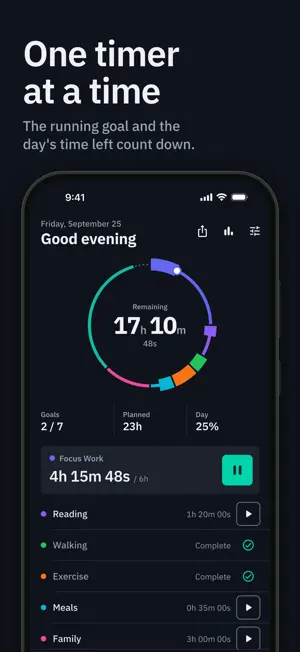
24 Hours turns your day into a budget. Give each goal its share of the 24 hours (sleep 8, work 6, exercise 1), press Start when you begin it, and watch its countdown. One timer runs at a time, so an hour spent on one goal comes out of the day. The ring on the home screen shows each goal's share of the day and what is left. HOW A DAY WORKS • Pick a starter plan (Balanced Day, Workday, Student, Fitness Reset, Weekend, Deep Work) or add your own goals. • Press Start on a goal to begin its countdown, and Pause to stop it. The countdown keeps running when the app is closed or the phone is locked. • At midnight the day is saved to history and goals start full again; an overnight goal like Sleep, started from 6 pm and on the next day's schedule, counts on the day you wake. FREE • Up to 10 goals, each on the weekdays you choose • The running countdown on the Lock Screen and in the Dynamic Island • A Home Screen widget with today's hours left, and a Shortcut to start today's goal • Trends for the last 30 days, and edits to any of the last 90 days • A picture of your day to share, and your history as CSV (copied to the clipboard) • Navy, Indigo and AMOLED Black themes, each in light and dark SUPPORTER, ONE PAYMENT • Unlimited goals • One-time goals for a single date • 90-day Trends, custom ranges, and weekday and tag breakdowns • 6 more color themes • Backup to your own Google Drive, by hand or automatically There is no subscription, and the free app keeps working if you never buy it. PRIVATE No account, no ads, no analytics. Goals and history stay on your phone. Google Drive backup, if you turn it on, writes to a hidden app folder in your own Drive.
What’s new
Version 1.3.1 · Updated October 5, 2026
Overnight goals: turn on "Counts on the day you wake" for a goal like Sleep. When you start it from 6 pm and it is on the next day's schedule, its time counts toward the next day. At midnight, a goal still running with the app closed stops, and the new day starts with its full hours. If the app is open at midnight and the goal is on the new day's schedule, it keeps running into the new day. Overnight goals keep running through the night. The picture of your day that you share shows the goals on it as done or in progress, with time spent against the plan (for example "5h of 6h") and any time over. Lock Screen pauses and resumes are recorded at the time you tap, including across midnight.
App privacy
The developer, Scrolling Is Evil LLC, reported these privacy practices to Apple.
Data Linked to You
The following data, which may be collected and linked to your identity, may be used for the following purposes:
- Contact Info: Email Address
- User Content: Other User Content
Used for: App Functionality
Data Not Linked to You
The following data, which may be collected but is not linked to your identity, may be used for the following purposes:
- Purchases: Purchase History
- Identifiers: User ID
Used for: Analytics, App Functionality
Alternatives to 24 Hours: Time Budget
Looking for apps like 24 Hours: Time Budget? Here are 6 similar apps on the App Store.
-
 168: Time Budget
-
 Thalam - Plan & Track
-
 Leeway: Time Blocking Planner
-
 enDo -Manage your daily tasks-
-
 DayBox: Time Blocking Planner
-
 NextStep: Visual Routine Timer
| App | Rating | Price | Last updated | Compare |
|---|---|---|---|---|
| 24 Hours: Time Budget | 4.0 / 5 (1 rating) | Free | October 5, 2026 | |
| 168: Time Budget | – | Free | May 6, 2026 | Compare |
| Thalam - Plan & Track | – | Free | Jul 1, 2026 | Compare |
| Leeway: Time Blocking Planner | – | Free | Oct 18, 2026 | Compare |
| enDo -Manage your daily tasks- | – | Free | Jan 27, 2026 | Compare |
| DayBox: Time Blocking Planner | – | Free | Sep 5, 2026 | Compare |
| NextStep: Visual Routine Timer | – | Free | Oct 17, 2026 | Compare |