

Calendar Alarms
Tristan Beasley Productivity iPhoneiPadiPod touchApple Watch
Calendar Alarms is a free Productivity app for iPhone and iPad by Tristan Beasley. Rated 5.0/5 from 1 ratings. Requires iOS 26.0. Updated October 28, 2026.
- Rating
- 5.0
- 1 ratings
- Price
- Free
- on the App Store
- Size
- 54 MB
- Age 4+
- Updated
- Oct 28
- 2026 · v2.7
Screenshots
About Calendar Alarms
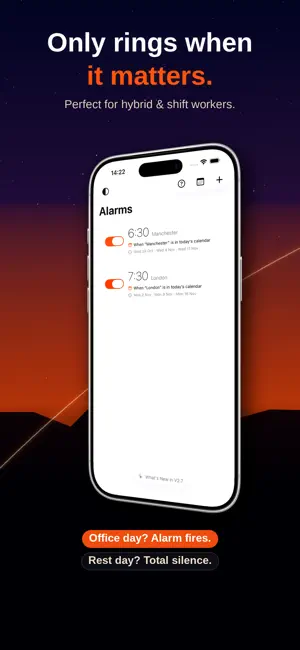
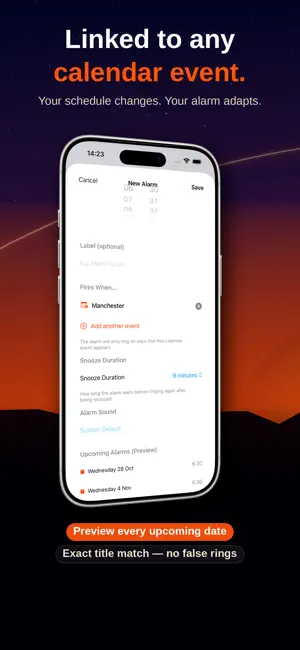
Wake up only when you need to. CalendarAlarm connects your alarm to your Apple Calendar, so your morning alarm rings automatically on the days it matters — and stays silent on the days it doesn't. Simply set an alarm time, link it to a calendar event (like "Office" or "Work"), and CalendarAlarm does the rest. Each morning it checks your calendar and rings only if that event appears in today's schedule. How it works: Set your alarm time once Link it to a keyword from your calendar events CalendarAlarm checks your calendar every day Your alarm rings on matching days — and skips the rest Perfect for: Hybrid workers with variable office days Commuters whose schedule changes week to week Shift workers with changing shift patterns Anyone tired of manually turning alarms on and off No more disabling and re-enabling alarms every Sunday night. No more sleeping through a work day because you forgot to switch it back on. Calendar Alarms handles it for you — quietly, reliably, automatically.
What’s new
Version 2.7 · Updated October 28, 2026
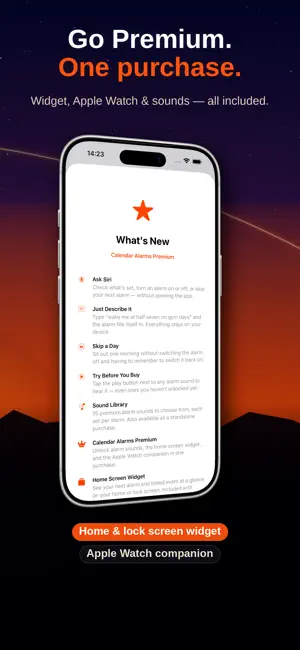
Calendar Alarms now works with Siri. Say "Hey Siri, skip my next alarm in Calendar Alarms", or ask what's set, turn an alarm on or off, or add a new one — all without opening the app. The same actions are in the Shortcuts app. Just describe it — when you add an alarm, tap Describe it instead and type something like "wake me at half seven on gym days". The alarm fills itself in, ready for you to check and save. It runs entirely on your iPhone and needs Apple Intelligence. Skip a day — swipe an alarm and tap Skip next to sit out one morning without switching it off. It rings as normal on the next matching day. Try before you buy — tap play beside any alarm sound to hear it, including the ones Premium unlocks. Also in this update: • Fixed: after travelling to a different time zone, alarms could ring at the old time. They now switch to local time — opening the app once when you arrive makes sure • Changes to your calendar are picked up more reliably when the app hasn't been opened for a while • The app now appears as Calendar Alarms on your Home Screen • Alarm times now follow your region and your 24-Hour Time setting • The Apple Watch app, home screen widget and Live Activity are now translated into all six supported languages • Fixed: when several alarms were linked to events that happen most days, some alarms could be left unscheduled • Smaller fixes and refinements throughout
App privacy
The developer, Tristan Beasley, reported these privacy practices to Apple.
Data Used to Track You
The following data may be used to track you across apps and websites owned by other companies:
- Identifiers: Device ID
Data Linked to You
The following data, which may be collected and linked to your identity, may be used for the following purposes:
- Purchases: Purchase History
Used for: App Functionality
Data Not Linked to You
The following data, which may be collected but is not linked to your identity, may be used for the following purposes:
- Identifiers: Device ID
Used for: Developer’s Advertising or Marketing
Alternatives to Calendar Alarms
Looking for apps like Calendar Alarms? Here are 6 similar apps on the App Store. The highest rated is ScanTo Pro: Offline PDF & OCR (3.0/5), and 4 of the 6 are free to download.
-
 Meeting Links
-
 ScanTo Pro: Offline PDF & OCR
3.0
-
 إدارتي
-
 VideoReviewer
-
 CaffeineClear : LastCup
-
 Project Manager - Workflow
| App | Rating | Price | Last updated | Compare |
|---|---|---|---|---|
| Calendar Alarms | 5.0 / 5 (1 rating) | Free | October 28, 2026 | |
| Meeting Links | – | 9.99 USD | May 22, 2026 | Compare |
| ScanTo Pro: Offline PDF & OCR | 3.0 / 5 (2) | Free | Oct 29, 2026 | Compare |
| إدارتي | – | Free | Jul 4, 2026 | Compare |
| VideoReviewer | – | Free | Jul 6, 2026 | Compare |
| CaffeineClear : LastCup | – | 1.99 USD | Aug 10, 2026 | Compare |
| Project Manager - Workflow | – | Free | Oct 29, 2026 | Compare |
Compare Calendar Alarms with the top alternatives: ratings, updates, ASO score and keyword gaps →