

Ordo: Calendar, Tasks, Planner
Aung Thein Sein Productivity iPhoneiPadiPod touch
Ordo: Calendar, Tasks, Planner is a free Productivity app for iPhone and iPad by Aung Thein Sein. Rated 5.0/5 from 4 ratings. Requires iOS 17.0.
- Rating
- 5.0
- 4 ratings
- Price
- Free
- on the App Store
- Size
- 285 MB
- Age 12+
- Updated
- Oct 30
- 2026 · v2.0.1
Screenshots



About Ordo: Calendar, Tasks, Planner
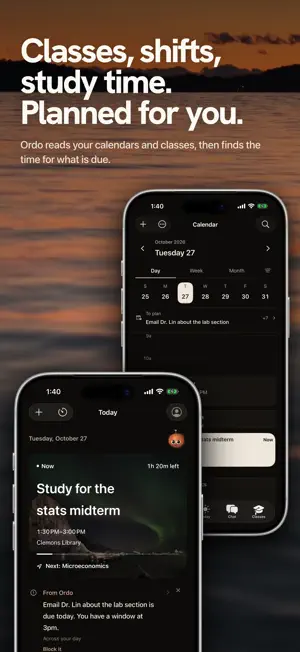
Ordo plans your day for you. It reads your calendars, knows your classes and what is due, places your tasks and practices into the time you actually have, and pauses the apps that pull you away while you focus. Nothing keeps score: no points, no streaks, no percentages. Open Ordo and Today shows what is next, what is due and where your free time is. PLANNED FOR YOU Give Ordo a task with a due date, or a practice like reading or a walk, and it finds a place for it in your open time. YOUR CLASSES, TRACKED Add your classes once and Ordo keeps the term: when and where each class meets, what is due, and when the next exam is. If your classes are already in your calendar, Ordo recognizes them and shows each one once. EVERY CALENDAR ON ONE PAGE Google Calendar and Outlook Calendar connect directly, next to the calendars already on your iPhone. Share your calendar with a friend who uses Ordo, as busy times or in full detail. CHAT Ask Ordo to move something, find an hour, or work out when to leave. It answers from your real schedule, with travel times from Apple Maps. PRACTICES WITHOUT STREAKS Tend the small things you come back to. Miss a day and nothing resets. FOCUS, WITH YOUR APPS PAUSED Start a focus timer that stays on your Lock Screen. Choose the apps that pause while you work: during each work period they show a quiet screen with your task and the time your break starts, and they open again at the break. Two emergency releases a week, so you are never locked out. SLEEP AND RECOVERY Connect Apple Health or WHOOP to see your sleep and recovery next to your plans. Use Ordo without an account, or sign in to keep your iPhone and web.useordoapp.com in sync. No ads, no tracking, and your data is never sold.
What’s new
Version 2.0.1 · Updated October 30, 2026
• Deep black is Ordo's new default look: a true black canvas with copper accents. If you chose a look before, Ordo keeps it. • A Focus session you start on the web now blocks your chosen apps on this iPhone too, the next time Ordo is open. • In first-day setup, a task without a time estimate now saves. • When you switch accounts, results still arriving for the previous account are discarded.
App privacy
The developer, Aung Thein Sein, reported these privacy practices to Apple.
Data Linked to You
The following data, which may be collected and linked to your identity, may be used for the following purposes:
- Location: Coarse Location, Precise Location
- Health & Fitness: Health, Fitness
- Contact Info: Email Address, Name, Other User Contact Info
- Contacts: Contacts
- User Content: Photos or Videos, Other User Content
- Identifiers: User ID
- Usage Data: Product Interaction
- Diagnostics: Crash Data, Other Diagnostic Data
Used for: Product Personalization, App Functionality
Alternatives to Ordo: Calendar, Tasks, Planner
Looking for apps like Ordo: Calendar, Tasks, Planner? Here are 6 similar apps on the App Store. The highest rated is Crocodile Calendar (5.0/5), and all 6 are free to download.
-
 Crocodile Calendar
5.0
Crocodile Calendar
5.0
-
 Ordo Calendar
5.0
Ordo Calendar
5.0
-
 Mellow: Social Media Planner
5.0
Mellow: Social Media Planner
5.0
-
 Bloomo: AI Ideas & Drafts
3.0
Bloomo: AI Ideas & Drafts
3.0
-
 Slashy Mail
4.8
Slashy Mail
4.8
-
 PersonAI: To-Do & Life Planner
5.0
PersonAI: To-Do & Life Planner
5.0
| App | Rating | Price | Last updated | Compare |
|---|---|---|---|---|
| Ordo: Calendar, Tasks, Planner | 5.0 / 5 (4 ratings) | Free | October 30, 2026 | |
| Crocodile Calendar | 5.0 / 5 (1) | Free | Oct 17, 2026 | Compare |
| Ordo Calendar | 5.0 / 5 (22) | Free | Oct 22, 2026 | Compare |
| Mellow: Social Media Planner | 5.0 / 5 (1) | Free | Sep 30, 2026 | Compare |
| Bloomo: AI Ideas & Drafts | 3.0 / 5 (2) | Free | Oct 7, 2026 | Compare |
| Slashy Mail | 4.8 / 5 (12) | Free | Oct 27, 2026 | Compare |
| PersonAI: To-Do & Life Planner | 5.0 / 5 (16) | Free | Oct 2, 2026 | Compare |