

Ordo Calendar
Mohammed Huraibi Productivity iPhoneiPadiPod touch
Ordo Calendar is a free Productivity app for iPhone and iPad by Mohammed Huraibi. Rated 5.0/5 from 21 ratings. Requires iOS 17.0. Updated October 22, 2026.
- Rating
- 5.0
- 21 ratings
- Price
- Free
- on the App Store
- Size
- 21 MB
- Age 4+
- Updated
- Oct 22
- 2026 · v1.4
Screenshots

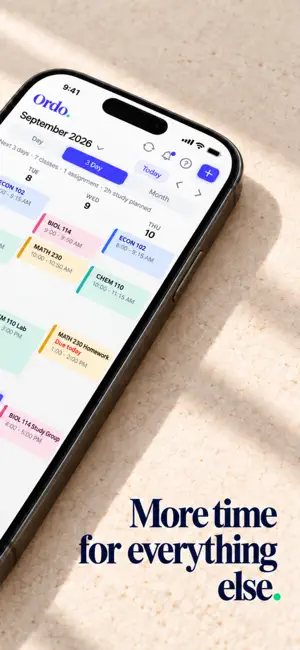


About Ordo Calendar
Ordo is the AI calendar built for college students. Connect Canvas, Moodle, or Brightspace once and every class, assignment, and deadline shows up automatically—then Ordo helps you plan the study time to stay ahead of all of it. WHAT ORDO DOES LMS sync — Import your classes and assignments straight from Canvas, Moodle, or Brightspace. No manual entry, no copying due dates. Google Calendar sync — Keep Ordo and your existing calendar in sync, both ways. Your schedule stays current everywhere. See your week your way — Switch between Day, 3-Day, and Month views to focus on today or scan the whole month at a glance. Smart task tracking — Every assignment sorted into Overdue, Today, and Upcoming, with priority and time estimates so you always know what to do next. Ask Ordo anything — A built-in AI assistant that knows your schedule. Ask "what should I work on today?" or "when should I study for my next exam?" and get an answer based on your actual classes and deadlines. It can add and move events for you, too. Stay ahead of deadlines — Ordo surfaces what's due so midterms and problem sets never sneak up on you. Built by a student, for students. Free to use.
Ratings & reviews
5.0
21 ratings
What’s new
Version 1.4 · Updated October 22, 2026
Talk to Ordo. Tap the mic in chat or on the calendar and say what you need — Ordo listens, cleans it up, and sends it. (iOS 26 and later) Colors for everything. Pick a color when you add an event, change it any time from the event, or just ask Ordo. New events get a color that doesn't clash with your day. Morning rundown. A notification at 8 AM with the day's events and deadlines, on top of the 30-minute reminder. All-day events in chat. Ask for a birthday, a holiday, or anything all day and it lands in the all-day row. Fixes: class end times and durations, event dates in the detail view, the delete dialog, event colors on the calendar, and times on short event cards.
App privacy
The developer, Mohammed Huraibi, reported these privacy practices to Apple.
Data Linked to You
The following data, which may be collected and linked to your identity, may be used for the following purposes:
- Contact Info: Email Address
- User Content: Audio Data, Other User Content
- Identifiers: User ID
- Diagnostics: Crash Data, Performance Data
Used for: App Functionality
Alternatives to Ordo Calendar
Looking for apps like Ordo Calendar? Here are 6 similar apps on the App Store. The highest rated is Crocodile Calendar (5.0/5), and all 6 are free to download.
-
 Crocodile Calendar
5.0
-
 Schedulo: Event Reminders
-
 Quivo: AI Voice Note Taker
-
 iON - Daily AI assistant
-
 Sonder Calendar
4.5
-
 GradTrack: Pre-Health Tracker
5.0
| App | Rating | Price | Last updated | Compare |
|---|---|---|---|---|
| Ordo Calendar | 5.0 / 5 (21 ratings) | Free | October 22, 2026 | |
| Crocodile Calendar | 5.0 / 5 (1) | Free | Oct 17, 2026 | Compare |
| Schedulo: Event Reminders | – | Free | Sep 5, 2026 | Compare |
| Quivo: AI Voice Note Taker | – | Free | Aug 23, 2026 | Compare |
| iON - Daily AI assistant | – | Free | Mar 19, 2026 | Compare |
| Sonder Calendar | 4.5 / 5 (4) | Free | Sep 17, 2026 | Compare |
| GradTrack: Pre-Health Tracker | 5.0 / 5 (5) | Free | Apr 28, 2026 | Compare |
Compare Ordo Calendar with the top alternatives: ratings, updates, ASO score and keyword gaps →