

Sonder Calendar
Owen Lombardi Productivity iPhoneiPadiPod touch
Sonder Calendar is a free Productivity app for iPhone and iPad by Owen Lombardi. Rated 4.5/5 from 4 ratings. Requires iOS 15.1. Updated September 17, 2026.
- Rating
- 4.5
- 4 ratings
- Price
- Free
- on the App Store
- Size
- 38 MB
- Age 4+
- Updated
- Sep 17
- 2026 · v1.2
Screenshots

About Sonder Calendar
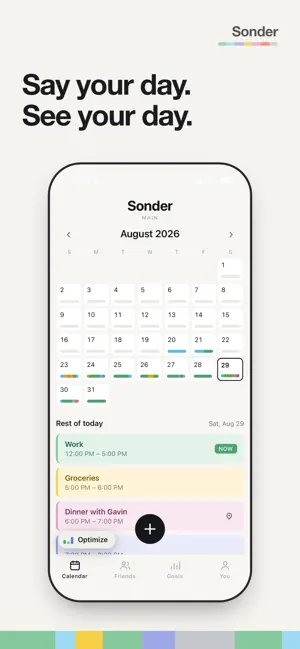
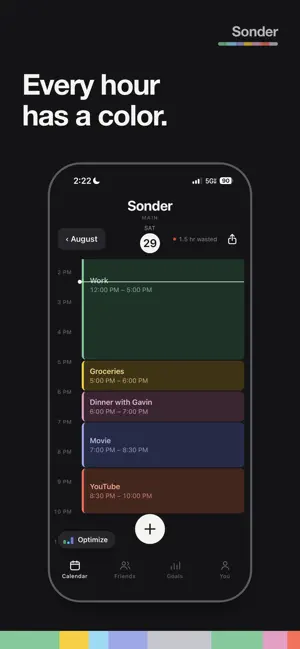
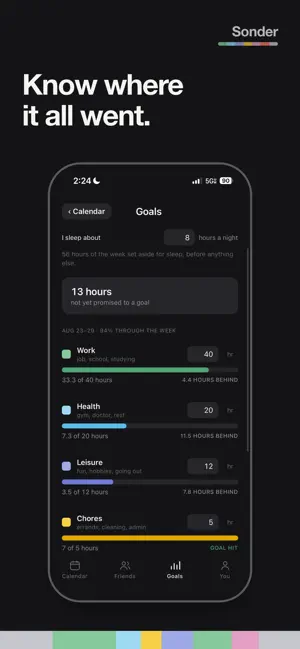
How many buttons do you press to put one thing on your calendar? Sonder is one. You talk, it listens, and your day comes back as color. Say "gym at seven, class nine to noon, work one to five, dinner with Gavin at six" and all four land on the right days at the right times, sorted into seven colors. No forms. No time pickers. No dragging blocks around a grid. SEVEN COLORS Every hour becomes one of seven things: Work — job, class, studying, meetings Health — gym, sports, doctor, rest that actually restores you Leisure — movies, gaming, going out, hobbies Chores — errands, laundry, cooking, admin People — family, partner, close friends Wasted time — doomscrolling, aimless phone time Sleep & transit — sleeping, commuting, driving Most calendars tell you what is next. Sonder shows you where it all went. BUILT FOR A SEMESTER Repeating classes and shifts are one sentence. "Every Monday and Wednesday, chem nine to ten thirty, until December tenth." Say it once and it fills the whole term. Move it later by talking, not by tapping through a repeat menu. ASK IT THINGS "When is my dentist appointment?" "What do I have Friday?" It answers instead of adding something. SEE THE SHAPE OF YOUR WEEK Month, week, day and year, all in color. A week of green with no blue in it looks like exactly what it is. GOALS, NEVER STREAKS Set how many hours a week you want on each category and Sonder shows how far ahead or behind you are, plus how many hours you have not promised to anything yet. There are no streaks. Streaks make people log what looks good instead of what happened, and then the numbers are fiction. The data is the point, so it stays honest. OPTIMIZE One tap names what you are furthest behind on this week and where it fits today. It is arithmetic on the calendar you already have, so it costs nothing and works with no signal. FRIENDS, WITHOUT A FEED Add friends, invite them to a specific event, and see how many hours you have spent together. There is no feed, no follower count, and nothing to scroll. Your calendar is not visible to your friends. They see an event only when you send them that one event by name. A JOINT CALENDAR Share one calendar with one person — a partner, a roommate, whoever you actually plan around. You both write to it, you both see it, nobody else does. Your own calendar stays yours. YOUR WORDS STAY YOURS What you say goes into your own backup, which only you can read. Sonder does not sell your data and runs no third-party analytics. Nothing you write is shown to anyone unless you deliberately send it to them. FREE The whole calendar, friends, invites and every count. Voice and typing share a limit of five requests a day. MEMBER $3.99 a month, or $29.99 a year. The names behind the counts: who viewed your profile, whose top friends you are in, and your own, by hours together. Plus twenty requests a day instead of five. Payment is charged to your Apple account at confirmation of purchase. The subscription renews automatically unless auto-renew is turned off at least 24 hours before the end of the current period. You can manage or cancel it any time in your Apple account settings. Terms of Use: https://sondercalendar.com/terms Privacy Policy: https://sondercalendar.com/privacy
What’s new
Version 1.2 · Updated September 17, 2026
Say what you're working toward — a 3.8 this semester, a marathon in March — and Sonder turns it into a week you can actually keep. You pick which parts you'll stick to, and they go on your calendar as standing commitments. Everyone gets Member features for 7 days with this update. Also in this one: - Bring in the calendars already on your phone, in one go - Reminders: a dated thing with no hours, sitting above the day - Delete a repeating event and every later one, in a single step - The bars move with your voice while you're talking - Your calendar opens with no connection, and you can add an event by hand - Ending a joint calendar, and starting a new one afterwards, both work properly now
App privacy
The developer, Owen Lombardi, reported these privacy practices to Apple.
Data Linked to You
The following data, which may be collected and linked to your identity, may be used for the following purposes:
- Purchases: Purchase History
- Contact Info: Email Address, Name
- User Content: Other User Content
- Identifiers: User ID, Device ID
- Usage Data: Product Interaction
Used for: App Functionality
Alternatives to Sonder Calendar
Looking for apps like Sonder Calendar? Here are 6 similar apps on the App Store. The highest rated is Triflow (5.0/5), and 5 of the 6 are free to download.
-
 Voxendar: Voice AI Calendar
-
 Big Number Calendar
-
 VoiceCalendar AI
-
 HAN:KAN - Schedule Planner
-
 Triflow
5.0
Triflow
5.0
-
 Bigger Notes
5.0
Bigger Notes
5.0
| App | Rating | Price | Last updated | Compare |
|---|---|---|---|---|
| Sonder Calendar | 4.5 / 5 (4 ratings) | Free | September 17, 2026 | |
| Voxendar: Voice AI Calendar | – | Free | Oct 15, 2026 | Compare |
| Big Number Calendar | – | Free | Oct 15, 2026 | Compare |
| VoiceCalendar AI | – | Free | Sep 11, 2026 | Compare |
| HAN:KAN - Schedule Planner | – | Free | Oct 15, 2026 | Compare |
| Triflow | 5.0 / 5 (1) | 3.99 USD | Oct 10, 2026 | Compare |
| Bigger Notes | 5.0 / 5 (7) | Free | Feb 5, 2026 | Compare |
Compare Sonder Calendar with the top alternatives: ratings, updates, ASO score and keyword gaps →