

Snapdeck: AI Flashcards
HELGE JOHANNESSEN BJORLAND Education iPhoneiPadiPod touch
Snapdeck: AI Flashcards is a free Education app for iPhone and iPad by HELGE JOHANNESSEN BJORLAND. Requires iOS 17.0. Updated June 12, 2026.
- Price
- Free
- on the App Store
- Size
- 5 MB
- Age 4+
- Updated
- Jun 12
- 2026 · v1.0
Screenshots

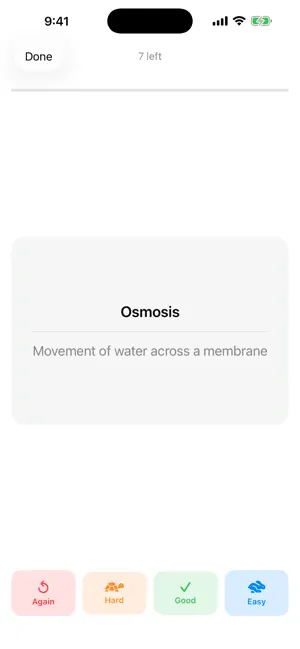
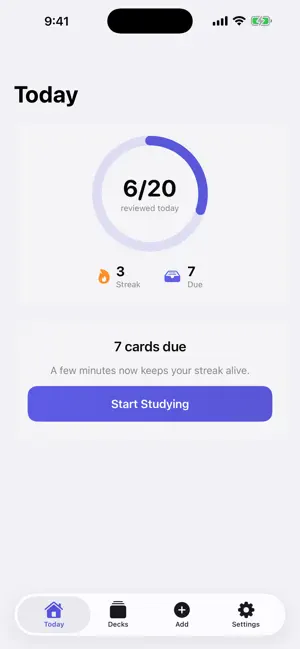

About Snapdeck: AI Flashcards
Snapdeck turns any set of notes into a ready-to-study flashcard deck — in seconds, entirely on your iPhone. Snap a photo of handwritten notes, import from your camera roll, or paste text. Snapdeck extracts the content and generates question-and-answer cards using AI. How it works 1. Capture your notes — camera, photo library, or paste text. 2. Snapdeck reads your notes using Apple's Vision framework (on-device OCR). 3. On iPhone 15 Pro and newer (iOS 26+), Apple's on-device Foundation Models generate the flashcards — no internet needed. On other iPhones, Snapdeck uses a secure cloud AI (Google Gemini) to generate them; only the note text is sent, never your photos. 4. Study with spaced repetition — Snapdeck uses the SM-2 algorithm to surface cards at the right time. Private by design No accounts, no analytics, no ad tracking. Your decks, cards, and study history stay on your device, and your photos are read on-device (never uploaded). On iPhone 15 Pro and newer, card generation is fully on-device too. On other iPhones, only the text of the notes you choose to convert is sent — anonymously, over an encrypted connection — to generate the cards. Purchases go through Apple's StoreKit; Snapdeck never sees your payment details. Study features • SM-2 spaced repetition — the proven algorithm used in apps like Anki • Daily study goal with a progress ring • Streak tracking to keep you consistent • "All caught up" — know exactly when you're done for the day • Local daily reminder notifications, scheduled on your device • Home Screen widget (small + medium) — cards due today and your streak at a glance Snapdeck Pro Unlock the full experience with a Snapdeck Pro subscription: • Unlimited AI card generations (free: 5/day) • Unlimited decks (free: 3 decks) • Study stats and insights • Home Screen widget Available as a monthly or yearly subscription. Manage or cancel anytime in iOS Settings › Apple ID › Subscriptions. Languages: English and Norwegian (Bokmål), with an in-app language switcher. Requires: iPhone, iOS 17 or later. On-device AI generation requires iPhone 15 Pro or newer, iOS 26+. Terms of Use (EULA): https://www.apple.com/legal/internet-services/itunes/dev/stdeula/
App privacy
The developer, HELGE JOHANNESSEN BJORLAND, reported these privacy practices to Apple.
Data Not Linked to You
The following data, which may be collected but is not linked to your identity, may be used for the following purposes:
- User Content: Other User Content
Used for: App Functionality
Alternatives to Snapdeck: AI Flashcards
Looking for apps like Snapdeck: AI Flashcards? Here are 6 similar apps on the App Store. The highest rated is StudyPolar: AI Study & Quizzes (5.0/5), and all 6 are free to download.
-
 Kikusho - Japanese flashcards
-
 Lucideck
-
 Memorit: Smart Flashcards
-
 FlashcardAI - Photo to Cards
-
 StudyPolar: AI Study & Quizzes
5.0
StudyPolar: AI Study & Quizzes
5.0
-
 SnapDeck AI: Flashcards
| App | Rating | Price | Last updated | Compare |
|---|---|---|---|---|
| Snapdeck: AI Flashcards | – | Free | June 12, 2026 | |
| Kikusho - Japanese flashcards | – | Free | Sep 12, 2026 | Compare |
| Lucideck | – | Free | Jun 10, 2026 | Compare |
| Memorit: Smart Flashcards | – | Free | Sep 25, 2026 | Compare |
| FlashcardAI - Photo to Cards | – | Free | Aug 20, 2026 | Compare |
| StudyPolar: AI Study & Quizzes | 5.0 / 5 (1) | Free | Sep 1, 2026 | Compare |
| SnapDeck AI: Flashcards | – | Free | Sep 30, 2026 | Compare |