

FlashcardAI - Photo to Cards
Taiga Nagano Education iPhoneiPadiPod touch
FlashcardAI - Photo to Cards is a free Education app for iPhone and iPad by Taiga Nagano. Requires iOS 17.0. Updated August 20, 2026.
- Price
- Free
- on the App Store
- Size
- 75 MB
- Age 4+
- Updated
- Aug 20
- 2026 · v1.4.0
Screenshots


About FlashcardAI - Photo to Cards
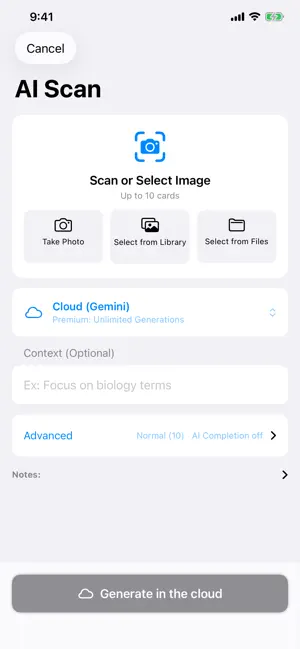
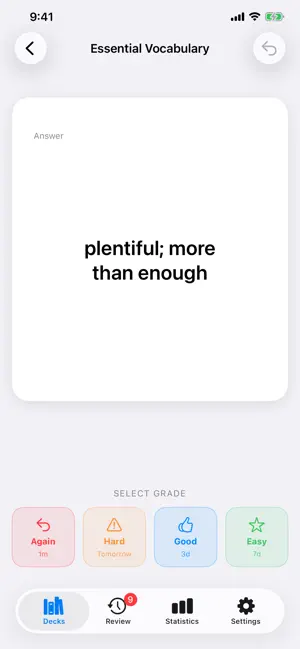
Snap a photo. Get a deck. Textbooks, notes, word lists — photograph them and they become flashcards. FlashcardAI turns photos and text into study cards automatically. [Main features] ■ A photo becomes cards Photograph a textbook, your notes or a word list, and the AI pulls out what matters and shapes it into question-and-answer cards. Up to 10 photos at once; PDFs work too. ■ No photo needed Just type a topic — "TOEIC verbs", "cell biology" — and you get cards. ■ Spaced repetition How you rate a card decides when it comes back, so it resurfaces just as you start to forget. ■ Home Screen widget See a due card, reveal the answer and rate it — all inside the widget. ■ Review from the Lock Screen Due cards can appear on your Lock Screen too (turn it on in Settings). ■ Find and tidy Search cards inside a deck or across every deck. Group decks into folders, and file away the ones you've finished. ■ See your progress Study streak, weekly volume, what's coming up, and mastery per deck. [Who it's for] - Anyone who wants their class notes and textbooks as flashcards - Studying for an exam or certification in short bursts of free time - Tired of writing flashcards by hand - Looking for a system that brings things back before you forget [Free] - Up to 5 AI generations per day - Up to 10 images at a time - Up to 10 decks and 3 folders (watch a short video to create more) [Premium] - Unlimited AI generation - No ads - Unlimited decks and folders - AI Fill-in: adds related knowledge when a photo alone isn't enough - Up to 300 characters of guidance per generation (50 on the free plan) - iCloud sync: the same decks on all your devices - Full statistics: past history, the next 30 days of reviews, and mastery for every deck [About the Subscription] - Your subscription automatically renews unless canceled at least 24 hours before the end of the current period. - Payment will be charged to your Apple ID account at confirmation of purchase. - You can manage or cancel your subscription anytime in your Apple ID account settings. - This app uses an anonymous account. Deleting the app also deletes your data. * The photos you take are never used as training data outside of this service. Apple standard EULA: https://www.apple.com/legal/internet-services/itunes/dev/stdeula/
What’s new
Version 1.4.0 · Updated August 20, 2026
NEW • Study from the Lock Screen Review cards appear on your Lock Screen — reveal the answer and rate it without opening the app. Turn it on in Settings. • Search your cards Filter cards inside a deck by keyword. From the home screen, search across every deck at once. • Add cards back to back When adding cards by hand, "Save and add another" keeps the sheet open so you can keep typing. IMPROVEMENTS • No more ads while studying The banner on the study screen and the full-screen ad after a session are gone. • Rebuilt widgets Reveal and rate a due card right in the widget. Choose which deck it draws from and whether to shuffle. • Choose how a session starts Pick the scope (today's cards or all of them) and whether to shuffle, right when you start. • Generation keeps running when you close the scan screen Do something else while it works — the cards land in your deck when it finishes. • Better AI generation Fixed cases where a short topic could produce cards unrelated to what you wanted to study. FIXES • Fixed the reason for a failed generation sometimes not being shown. • Fixed "Saved" appearing even when saving a photo had failed.
App privacy
The developer, Taiga Nagano, reported these privacy practices to Apple.
Data Used to Track You
The following data may be used to track you across apps and websites owned by other companies:
- Identifiers: Device ID
- Usage Data: Advertising Data
Data Not Linked to You
The following data, which may be collected but is not linked to your identity, may be used for the following purposes:
- Identifiers: Device ID
- Usage Data: Advertising Data
- User Content: Photos or Videos, Other User Content
Used for: Third-Party Advertising, Analytics, App Functionality
Alternatives to FlashcardAI - Photo to Cards
Looking for apps like FlashcardAI - Photo to Cards? Here are 6 similar apps on the App Store. The highest rated is NoteFren: AI Flashcards (5.0/5), and all 6 are free to download.
-
 oboo | 撮るだけで作れる単語帳アプリ
-
 SnapDeck AI: Flashcards
-
 NoteFren: AI Flashcards
5.0
NoteFren: AI Flashcards
5.0
-
 Flashcard AI+
-
 ことり-写真で単語帳
-
 Cognicard
5.0
Cognicard
5.0
| App | Rating | Price | Last updated | Compare |
|---|---|---|---|---|
| FlashcardAI - Photo to Cards | – | Free | August 20, 2026 | |
| oboo | 撮るだけで作れる単語帳アプリ | – | Free | Jan 20, 2026 | Compare |
| SnapDeck AI: Flashcards | – | Free | Sep 30, 2026 | Compare |
| NoteFren: AI Flashcards | 5.0 / 5 (3) | Free | Sep 29, 2026 | Compare |
| Flashcard AI+ | – | Free | Sep 20, 2026 | Compare |
| ことり-写真で単語帳 | – | Free | Jul 15, 2026 | Compare |
| Cognicard | 5.0 / 5 (4) | Free | Apr 2, 2026 | Compare |