

LanLens - Network Scanner
Zendo Mobile Utilities iPhoneiPadiPod touch
LanLens - Network Scanner is a free Utilities app for iPhone and iPad by Zendo Mobile. Requires iOS 26.2. Updated July 4, 2026.
- Price
- Free
- on the App Store
- Size
- 24 MB
- Age 4+
- Updated
- Jul 4
- 2026 · v1.26.3
Screenshots



About LanLens - Network Scanner
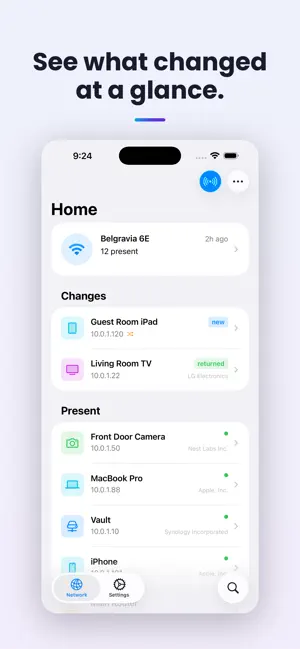
Track what's on your network. LanLens remembers the state of your network and tells you if something changes. No always-on computer, no extra hardware. Just your iPhone or iPad, checking in on your network. LanLens scans your local network and shows you its devices in a clean, native interface built for iPhone and iPad. Scan again and LanLens tells you exactly what changed: Which devices are new, which have returned, and which have departed. No more wondering whether that unfamiliar device showed up today or was there all along. With LanLens Pro, scanning runs periodically in the background. If a new device shows up, LanLens tells you. Even if the app isn't open. Your network stays your business: No account. No tracking. Zero data collected. Everything lives on your device. (iCloud sync opt-in available if you want to.) ALWAYS FREE - Scan your whole network (no device cap) - See what changed since your last scan - Get details for every device - Rename devices and networks, assign icons - Browse recent network history LANLENS PRO - Background scanning with alerts for changes - Customizable notifications and filters - Unlimited network history - All your networks tracked - iCloud sync across your iPhone and iPad (opt-in) A note on scanning: Like any iOS network scanner, LanLens discovers the devices it can see on your local network. Some stay quiet and may not always appear, but the change view stays useful no matter what. ---- LanLens Pro is offered as a monthly or yearly auto-renewing subscription, or a one-time lifetime purchase. Payment is charged to your Apple Account at confirmation. Subscriptions renew automatically unless auto-renew is turned off at least 24 hours before the current period ends. You can manage or cancel anytime in your Account Settings. Privacy Policy: https://lanlens.app/privacy Terms of Use: https://lanlens.app/terms
What’s new
Version 1.26.3 · Updated July 4, 2026
This one's all about polish: We've made small UI refinements throughout to make LanLens cleaner and more pleasant to use. Also in this release: - You can now give your networks custom names.
App privacy
The developer, Zendo Mobile, reported these privacy practices to Apple.
Data Not Collected
The developer does not collect any data from this app.
Alternatives to LanLens - Network Scanner
Looking for apps like LanLens - Network Scanner? Here are 6 similar apps on the App Store. The highest rated is House Hero: DIY Expert (5.0/5), and 5 of the 6 are free to download.
-
 House Hero: DIY Expert
5.0
House Hero: DIY Expert
5.0
-
 LensAlert: AI Glasses Detector
-
 House Map App
-
 Network Scanner Toolkit
5.0
Network Scanner Toolkit
5.0
-
 Linkrinse: Clean URLs
-
 Photo Compressor - Shrink Size
| App | Rating | Price | Last updated | Compare |
|---|---|---|---|---|
| LanLens - Network Scanner | – | Free | July 4, 2026 | |
| House Hero: DIY Expert | 5.0 / 5 (2) | Free | Aug 9, 2026 | Compare |
| LensAlert: AI Glasses Detector | – | Free | Sep 25, 2026 | Compare |
| House Map App | – | Free | Apr 15, 2026 | Compare |
| Network Scanner Toolkit | 5.0 / 5 (1) | Free | Oct 23, 2026 | Compare |
| Linkrinse: Clean URLs | – | 1.99 USD | Oct 7, 2026 | Compare |
| Photo Compressor - Shrink Size | – | Free | Oct 18, 2026 | Compare |