

Spotter Tools Pro: Storm Radar
DUSTIN GARNER Weather iPhoneiPadiPod touch
Spotter Tools Pro: Storm Radar is a paid Weather app for iPhone and iPad by DUSTIN GARNER. Rated 5.0/5 from 9 ratings. Requires iOS 15.0.
- Rating
- 5.0
- 9 ratings
- Price
- 19.99 USD
- on the App Store
- Size
- 158 MB
- Age 4+
- Updated
- Oct 11
- 2026 · v1.0.74
Screenshots


About Spotter Tools Pro: Storm Radar
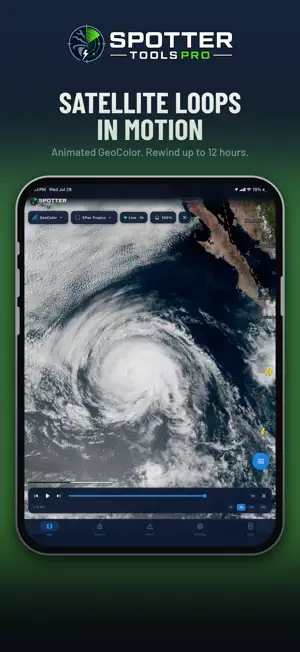
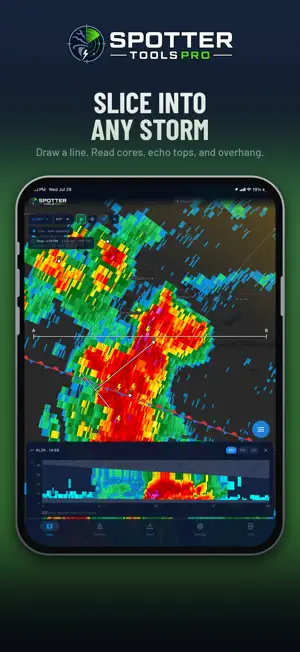
Spotter Tools Pro is a severe weather app for weather enthusiasts, storm chasers, and trained spotters. GPU-rendered NEXRAD radar, turn-by-turn directions, live wind flow, soundings, lightning, satellite, worldwide tropical, air quality, five forecast models, IBW alerts, live chasers, and thousands of live cameras. Plus Spotter Network reporting and Chaser Mode. Buy once. No subscription, no ads, no third-party trackers. TURN-BY-TURN DIRECTIONS Drive to any address, town, or map point with your route drawn over live radar and warnings. Turn banner with distance and arrival time, spoken prompts that lower your music, and automatic rerouting. Start from search or a long-press. SPOTTER NETWORK REPORTING & BEACON Tornado, funnel cloud, wall cloud, hail, measured wind, flood, flash flood, and damage, each with the exact fields Spotter Network expects. Reports queue offline and auto-upload. Foreground and background GPS beacon with a configurable interval. RADAR: LEVEL 2, LEVEL III & TDWR Crisp at any zoom. Single-site Level 2 decoded on-device: Reflectivity, Velocity, Correlation Coefficient, Spectrum Width, and Storm-Relative Velocity. Plus WSR-88D Level III, dual-pol (ZDR, CC, KDP, HCA), derived products (VIL, Digital Precip Rate, rotation), storm tracks, mesocyclone and TVS markers, a VAD Wind Profile, and the 45-site TDWR network. Add a Mesoanalysis layer (SPC-style severe parameters) and a Storm Cell Deep Dive. Dual-view split-screen compare. 16 .pal color tables, or import your own. ANIMATED & COMPOSITE RADAR Loop recent volumes. Add a GPU-crisp CONUS MRMS mosaic drawn from the full product catalog, including the FLASH flash-flood suite, with up to 12-hour playback and tap-to-read values. LIVE WIND & SOUNDINGS Animated surface-wind particles colored by speed. On-device skew-T soundings, hodographs, and full analysis: tap anywhere for a profile (balloon or HRRR). LIGHTNING, SATELLITE & TROPICAL Live GOES GLM lightning; GOES East and West satellite (Infrared, Water Vapor, Visible, GeoColor) with a radar-synced cloud loop; and worldwide tropical: outlook areas, storm cones, spaghetti tracks, intensity, and wind-arrival times. WEATHER MODELS Overlay HRRR, GFS, RRFS, NAM, and ECMWF guidance (reflectivity, temp, wind, CAPE, precip) with a time bar. OBSERVATIONS & LAYERS RTMA surface observations (temperature, dew point, theta-e, wind, gusts), MRMS observed precipitation, METARs, EPA AirNow air quality, and WPC surface fronts and pressure centers. LIVE STORM CHASERS Watch major chasers stream live via YouTube and Facebook Live, right on the map. Live badges show who's on air. LIVE TRAFFIC & SKY CAMERAS Tens of thousands of DOT cameras across 37 states, plus FAA, Windy, NOAA buoy, USGS volcano, NPS, ALERTWildfire, and curated webcams. Live video where offered, stills elsewhere. SMART PUSH ALERTS Background NWS warnings with a polygon preview. Filter modes: Standard, Outbreak, and PDS/Emergency only. Watch zones: current location, home, city, state, or nationwide. Severe-alert tone, plus optional Critical Alerts so a Tornado Emergency or PDS warning sounds through silent mode and Focus. Each warning shows an estimated population inside the polygon. NWS & SPC ON THE MAP - 50+ NWS warning polygons, toggleable - Tornado and severe thunderstorm watch boxes - SPC Mesoscale Discussions and WPC flood discussions, full text on tap - Outlooks: convective Day 1 to 8, thunderstorm, excessive rainfall, fire weather, winter storm severity, CPC 6 to 10 day, drought - SPC storm reports plus the live Spotter Network feed MORE City and place search, long-press map menu, distance and bearing tools, freehand drawing, and storm-track projection. Optional account and opt-in Presence to see other users on the map. Per-event colors, county and state lines, 6 themes (OLED black). Privacy Policy: https://spottertoolspro.vercel.app/privacy Terms of Service: https://spottertoolspro.vercel.app/terms Support: [email protected]
Ratings & reviews
5.0
9 ratings
What’s new
Version 1.0.74 · Updated October 11, 2026
RADAR IN YOUR CAR: CARPLAY Spotter Tools Pro is now a CarPlay navigation app. • Live radar on your car's screen, with warning polygons, storm cells, storm reports and radar sites • Layers: Reflectivity, Velocity, Storm-relative velocity, Correlation coefficient or the National composite, plus warnings on or off and a dark or light map • Sites: follow the nearest radar automatically or pick one • Search a town, ZIP code or address, or pick a recent place or a storm nearby, then Go for turn-by-turn on CarPlay's own turn cards • A trip started on your iPhone shows up in the car, and End in the car ends it on both • Car alerts on the CarPlay screen, and simpler maps for the Dashboard and instrument cluster SPOKEN TURNS WITH YOUR PHONE LOCKED Directions now keep talking when your iPhone is locked or another app is in front. LIVE CHASER POSITIONS • A new map layer shows featured storm chasers who are streaming on YouTube right now and sharing their position on Spotter Network • Tap a marker to watch their live stream • Live chasers stay on the map for as long as Spotter Network lists them • Team channels show a marker for each member out chasing • Partner chasers get a gold-ringed marker with their photo: Jim McGonigle, New Mexico Storm Chasing and South Central Mississippi Storm Chasers SHARE BUTTON • A new Share button in the bottom bar captures the screen you are on, map included, with a footer showing the logo, spottertools.pro and the date and time DUAL VIEW • Every Level II product in both panes, including storm-relative velocity, spectrum width and normalized rotation • Two panes on one radar share each download, so side by side costs no more data • Search, Center on me, a radar site pick or an alert now move both panes • Dual view loops use no more memory than single view TROPICAL • Each named storm's position is a spinning storm symbol with its category in the eye, faster as it strengthens • Fixed a storm card time that was 3 hours early and a distance that could be 45 miles off • New advisories show within about 5 minutes, and typhoons get their real category BUOY DATA EXPORT • Export data on a NOAA buoy's camera card shares its last 5 days of reports as a spreadsheet file NATIONAL RADAR • Low + Mid rotation: both rotation levels on one map, striped where both are spinning • Smooth colour scales for rotation, hail size, echo tops, VIL, rain totals and precip rate, with a quiet grey wash for weak values • Reflectivity layers in the national product list now use your own colour table and gate filter RADAR FIXES • Archived Level 2 velocity loops no longer skip 30 to 60 minutes when the radar keeps changing its settings • One failed scan no longer ends a Level 2 loop early and drops every newer frame
App privacy
The developer, DUSTIN GARNER, reported these privacy practices to Apple.
Data Linked to You
The following data, which may be collected and linked to your identity, may be used for the following purposes:
- Location: Precise Location
- Contact Info: Email Address, Name
- User Content: Other User Content
- Identifiers: User ID
Used for: App Functionality
Data Not Linked to You
The following data, which may be collected but is not linked to your identity, may be used for the following purposes:
- Diagnostics: Crash Data, Performance Data
Used for: App Functionality
Alternatives to Spotter Tools Pro: Storm Radar
Looking for apps like Spotter Tools Pro: Storm Radar? Here are 6 similar apps on the App Store. The highest rated is SatelliteWx (5.0/5), and all 6 are free to download.
-
 SatelliteWx
5.0
SatelliteWx
5.0
-
 Orion Maps
2.4
Orion Maps
2.4
-
 Echoes Weather: Radar & Models
4.9
Echoes Weather: Radar & Models
4.9
-
 Neptune Weather
4.6
Neptune Weather
4.6
-
 Recon Weather
4.9
Recon Weather
4.9
-
 Storm Chaser Atlas
4.2
Storm Chaser Atlas
4.2
| App | Rating | Price | Last updated | Compare |
|---|---|---|---|---|
| Spotter Tools Pro: Storm Radar | 5.0 / 5 (9 ratings) | 19.99 USD | October 11, 2026 | |
| SatelliteWx | 5.0 / 5 (1) | Free | Sep 23, 2026 | Compare |
| Orion Maps | 2.4 / 5 (7) | Free | Oct 26, 2026 | Compare |
| Echoes Weather: Radar & Models | 4.9 / 5 (64) | Free | Oct 26, 2026 | Compare |
| Neptune Weather | 4.6 / 5 (8) | Free | Oct 26, 2026 | Compare |
| Recon Weather | 4.9 / 5 (35) | Free | Oct 27, 2026 | Compare |
| Storm Chaser Atlas | 4.2 / 5 (5) | Free | Aug 20, 2026 | Compare |