
DriveHUD Navigator
YunXiang Wu Navigation iPhoneiPadiPod touch
DriveHUD Navigator is a free Navigation app for iPhone and iPad by YunXiang Wu. Requires iOS 26.5. Updated June 11, 2026.
- Price
- Free
- on the App Store
- Size
- 20 MB
- Age 4+
- Updated
- Jun 11
- 2026 · v1.0.4
Screenshots

About DriveHUD Navigator
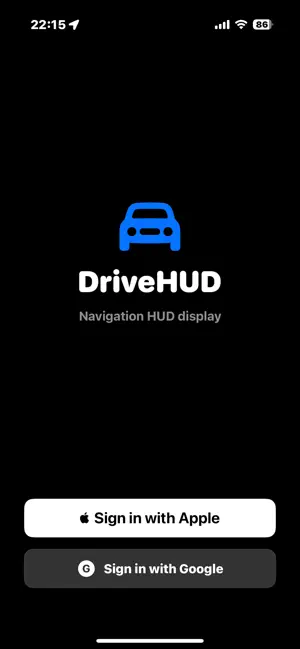
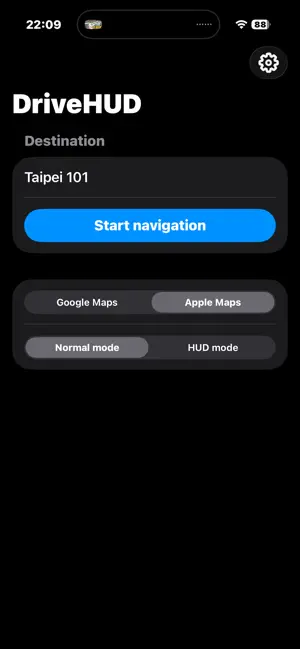
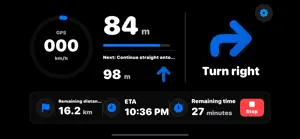
DriveHUD is a head-up display (HUD) navigation app designed for drivers. Place your iPhone on the dashboard and use the windshield reflection to keep clear navigation information in your line of sight, helping you stay focused on the road. Key Features • HUD mode: mirrors the screen for windshield reflection • Dual navigation engines: switch between Google Maps route services and Apple Maps • Real-time turn guidance: clearly shows the next maneuver and distance • Speed display: shows your current driving speed in real time • Destination search: quickly search for an address or place name • Share import: share a destination from Google Maps or Apple Maps and start navigation easily • Automatic rerouting: recalculates the route when you go off course • Multi-language support: Traditional Chinese, English, Japanese, Korean, and Thai How to Use 1. Enter a destination or share one from a map app 2. Choose a navigation source: Google Maps or Apple Maps 3. Start navigation and place your iPhone on the dashboard 4. Switch to HUD mode and align the windshield reflection Advertising Notice DriveHUD is free to use. Some user versions may include ads, and ad revenue helps support ongoing development and maintenance.
What’s new
Version 1.0.4 · Updated June 11, 2026
What's new in this version: • Redesigned app icon in the new iOS 27 style • Refined HUD turn icons for clearer display • Clearer insufficient-points message — now shows points needed and your current balance, localized in all supported languages • Fixed an issue where the saved navigation source might not restore correctly at launch
App privacy
The developer, YunXiang Wu, reported these privacy practices to Apple.
Data Used to Track You
The following data may be used to track you across apps and websites owned by other companies:
- Contact Info: Email Address
- Browsing History: Browsing History
- Identifiers: User ID, Device ID
Data Linked to You
The following data, which may be collected and linked to your identity, may be used for the following purposes:
- Contact Info: Email Address
- Browsing History: Browsing History
- Identifiers: User ID, Device ID
Used for: Third-Party Advertising, Developer’s Advertising or Marketing, Product Personalization
Data Not Linked to You
The following data, which may be collected but is not linked to your identity, may be used for the following purposes:
- Location: Precise Location
Used for: Third-Party Advertising, Developer’s Advertising or Marketing, Analytics, Product Personalization, App Functionality
Alternatives to DriveHUD Navigator
Looking for apps like DriveHUD Navigator? Here are 6 similar apps on the App Store. The highest rated is CarDash: Car Dashboard & HUD (5.0/5), and 5 of the 6 are free to download.
-
 HUD Nav
4.3
-
 Vlizz
-
 Pro GPS: Speedometer & HUD
-
 車位來了
-
 CarDash: Car Dashboard & HUD
5.0
-
 Roadmeter: GPS Speedometer HUD
| App | Rating | Price | Last updated | Compare |
|---|---|---|---|---|
| DriveHUD Navigator | – | Free | June 11, 2026 | |
| HUD Nav | 4.3 / 5 (3) | 2.99 USD | May 31, 2025 | Compare |
| Vlizz | – | Free | Sep 25, 2026 | Compare |
| Pro GPS: Speedometer & HUD | – | Free | Sep 7, 2026 | Compare |
| 車位來了 | – | Free | Oct 5, 2026 | Compare |
| CarDash: Car Dashboard & HUD | 5.0 / 5 (1) | Free | Oct 1, 2026 | Compare |
| Roadmeter: GPS Speedometer HUD | – | Free | Sep 7, 2026 | Compare |
Compare DriveHUD Navigator with the top alternatives: ratings, updates, ASO score and keyword gaps →