

MindBoardy
Infamous Tuesday Productivity iPhoneiPadiPod touch
MindBoardy is a free Productivity app for iPhone and iPad by Infamous Tuesday. Requires iOS 15.1. Updated October 17, 2026.
- Price
- Free
- on the App Store
- Size
- 43 MB
- Age 17+
- Updated
- Oct 17
- 2026 · v1.1.0
Screenshots

About MindBoardy
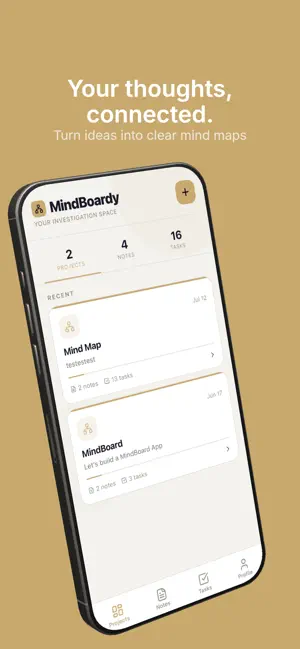
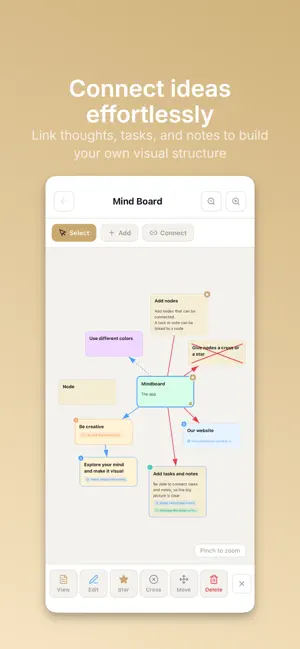
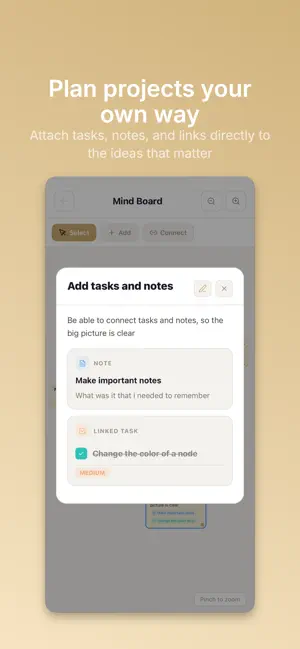
MindBoardy – Visual Mind Maps for Ideas and Creativity Turn your ideas into clear, connected mind maps with MindBoardy. MindBoardy is a visual mind mapping app that helps you organize your thoughts, explore ideas, and connect information in one flexible workspace. Whether you're brainstorming, studying, planning a project, or simply organizing your thoughts, MindBoardy gives you the freedom to think visually and structure your ideas your way. Think freely. Connect ideas. See the bigger picture. Features: • Visual Mind Mapping – Create, arrange, and connect nodes freely to build mind maps that reflect the way you think. • Multiple Mind Boards – Create up to 2 mind boards with the free version or upgrade to Premium for up to 20 mind boards. • Notes and Tasks – Add notes and tasks to any node to keep related information connected. • Image Nodes – Upload images directly into your mind maps to make your ideas more visual. • Website Links – Attach URLs to nodes and keep useful resources close to your ideas. • Highlight Important Ideas – Make key nodes stand out and focus on what matters. • Flexible Organization – Structure complex topics into clear, connected mind maps without being restricted to predefined layouts. • Cloud Sync – Keep your mind boards synchronized across your devices. Perfect For: • Brainstorming and creative thinking • Mind mapping and idea generation • Studying and learning • Research and knowledge organization • Project planning • Personal organization • Connecting ideas and exploring new perspectives A Space for Your Ideas Your thoughts don't always follow a straight line. MindBoardy gives you the freedom to explore connections, develop ideas, and organize information visually in a way that works for you. Start with 2 free mind boards and upgrade to Premium for up to 20 mind boards when you need more space for your ideas. Whether you're a student, creative thinker, professional, or simply someone with lots of ideas, MindBoardy helps you turn scattered thoughts into meaningful connections.
What’s new
Version 1.1.0 · Updated October 17, 2026
What’s New in This Version - Image Nodes Are Here! Upload images directly into your mind maps as fully functional nodes. - More Reliable Connections: We fixed an issue that could cause connections between nodes to break, making your mind maps more reliable. - Improved Node Resizing: We’ve made resizing nodes smoother and more reliable for a better mind mapping experience. - Minor bug fixes
App privacy
The developer, Infamous Tuesday, reported these privacy practices to Apple.
Data Used to Track You
The following data may be used to track you across apps and websites owned by other companies:
- Identifiers: Device ID
- Usage Data: Product Interaction, Advertising Data
Data Linked to You
The following data, which may be collected and linked to your identity, may be used for the following purposes:
- Identifiers: Device ID, User ID
- Usage Data: Product Interaction, Advertising Data
- Purchases: Purchase History
- Contact Info: Email Address, Name
- User Content: Photos or Videos, Other User Content
Used for: Third-Party Advertising, App Functionality
Alternatives to MindBoardy
Looking for apps like MindBoardy? Here are 6 similar apps on the App Store. The highest rated is Locki: Focus & Block Apps (5.0/5), and all 6 are free to download.
-
 Locki: Focus & Block Apps
5.0
-
 LearnPass: English Vocabulary
5.0
-
 Mindscope 2
5.0
-
 BrewFocus - Focus in a Cafe
-
 Kaizen: Focus & Study Timer
5.0
-
 Pomodoro Timer: Grindoro Focus
5.0
| App | Rating | Price | Last updated | Compare |
|---|---|---|---|---|
| MindBoardy | – | Free | October 17, 2026 | |
| Locki: Focus & Block Apps | 5.0 / 5 (1) | Free | Jul 26, 2026 | Compare |
| LearnPass: English Vocabulary | 5.0 / 5 (1) | Free | Oct 27, 2026 | Compare |
| Mindscope 2 | 5.0 / 5 (1) | Free | Oct 9, 2026 | Compare |
| BrewFocus - Focus in a Cafe | – | Free | Nov 5, 2026 | Compare |
| Kaizen: Focus & Study Timer | 5.0 / 5 (1) | Free | Nov 9, 2026 | Compare |
| Pomodoro Timer: Grindoro Focus | 5.0 / 5 (18) | Free | Sep 21, 2026 | Compare |
Compare MindBoardy with the top alternatives: ratings, updates, ASO score and keyword gaps →