

Kaizen: Focus & Study Timer
MK Development Productivity iPhoneiPadiPod touch
Kaizen: Focus & Study Timer is a free Productivity app for iPhone and iPad by MK Development. Rated 5.0/5 from 1 ratings. Requires iOS 16.4.
- Rating
- 5.0
- 1 ratings
- Price
- Free
- on the App Store
- Size
- 69 MB
- Age 4+
- Updated
- Oct 19
- 2026 · v5.0.0
Screenshots


About Kaizen: Focus & Study Timer
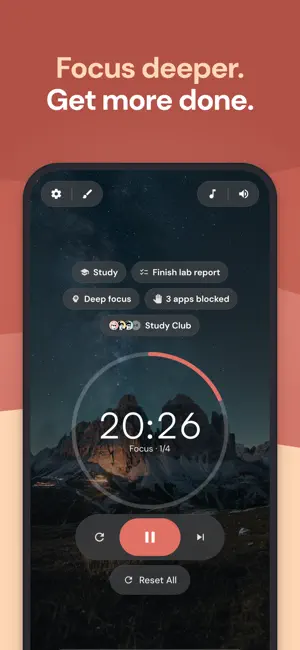
Kaizen is a focus timer that blocks your distracting apps, tracks your habits, and lets you study alongside others in live focus rooms. Start a session and the apps you picked stay blocked until your break. Free to use, with no ads. Premium features are marked below. POMODORO TIMER & STOPWATCH • Presets: Classic (25/5/15), Quick (15/3/10), Extended (50/10/30), Long Focus (90/15/30), or your own • Focus 5 to 180 minutes, short breaks 1 to 60, long breaks 5 to 120 • Stopwatch: count up with no fixed end and finish when you're ready • Auto-start runs sessions back to back while Kaizen is open, up to your long break • Keeps time in the background and notifies you when a session or break ends • Fullscreen mode that shows only the timer • Tag each session (Work, Study, and more) to see where your focus goes APP BLOCKER Kaizen uses Apple's Screen Time to block the apps and websites you choose: • Your apps are blocked during focus sessions and open again on your break • Block now: block them right away, until you turn it off • The block stays in place even if Kaizen is closed • An optional "Open anyway" button: you set how often, how long to wait, and for how long • Block up to 3 apps or websites free • Premium: up to 50 apps, plus Strict mode (stays blocked when you pause) and Locked mode (after the first minute the session can't be skipped or ended, with one emergency end a week) Your choices stay on your device. Kaizen can't see which apps you picked. HABIT TRACKER • Check-off habits, or timed habits your focus sessions count toward • Schedules: daily, specific weekdays, or a number of times per week • Forgiving streaks: a skipped day doesn't break them • A consistency score and trend chart for every habit • Backdate any past day and keep your full history • Reminders that follow each habit's schedule • Up to 5 active habits free, unlimited with Premium FOCUS ROOMS Stay on task next to other people, without a video call: • Join any room free, or host a private one and invite up to 3 friends with a link • See who's focusing, on a break, or paused, with live timers • No camera or microphone, just your avatar and quiet company • Premium: host public or bigger rooms (up to 50 people), and share the task you're working on Many people with ADHD use this kind of body doubling to get started and keep going. TASKS • Jot a task down in one line now, plan the details later • An unlimited inbox, so capturing a thought never hits a limit • Priorities, due dates, subtasks, time estimates, and reminders • Pick a task before a session and your focus time counts toward it • Today, Tomorrow, and Overdue badges keep deadlines in view • Up to 7 planned tasks free, unlimited with Premium THEMES & FOCUS MUSIC • 60+ backgrounds across Lofi, Nature, City, Cozy, Space, and Minimal, including animated ones • Lo-fi, ambient, nature, white noise, and classical tracks, saved for offline listening • Mute music on your breaks • Premium: every theme, the full music library, and your own photo as the background STATISTICS & STREAKS • Daily, weekly, and monthly focus totals • Charts for focus over time, by hour, by weekday, by tag, and by session type • Session history showing which tasks and habits each session counted toward • Re-tag or delete any past session • A daily focus streak • Premium: yearly and all-time statistics MADE FOR • Students studying for their exams • Remote workers and freelancers who need time for deep work • People with ADHD who focus better with structure and company • Anyone who reaches for their phone when they should be focusing WORKS EVERYWHERE Use Kaizen on iPhone, iPad, your computer, or the web. Your tasks, habits, and stats sync across all of them. Start a focus session, block your distracting apps, and see how much more you get done. Terms of Use (EULA): https://my-kaizen.com/eula Privacy Policy: https://my-kaizen.com/privacy Terms & Conditions: https://my-kaizen.com/terms Questions? Reach us at [email protected]
What’s new
Version 5.0.0 · Updated October 19, 2026
* Build your own avatar from hair, faces, outfits and more. Avatars replace profile photos * A redesigned Profile: your avatar up top, and your focus time compared with the period before * A redesigned bottom menu, and the timer screen is now called Focus * Kaizen opens faster when you come back to it, plus smaller fixes and polish
App privacy
The developer, MK Development, reported these privacy practices to Apple.
Data Linked to You
The following data, which may be collected and linked to your identity, may be used for the following purposes:
- Contact Info: Email Address, Name
- Purchases: Purchase History
- Identifiers: User ID
- Usage Data: Product Interaction
- User Content: Other User Content
- Diagnostics: Crash Data, Performance Data
Used for: Developer’s Advertising or Marketing, Analytics, App Functionality
Alternatives to Kaizen: Focus & Study Timer
Looking for apps like Kaizen: Focus & Study Timer? Here are 6 similar apps on the App Store. The highest rated is Kaizen: ToDo & Productivity (5.0/5), and all 6 are free to download.
-
 Kaizen Focus
-
 Kaizen Personal Development
-
 Kaizen: ToDo & Productivity
5.0
-
 Nooklo — Deep Work
5.0
-
 Ikigai Flow: Purpose & Tasks
-
 Kehai: Pomodoro Focus Room
| App | Rating | Price | Last updated | Compare |
|---|---|---|---|---|
| Kaizen: Focus & Study Timer | 5.0 / 5 (1 rating) | Free | October 19, 2026 | |
| Kaizen Focus | – | Free | Sep 28, 2026 | Compare |
| Kaizen Personal Development | – | Free | Jul 28, 2026 | Compare |
| Kaizen: ToDo & Productivity | 5.0 / 5 (2) | Free | Mar 10, 2026 | Compare |
| Nooklo — Deep Work | 5.0 / 5 (2) | Free | Aug 17, 2026 | Compare |
| Ikigai Flow: Purpose & Tasks | – | Free | Jul 1, 2026 | Compare |
| Kehai: Pomodoro Focus Room | – | Free | Jul 7, 2026 | Compare |