

Clock In Myself — Time Tracker
Jiwen Hua Productivity iPhoneiPadiPod touch
Clock In Myself — Time Tracker is a free Productivity app for iPhone and iPad by Jiwen Hua. Requires iOS 15.0. Updated September 18, 2026.
- Price
- Free
- on the App Store
- Size
- 49 MB
- Age 4+
- Updated
- Sep 18
- 2026 · v1.1.0
Screenshots
About Clock In Myself — Time Tracker
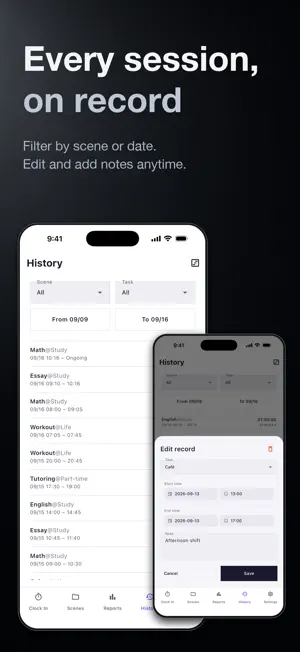
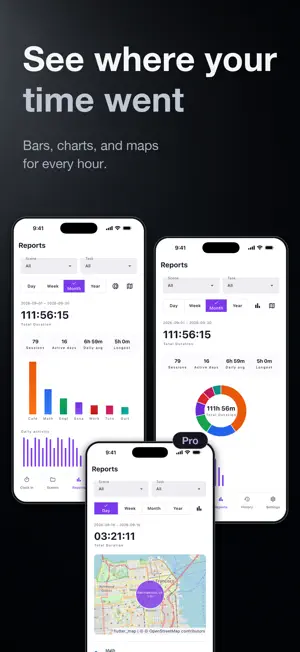
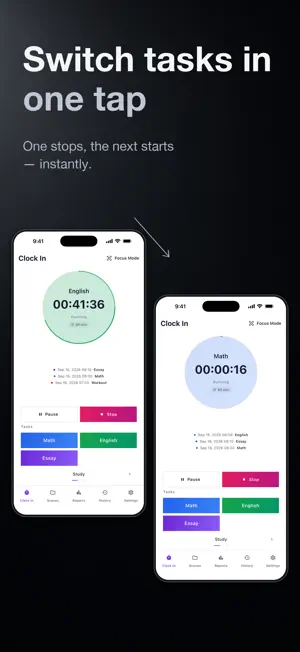
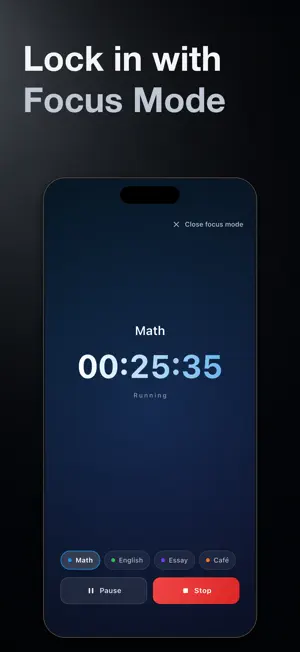
Clock In Myself - a ledger for your time. Coding, meetings, emails, side projects... at the end of the day, can you say where your hours actually went? Clock In Myself records every minute, so you always can. YOUR TIME, ON THE RECORD Rich reports Total time in the donut center, a KPI strip, and a daily-trend chart across Day / Week / Month / Year. See exactly where your time goes. Every entry saved and editable Tap any past entry to fix the time, change the task, or add a memo. Your records stay accurate. Auto-location (Pro) Location captured automatically with each entry - your records show not just when, but where. RECORDING MADE EFFORTLESS One-tap start and switch Tap a task to start recording. Tap another and the previous entry closes as the new one starts. Keeping records takes zero effort. True pause Time doesn't reset when you pause. Resume seamlessly after lunch. Widgets & Focus Mode Record from the Home Screen or Lock Screen without opening the app; a full-screen distraction-free timer keeps you on task. Auto-stop Forgot to stop? A timeout you set closes the entry automatically, so your records stay clean. AND MORE 13 languages From Chinese to Arabic, including full right-to-left layout. Follows your system language by default. Your data stays on your device No account, no sign-up, no cloud. Every record lives on your iPhone and never leaves it. Pro - a one-time purchase - Pay once, keep every Pro feature forever - No subscription, no auto-renewal, nothing to cancel - Your Apple ID is charged once at confirmation of purchase - Reinstalled the app or switched devices? Restore Purchases brings Pro back - The price is shown in the app in your local currency before you buy Privacy promise - No data sale, no ads - No access to contacts or photos - Delete any record any time; uninstalling removes everything Privacy Policy: https://clockinmyself.app/privacy Terms of Use: https://clockinmyself.app/terms
What’s new
Version 1.1.0 · Updated September 18, 2026
Pro is now a one-time purchase. - Buy Pro once and keep every Pro feature forever. No subscription, no auto-renewal. - Already subscribed? Nothing changes - your Pro stays active for as long as your subscription runs. - Your records now live only on your device. The account and sign-in screens are gone; nothing is uploaded. - Reinstalling or switching devices? Settings > Pro > Restore Purchases brings Pro back. - Bug fixes and stability improvements
App privacy
The developer, Jiwen Hua, reported these privacy practices to Apple.
Data Linked to You
The following data, which may be collected and linked to your identity, may be used for the following purposes:
- Purchases: Purchase History
- Location: Precise Location
- Contact Info: Email Address
- User Content: Other User Content
- Identifiers: User ID
Used for: App Functionality
Data Not Linked to You
The following data, which may be collected but is not linked to your identity, may be used for the following purposes:
- Identifiers: Device ID
- Usage Data: Product Interaction
- Diagnostics: Crash Data, Performance Data, Other Diagnostic Data
Used for: Analytics, App Functionality
Alternatives to Clock In Myself — Time Tracker
Looking for apps like Clock In Myself — Time Tracker? Here are 6 similar apps on the App Store. The highest rated is Workloom: Work Hours & Commute (5.0/5), and all 6 are free to download.
-
 TickLog
-
 Timiew / 作業時間記録・調整・通知・時給計算
-
 Workloom: Work Hours & Commute
5.0
Workloom: Work Hours & Commute
5.0
-
 工数ノート - フリーランス時間管理
-
 TimeCharge
-
 Clock Me: Calendar & Tracking
| App | Rating | Price | Last updated | Compare |
|---|---|---|---|---|
| Clock In Myself — Time Tracker | – | Free | September 18, 2026 | |
| TickLog | – | Free | Jun 11, 2026 | Compare |
| Timiew / 作業時間記録・調整・通知・時給計算 | – | Free | Aug 28, 2026 | Compare |
| Workloom: Work Hours & Commute | 5.0 / 5 (1) | Free | Jun 29, 2026 | Compare |
| 工数ノート - フリーランス時間管理 | – | Free | Jan 5, 2026 | Compare |
| TimeCharge | – | Free | Jul 2, 2026 | Compare |
| Clock Me: Calendar & Tracking | – | Free | Sep 17, 2026 | Compare |