

Tracker Light
Abbas Najem Productivity iPhoneiPadiPod touch
Tracker Light is a free Productivity app for iPhone and iPad by Abbas Najem. Requires iOS 15.1. Updated June 23, 2026.
- Price
- Free
- on the App Store
- Size
- 51 MB
- Age 4+
- Updated
- Jun 23
- 2026 · v1.0
Screenshots
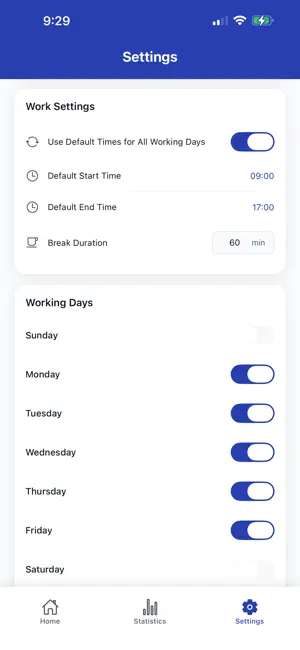
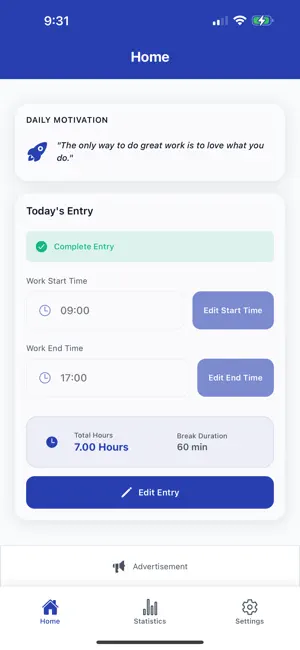

About Tracker Light
Tracker Light is the simplest way to log and manage your work hours. Whether you're a freelancer tracking billable time, a shift worker with varying schedules, or a remote professional staying on top of your hours—this app makes time tracking effortless. SIMPLE DAILY LOGGING • Log your start and end times in just two taps • Automatic break deduction and total hours calculation • Add notes to any work entry • Supports overnight and irregular shifts SMART REMINDERS • Get notified when it's time to start or end work • Customizable notification schedule • Never forget to log your hours again DETAILED STATISTICS • View your work history with flexible date ranges • See total hours, daily averages, and days worked • Track your productivity trends over time DATA YOU CONTROL • All data stored locally on your device—your privacy matters • Export your hours to CSV for invoicing or reports • Import existing data from CSV files • Your data stays yours, always PERSONALIZED SETTINGS • Set default work times for each day of the week • Configure break duration • Choose your working days • Light and Dark mode support STAY MOTIVATED • Daily inspirational quotes to keep you going • Clean, distraction-free interface • Focus on what matters—your work Download Tracker Light today and take control of your time. Simple. Private. Effective.
App privacy
The developer, Abbas Najem, reported these privacy practices to Apple.
Data Used to Track You
The following data may be used to track you across apps and websites owned by other companies:
- Identifiers: Device ID
- Usage Data: Advertising Data
Data Not Linked to You
The following data, which may be collected but is not linked to your identity, may be used for the following purposes:
- Identifiers: Device ID
- Usage Data: Product Interaction, Advertising Data
Used for: Third-Party Advertising, Analytics