

Hours Tracker: Pay and Shifts
Skytop Software, LLC Productivity iPhoneiPadiPod touch
Hours Tracker: Pay and Shifts is a free Productivity app for iPhone and iPad by Skytop Software, LLC. Rated 4.8/5 from 5 ratings. Requires iOS 26.3.
- Rating
- 4.8
- 5 ratings
- Price
- Free
- on the App Store
- Size
- 31 MB
- Age 4+
- Updated
- Oct 29
- 2026 · v2.2.0
Screenshots


About Hours Tracker: Pay and Shifts
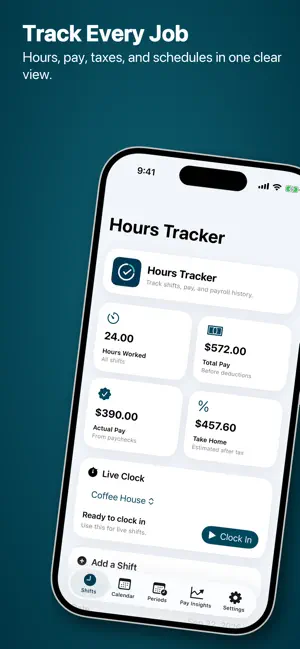
Hours Tracker: Pay and Shifts helps you track work hours, jobs, breaks, tips, pay periods, and estimated earnings from your iPhone. Keep your work records organized, whether you have one job or several. Clock in live or add shifts manually, plan upcoming work, and review earnings across your jobs. TRACK EVERY JOB • Add multiple jobs and switch between them easily. • Keep each job's hourly rate, tax estimates, overtime rules, pay schedule, and calendar preferences separate. • Choose the job when adding a shift. MANAGE SHIFTS AND BREAKS • Clock in and out, or enter shifts manually. • Track paid and unpaid breaks and configure automatic break rules. • Review breaks, tips, notes, and totals before saving a completed live shift. • Plan one-time or repeating shifts, find addresses with suggestions, and sync planned shifts to Calendar. • Use Live Activities, Dynamic Island, and optional reminders. UNDERSTAND YOUR PAY • View a color-coded pay breakdown across jobs and estimated taxes. • Set weekly, biweekly, semi-monthly, or monthly pay periods for each job. • Record actual paycheck amounts and keep your payroll history organized. • Enable automatic pay-period wrap-ups for summaries and timesheets inside completed pay periods. • Generate PDF or CSV timesheets for a pay period or custom date range. KEEP YOUR RECORDS HANDY • Sign in with Apple, Google, or email. • Back up and restore your records with iCloud. • Get started with a guided walkthrough in English or Spanish. • Remove banner ads with an optional one-time purchase. Pay and tax figures are estimates based on your entries and settings. Use your employer's payroll records to confirm actual pay and deductions.
Ratings & reviews
4.8
5 ratings
What’s new
Version 2.2.0 · Updated October 29, 2026
New in 2.2.0: • Ask Siri to start or end your shift without opening Hours Tracker. • Start paid or unpaid breaks, end a break, and ask whether you are currently clocked in. • Get clear spoken confirmations when an action succeeds or when a shift or break is already running. • Break details stay attached to the saved shift whether you finish from Siri, the app, or Live Clock. • Find every available phrase in the new Siri Shortcuts guide under Settings. • Use “Start a shift with Hours Tracker” immediately, or add the shorter “Start a shift” phrase to Siri once.
App privacy
The developer, Skytop Software, LLC, reported these privacy practices to Apple.
Data Linked to You
The following data, which may be collected and linked to your identity, may be used for the following purposes:
- Contact Info: Email Address, Name
Used for: App Functionality
Alternatives to Hours Tracker: Pay and Shifts
Looking for apps like Hours Tracker: Pay and Shifts? Here are 6 similar apps on the App Store. The highest rated is Hours Tracker: Work Hours Log (4.7/5), and all 6 are free to download.
-
 TimeWork: Shift Tracker
-
 ShiftFit: Work Pay Tracker
4.0
-
 Paypr: Nanny Pay Tracker
-
 Hours Tracker: Work Hours Log
4.7
-
 Food Planner - Ulam
-
 Shift Calendar & Work Planner
| App | Rating | Price | Last updated | Compare |
|---|---|---|---|---|
| Hours Tracker: Pay and Shifts | 4.8 / 5 (5 ratings) | Free | October 29, 2026 | |
| TimeWork: Shift Tracker | – | Free | Sep 17, 2026 | Compare |
| ShiftFit: Work Pay Tracker | 4.0 / 5 (2) | Free | Sep 10, 2026 | Compare |
| Paypr: Nanny Pay Tracker | – | Free | Oct 19, 2026 | Compare |
| Hours Tracker: Work Hours Log | 4.7 / 5 (7) | Free | Oct 27, 2026 | Compare |
| Food Planner - Ulam | – | Free | Oct 8, 2026 | Compare |
| Shift Calendar & Work Planner | – | Free | Jul 11, 2026 | Compare |