

Hours Tracker: Clock In
DigitalSprout Productivity iPhoneiPadiPod touch
Hours Tracker: Clock In is a free Productivity app for iPhone and iPad by DigitalSprout. Rated 4.7/5 from 7 ratings. Requires iOS 26.1.
- Rating
- 4.7
- 7 ratings
- Price
- Free
- on the App Store
- Size
- 11 MB
- Age 4+
- Updated
- Oct 12
- 2026 · v1.3
Screenshots


About Hours Tracker: Clock In
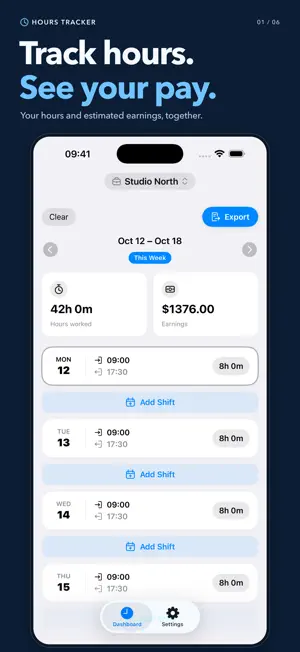
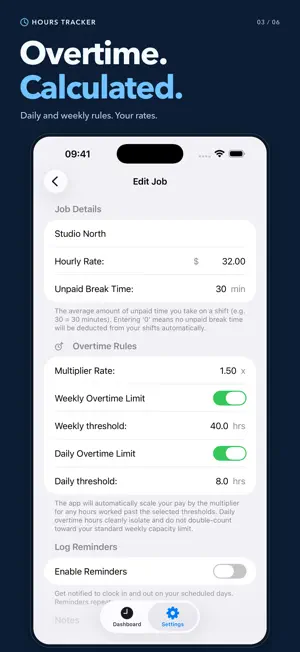
Track your work hours, keep a clear shift log, and see your estimated earnings for the week. Hours Tracker brings your jobs, breaks, overtime, and timesheets together on iPhone. Whether you work hourly shifts, freelance, or juggle several jobs, keep the details of your working week in one place. LOG EACH SHIFT Add start and end times, deduct unpaid breaks, and attach notes. You can also save a start time first and add the end time when your shift finishes. SEE YOUR WEEK AT A GLANCE Review logged hours and estimated pay on your weekly dashboard. Switch between individual jobs or view them together, and move between weeks to check your records. SET YOUR OWN RATES AND OVERTIME Give each job its own hourly rate and default break. Set daily or weekly overtime thresholds and a pay multiplier, with overrides for individual entries when needed. KEEP MULTIPLE JOBS ORGANIZED Separate your shifts by job while keeping an overview of your total working week. Record different hourly rates for different jobs or individual shifts. SHARE YOUR TIMESHEETS Export CSV or XLS timesheets for a selected job or all jobs. Choose a week, month, custom date range, or all your entries, then share the file from your iPhone. Choose whether to include break details, notes, and earnings. BUILD A CLEAR WORK HISTORY Review weekly totals and open a week to see its individual shifts. Edit entries when you need to correct a time or add a detail. REMIND YOURSELF TO LOG Set repeating reminders for your chosen workdays and start and finish times. Choose your currency symbol and whether your week starts on Sunday or Monday. Earnings are estimates based on your logged hours, rates, and overtime settings. They do not include tax or other deductions. Terms of Use: https://digitalsprout.org/hourstracker/terms-of-service Privacy Policy: https://digitalsprout.org/hourstracker/privacy-policy
Ratings & reviews
4.7
7 ratings
What’s new
Version 1.3 · Updated October 12, 2026
This update makes tracking your workweek clearer and more reliable. • Add another shift to the same day from any job view. • Jump back to the current week with one tap. • Find your way around with a new set of custom icons. • Improved overtime calculations for split shifts. • More reliable CSV and XLS exports, including break details and notes. • Better entry editing, work history, and number input.
App privacy
The developer, DigitalSprout, reported these privacy practices to Apple.
Data Not Linked to You
The following data, which may be collected but is not linked to your identity, may be used for the following purposes:
- Purchases: Purchase History
Used for: Analytics, App Functionality
Alternatives to Hours Tracker: Clock In
Looking for apps like Hours Tracker: Clock In? Here are 6 similar apps on the App Store. The highest rated is TimeTiles (5.0/5), and 5 of the 6 are free to download.
-
 Duee - Payment Calendar
4.8
Duee - Payment Calendar
4.8
-
 ICS2Calendar
3.0
ICS2Calendar
3.0
-
 TimeTiles
5.0
TimeTiles
5.0
-
 Honest Scanner
5.0
Honest Scanner
5.0
-
 KreativeBirds Email
-
 Shift: Work Hours & Time Card
| App | Rating | Price | Last updated | Compare |
|---|---|---|---|---|
| Hours Tracker: Clock In | 4.7 / 5 (7 ratings) | Free | October 12, 2026 | |
| Duee - Payment Calendar | 4.8 / 5 (4) | Free | Sep 7, 2026 | Compare |
| ICS2Calendar | 3.0 / 5 (1) | 0.99 USD | May 27, 2026 | Compare |
| TimeTiles | 5.0 / 5 (1) | Free | Jul 9, 2026 | Compare |
| Honest Scanner | 5.0 / 5 (2) | Free | Sep 5, 2026 | Compare |
| KreativeBirds Email | – | Free | Jul 30, 2026 | Compare |
| Shift: Work Hours & Time Card | – | Free | Jul 27, 2026 | Compare |