

Shift: Work Hours & Time Card
Donte Ennis Productivity iPhoneiPadiPod touch
Shift: Work Hours & Time Card is a free Productivity app for iPhone and iPad by Donte Ennis. Requires iOS 15.1. Updated July 27, 2026.
- Price
- Free
- on the App Store
- Size
- 62 MB
- Age 4+
- Updated
- Jul 27
- 2026 · v1.1.3
Screenshots

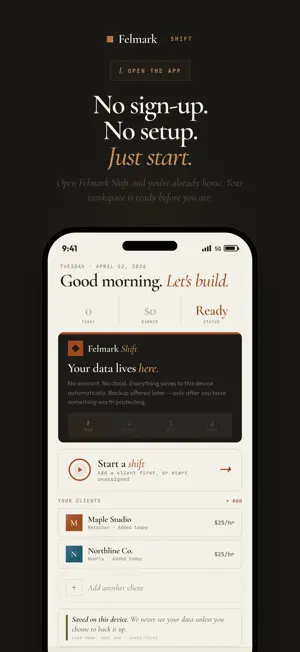

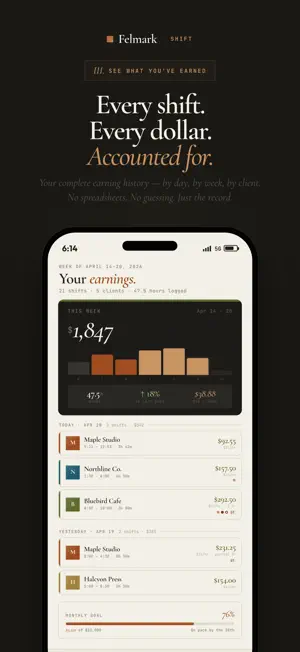
About Shift: Work Hours & Time Card
Shift is a work hours tracker, time card, and work log for independent and shift-based workers — cleaners, care workers, contractors, mobile service providers, and freelancers who need a clean record of time, clients, worksites, proof, and pay. Clock in. Work. Clock out. Your hours, your earnings, your week — laid out clean, no spreadsheet required. WHAT IT DOES • One-tap clock-in to any client. Hold to confirm so you never start a shift by accident. • Live timer on Home, persistent across app restarts and force-quits — your hours survive what your phone does. • Per-shift earnings from each client's hourly rate — your time card and pay records in one place. • Weekly plan view: sketch your week, mark days off, see when you're overcommitted. • History: every shift you've worked, searchable, filterable, with real durations. • Earnings rollup: this week, this month, year-to-date — every screen computes from the same record, so the numbers always agree. • Recovery-aware: evening and overnight shifts trigger a wind-down plan so you actually sleep. • Scope-creep tagging: log when a client asks for "just one more thing" so you can renegotiate later with receipts. • Optional Shift Worksite: compare foreground GPS checks with a saved client address when a job happens on-site. • Optional Shift Capture: add photo-reference proof to a live shift while the details are fresh. • Shift Seal: completed records carry an integrity seal, so your log stands up later. WHAT IT DOESN'T DO • No surveillance. No screen recording. No keystroke tracking. Just start/stop, like a stopwatch. • No background location. Worksite GPS checks run only when you turn them on for a live shift. • No subscription paywall on the basics. Time tracking is free, forever. • No analytics that lie. Every number on every screen comes from a shift you actually clocked. WHO IT'S FOR • House cleaners, care workers, health aides, contractors, freelancers, and mobile service providers who track work by shift or client. • Anyone juggling multiple clients, homes, jobs, or worksites and tired of "where did Tuesday go?" • Evening, night-shift, and overnight workers who need their app to respect recovery time. BACKUP AND PRO Shift works without an account. Sign in with Apple or Google only when you want cloud backup and restore. Professional upgrades are optional and billed through the App Store. SUBSCRIPTIONS Shift Pro is an auto-renewable subscription, available monthly or annually. Payment is charged to your Apple Account at confirmation of purchase. The subscription renews automatically unless auto-renew is turned off at least 24 hours before the end of the current period, and your account is charged for renewal within 24 hours before the period ends. Manage or cancel anytime in your Apple Account settings. Terms of Use (EULA): https://www.apple.com/legal/internet-services/itunes/dev/stdeula/ Felmark Terms: https://tryfelmark.com/shift/terms Privacy Policy: https://tryfelmark.com/shift/privacy PRIVACY Core tracking stays local by default. Optional Shift Worksite uses foreground location only when you enable it for a live shift. Optional account backup can include your saved shifts, Worksite records, and settings. No tracking. No ads. Read the full policy: https://tryfelmark.com/shift/privacy QUESTIONS [email protected]
What’s new
Version 1.1.3 · Updated July 27, 2026
Shift has a new name on the App Store — same app, same local-first record. • Your money, everywhere the same: Home, History, and Earnings now compute totals through one shared engine, so every screen agrees to the cent. • Planned blocks now match their shifts correctly across daylight-saving changes. • Sturdier restore: damaged records are filtered out at load instead of breaking timers. • Smaller fixes and under-the-hood updates.
App privacy
The developer, Donte Ennis, reported these privacy practices to Apple.
Data Linked to You
The following data, which may be collected and linked to your identity, may be used for the following purposes:
- Purchases: Purchase History
- Location: Precise Location
- Contact Info: Email Address, Name
- User Content: Other User Content
- Identifiers: User ID
Used for: App Functionality
Alternatives to Shift: Work Hours & Time Card
Looking for apps like Shift: Work Hours & Time Card? Here are 6 similar apps on the App Store. The highest rated is TimeTiles (5.0/5), and all 6 are free to download.
-
 TimeTiles
5.0
TimeTiles
5.0
-
 Clocked-In Timecard
-
 Tabsy
5.0
Tabsy
5.0
-
 Hours Tracker: Clock In
4.7
Hours Tracker: Clock In
4.7
-
 Timesheet: Work Hours & Pay
-
 Timecard Buddy
4.2
Timecard Buddy
4.2
| App | Rating | Price | Last updated | Compare |
|---|---|---|---|---|
| Shift: Work Hours & Time Card | – | Free | July 27, 2026 | |
| TimeTiles | 5.0 / 5 (1) | Free | Jul 9, 2026 | Compare |
| Clocked-In Timecard | – | Free | Jun 23, 2026 | Compare |
| Tabsy | 5.0 / 5 (5) | Free | Jun 6, 2026 | Compare |
| Hours Tracker: Clock In | 4.7 / 5 (7) | Free | Oct 19, 2026 | Compare |
| Timesheet: Work Hours & Pay | – | Free | Oct 19, 2026 | Compare |
| Timecard Buddy | 4.2 / 5 (34) | Free | May 12, 2026 | Compare |