

GamePanda
Aleksey Zelenskiy Entertainment iPhoneiPadiPod touch
GamePanda is a free Entertainment app for iPhone and iPad by Aleksey Zelenskiy. Rated 3.0/5 from 2 ratings. Requires iOS 18.0. Updated October 21, 2026.
- Rating
- 3.0
- 2 ratings
- Price
- Free
- on the App Store
- Size
- 124 MB
- Age 12+
- Updated
- Oct 21
- 2026 · v1.2.0
Screenshots


About GamePanda
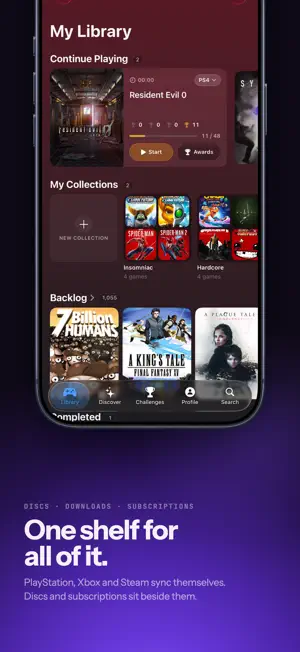
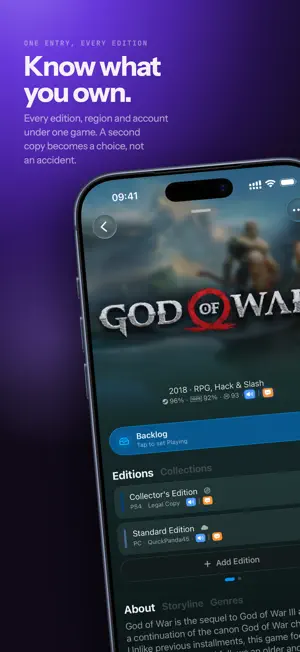
GamePanda keeps every game you own in one library. Link PlayStation, Xbox and Steam and your games arrive on their own: purchases, subscription titles, and the trophies and achievements you have already earned. Add discs, cartridges and anything else by hand, and they sit alongside the rest instead of being forgotten. ONE LIBRARY, EVERY PLATFORM Digital, physical and subscription titles together. Remasters, remakes and ports collapse under the game they belong to, so a collection reads like a collection instead of a list of duplicates. TROPHIES AND ACHIEVEMENTS THAT KEEP THEMSELVES CURRENT PlayStation trophies, Xbox achievements and Steam achievements in one place, refreshed in the background so progress is already there when you open the app. KNOW WHEN A GAME GETS CHEAPER Watch any game and GamePanda tells you when the price drops. That is the only time it will interrupt you. A BACKLOG YOU MIGHT ACTUALLY FINISH Tap to move a game from Backlog to Playing to Completed. Hold to park it. Challenges count what you finish across every console you own. DISCOVER WHAT TO PLAY NEXT Browse new releases, deals and what is worth playing on each platform. GAMEPANDA+ UNLOCKS MORE Unlimited collections instead of one. A game's whole price history instead of 30 days. A calendar of everything you are waiting for, and a notification the day one of them ships. Check any store region on any game, and change your own whenever you like. Link a second (or more) account(s) per platform. Install to your console and check its storage from your phone. See what your subscriptions gave away in past months. And choose exactly what counts as a deal, instead of just "on sale." And many more features to come! Terms of Use (EULA): https://www.apple.com/legal/internet-services/itunes/dev/stdeula/ Privacy Policy: https://gamepanda.app/privacy
What’s new
Version 1.2.0 · Updated October 21, 2026
New in this update: • Fixes onboarding on new installs: connecting PlayStation, Xbox or Steam, signing in, turning on notifications and opening your library work again. • Play sessions get a Live Activity on the Lock Screen and in the Dynamic Island, with Pause, Play and End buttons. • On iOS 26 and later, a library sync you start keeps going in the background, with its progress shown by iOS. • Sync progress, saved changes, price alerts and new platinums now appear in one status banner at the top of the screen. • Fixes freezes and high battery use when opening some games or syncing trophies, plus other fixes and improvements.
App privacy
The developer, Aleksey Zelenskiy, reported these privacy practices to Apple.
Data Linked to You
The following data, which may be collected and linked to your identity, may be used for the following purposes:
- Purchases: Purchase History
- Contact Info: Email Address, Name
- Identifiers: User ID, Device ID
- Usage Data: Product Interaction
Used for: App Functionality
Alternatives to GamePanda
Looking for apps like GamePanda? Here are 6 similar apps on the App Store. The highest rated is Joystickd (5.0/5), and all 6 are free to download.
-
 Joystickd
5.0
-
 Save Slot: Game Backlog
-
 Prisma - Game Diary
-
 PatchTLDR: Gaming Updates
-
 ReleaseQuest
-
 Level App - Track your games
| App | Rating | Price | Last updated | Compare |
|---|---|---|---|---|
| GamePanda | 3.0 / 5 (2 ratings) | Free | October 21, 2026 | |
| Joystickd | 5.0 / 5 (3) | Free | Sep 29, 2026 | Compare |
| Save Slot: Game Backlog | – | Free | Oct 3, 2026 | Compare |
| Prisma - Game Diary | – | Free | Sep 21, 2026 | Compare |
| PatchTLDR: Gaming Updates | – | Free | Jul 17, 2026 | Compare |
| ReleaseQuest | – | Free | Aug 14, 2026 | Compare |
| Level App - Track your games | – | Free | Jul 19, 2026 | Compare |
Compare GamePanda with the top alternatives: ratings, updates, ASO score and keyword gaps →