

FaceRefine: Natural Face Edit
航 李 Photo & Video iPhoneiPadiPod touch
FaceRefine: Natural Face Edit is a free Photo & Video app for iPhone and iPad by 航 李. Requires iOS 16.0. Updated September 3, 2026.
- Price
- Free
- on the App Store
- Size
- 162 MB
- Age 4+
- Updated
- Sep 3
- 2026 · v1.0.1
Screenshots


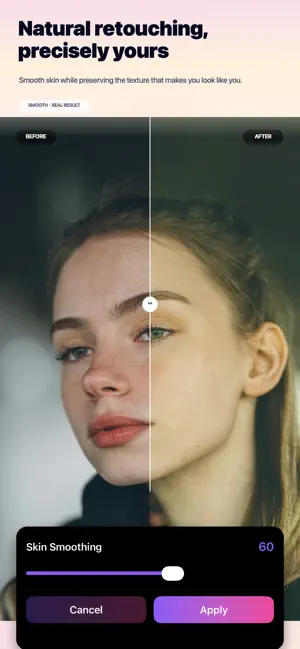

About FaceRefine: Natural Face Edit
Fix portrait lighting after the photo is taken. FaceRefine is a portrait retouching app designed for subtle, natural-looking results. Refine the light, skin, details, and color of a photo while keeping the features that make you look like you. PORTRAIT LIGHT Move a soft key light around the face after the shot. Start with Natural Fill, Window, Studio, or Contour. Use Auto for a quick result, or fine-tune direction, intensity, softness, and warmth. Portrait Light is included with FaceRefine Pro. NATURAL PORTRAIT RETOUCHING • Smooth skin while preserving facial texture • Remove small blemishes with a targeted brush • Brighten teeth selectively • Fine-tune facial proportions with adjustable reshape controls • Add blush, lipstick, and foundation with adjustable intensity • Control brightness, contrast, saturation, warmth, sharpness, and more • Explore curated filters and choose exactly how much to apply • Crop, rotate, and refine the composition • Compare every edit with the original • Export at high quality, including original resolution WHY FACEREFINE? • Natural-looking portrait results • Precise controls instead of one-tap over-editing • A focused workflow for portraits and selfies • Photo processing runs on your device • No account required Fix the light. Refine the details. Stay yourself. UNLIMITED ACCESS SUBSCRIPTION • Subscribe for unlimited access to all FaceRefine Pro features. • Subscriptions are billed weekly or annually at the rate shown for the selected plan. • Payment is charged to your Apple Account when the purchase is confirmed. • The subscription renews automatically unless canceled at least 24 hours before the end of the current period. • You can manage or cancel the subscription in your Apple Account settings. • Any unused portion of a free trial is forfeited when a subscription is purchased, where applicable. Privacy Policy: https://zomeelee.com/facerefine/privacy-a5b872bb.html Terms of Use: https://zomeelee.com/facerefine/terms-a5b872bb.html
What’s new
Version 1.0.1 · Updated September 3, 2026
New in 1.0.1: Portrait Light • Move a soft key light around the face after the photo is taken. • Start with Natural Fill, Window, Studio, or Contour. • Use Auto for a quick result, or fine-tune direction, intensity, softness, and warmth.
App privacy
The developer, 航 李, reported these privacy practices to Apple.
Data Not Linked to You
The following data, which may be collected but is not linked to your identity, may be used for the following purposes:
- Purchases: Purchase History
- Location: Coarse Location
- Identifiers: Device ID
- Usage Data: Product Interaction
- Diagnostics: Crash Data, Performance Data, Other Diagnostic Data
Used for: Analytics, App Functionality
Alternatives to FaceRefine: Natural Face Edit
Looking for apps like FaceRefine: Natural Face Edit? Here are 6 similar apps on the App Store.
-
 Saffron: AI Photo Relight
-
 AuraEdit AI – Face Editor
-
 Skinova: Photo Editor & Filter
-
 Plixar: AI Photo Editor
-
 FineUp: AI Face & Body Editor
-
 PhotoTransfer: Sync with Drive
| App | Rating | Price | Last updated | Compare |
|---|---|---|---|---|
| FaceRefine: Natural Face Edit | – | Free | September 3, 2026 | |
| Saffron: AI Photo Relight | – | Free | Aug 17, 2026 | Compare |
| AuraEdit AI – Face Editor | – | Free | Jun 23, 2026 | Compare |
| Skinova: Photo Editor & Filter | – | Free | Feb 5, 2026 | Compare |
| Plixar: AI Photo Editor | – | Free | Sep 30, 2026 | Compare |
| FineUp: AI Face & Body Editor | – | Free | Oct 5, 2026 | Compare |
| PhotoTransfer: Sync with Drive | – | Free | Oct 13, 2026 | Compare |