

Plixar: AI Photo Editor
ERX CONNECT Photo & Video iPhoneiPadiPod touch
Plixar: AI Photo Editor is a free Photo & Video app for iPhone and iPad by ERX CONNECT. Requires iOS 17.6. Updated September 30, 2026.
- Price
- Free
- on the App Store
- Size
- 13 MB
- Age 4+
- Updated
- Sep 30
- 2026 · v1.1
Screenshots


About Plixar: AI Photo Editor
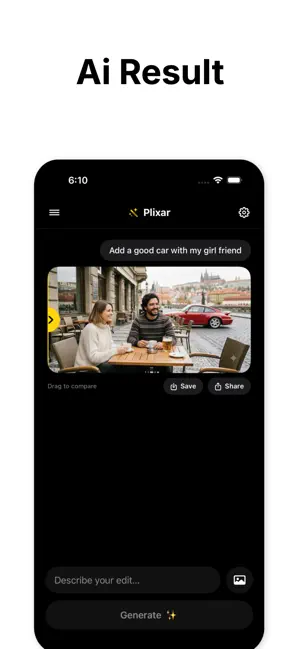
Plixar is the AI photo editor that lets you edit anything just by describing it. Type what you want, and watch your photo transform in seconds. No editing skills, no complicated tools. Just type, generate, and share. Turn ordinary photos into scroll-stopping edits. Add elements, change backgrounds, retouch portraits, or create fun, realistic edits to share with friends. WHAT YOU CAN DO - Edit by text: describe any change and the AI applies it instantly - Add elements: drop in objects, people, or effects with a single prompt - Retouch and improve: fix lighting, smooth skin, open eyes, sharpen details - Replace backgrounds: swap or recreate any scene from a description - Remove objects: erase unwanted people and distractions - Viral edits: create shareable, realistic transformations in seconds - Before and after: drag the slider to compare your original and result - Save and share: export in high quality to social media in one tap WHY PLIXAR - Powered by advanced AI image generation for ultra-realistic results - Instant processing on priority servers for lightning-fast edits - Simple, chat-style editing that anyone can use - Clean, distraction-free experience HOW IT WORKS 1. Pick a photo from your library 2. Describe the edit you want 3. Subscribe to Plixar Pro to generate, save, and share your result PLIXAR PRO Plixar requires a Plixar Pro subscription to generate edits. - Weekly plan - Yearly plan (best value, more credits) Payment will be charged to your Apple ID account at confirmation of purchase. Subscriptions automatically renew unless cancelled at least 24 hours before the end of the current period. Your account will be charged for renewal within 24 hours prior to the end of the current period. You can manage or cancel your subscription anytime in your App Store account settings. Any unused portion of a free trial, if offered, is forfeited when you purchase a subscription. Terms of Use (EULA): https://www.apple.com/legal/internet-services/itunes/dev/stdeula/
What’s new
Version 1.1 · Updated September 30, 2026
- Clearer subscription pricing on the upgrade screen - Improved AI editing quality and speed - Bug fixes and performance improvements
App privacy
The developer, ERX CONNECT, reported these privacy practices to Apple.
Data Used to Track You
The following data may be used to track you across apps and websites owned by other companies:
- Identifiers: Device ID
- Usage Data: Product Interaction, Advertising Data
Data Not Linked to You
The following data, which may be collected but is not linked to your identity, may be used for the following purposes:
- Identifiers: Device ID
- Usage Data: Product Interaction, Advertising Data
Used for: Third-Party Advertising, Developer’s Advertising or Marketing
Alternatives to Plixar: AI Photo Editor
Looking for apps like Plixar: AI Photo Editor? Here are 6 similar apps on the App Store. The highest rated is Noko AI: Photo Editor (5.0/5), and all 6 are free to download.
-
 AI Photo Magic — Image Editor
-
 Pixlo: AI Photo Editor
-
 Noko AI: Photo Editor
5.0
-
 AI Photo Generator - Phoxy
-
 Celebra Photo AI
-
 Smart Filter – AI photo editor
| App | Rating | Price | Last updated | Compare |
|---|---|---|---|---|
| Plixar: AI Photo Editor | – | Free | September 30, 2026 | |
| AI Photo Magic — Image Editor | – | Free | Apr 28, 2026 | Compare |
| Pixlo: AI Photo Editor | – | Free | May 15, 2026 | Compare |
| Noko AI: Photo Editor | 5.0 / 5 (1) | Free | Apr 21, 2026 | Compare |
| AI Photo Generator - Phoxy | – | Free | Jul 7, 2026 | Compare |
| Celebra Photo AI | – | Free | Jan 20, 2026 | Compare |
| Smart Filter – AI photo editor | – | Free | Aug 19, 2026 | Compare |