

Kotori: One-Line Expenses
ROHYO RO Finance iPhoneiPadiPod touch
Kotori: One-Line Expenses is a free Finance app for iPhone and iPad by ROHYO RO. Requires iOS 26.0. Updated September 25, 2026.
- Price
- Free
- on the App Store
- Size
- 18 MB
- Age 4+
- Updated
- Sep 25
- 2026 · v1.1.3
Screenshots


About Kotori: One-Line Expenses
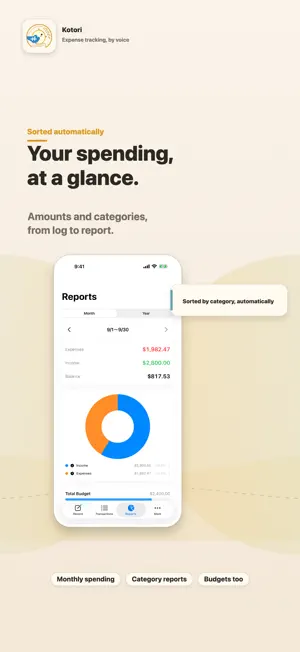
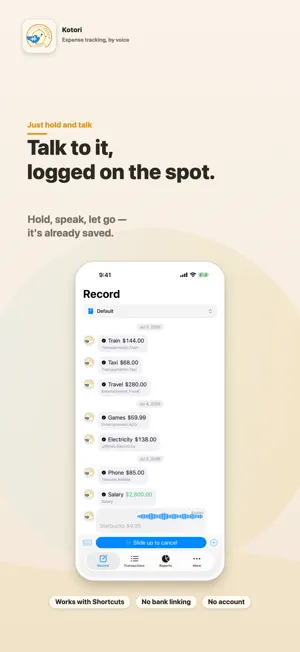
Say "Lunch, $12.99." That's it. The amount and category are logged automatically — and the merchant too, if you say it. No typing, no bank linking, no account. Speak, and Kotori — your little bird sidekick — catches it and logs it, sometimes with a sassy reply. Tracking expenses stops being data entry and becomes a chat with Kotori. ■ ONE LINE — FROM SHORTCUTS Say "Afternoon coffee, $4.99" or fire a Shortcut, and the expense is logged without even opening the app. Mention a merchant and it's kept; the amount and category are automatic. ■ LEARNS YOUR CATEGORIES, ON YOUR DEVICE Kotori learns how you sort things — your merchants, your wording, your habits — and gets more accurate the more you use it. All of that learning stays on your device. ■ PRIVATE BY DESIGN Your financial data is never uploaded to the developer's servers. Everything is processed on your device, and multi-device sync runs only through your own cloud. No account required. ■ SHARE A WALLET, TRACK TOGETHER Keeping the books with a partner or family? Share a wallet through your own cloud and log expenses together — everyone sees the same numbers, always up to date. Still no dedicated servers, still no sign-ups. ■ EVERYTHING YOU NEED Multiple wallets, 25+ currencies, transfers, monthly reports, category breakdowns, budgets, and CSV / MoneyForward import. ■ ON-DEVICE AI, AS A BOOST On supported devices, on-device AI helps Kotori learn faster and sort new merchants right away. It's an accelerator, not a requirement — Kotori works well without it. Basic features are free. Start with one line — just talk to Kotori.
What’s new
Version 1.1.3 · Updated September 25, 2026
・You can now swipe right on a transaction to edit it. ・Improved category editing and reordering. ・Improved the display of amounts and transactions at larger text sizes. ・Fixed an issue with the amount shown after recording with Shortcuts. ・Improved reliability when saving transactions and sharing wallets.
App privacy
The developer, ROHYO RO, reported these privacy practices to Apple.
Data Used to Track You
The following data may be used to track you across apps and websites owned by other companies:
- Identifiers: Device ID
Data Linked to You
The following data, which may be collected and linked to your identity, may be used for the following purposes:
- Location: Coarse Location
- Identifiers: Device ID
- Usage Data: Product Interaction, Advertising Data
Used for: Third-Party Advertising, Developer’s Advertising or Marketing, Analytics, App Functionality
Data Not Linked to You
The following data, which may be collected but is not linked to your identity, may be used for the following purposes:
- Diagnostics: Performance Data, Other Diagnostic Data, Crash Data
- Location: Coarse Location
- Identifiers: Device ID
- Usage Data: Product Interaction
Used for: Third-Party Advertising, Developer’s Advertising or Marketing, Analytics, App Functionality
Alternatives to Kotori: One-Line Expenses
Looking for apps like Kotori: One-Line Expenses? Here are 6 similar apps on the App Store. The highest rated is Money Keeper — Expense Tracker (5.0/5), and all 6 are free to download.
-
 Aveli: Budget & Expenses
-
 Money Keeper — Expense Tracker
5.0
Money Keeper — Expense Tracker
5.0
-
 SpendMind: AI Expense Tracker
5.0
SpendMind: AI Expense Tracker
5.0
-
 Wealthy: Finance & Budgeting
-
 Умный бюджет: учёт расходов
-
 BudgetKit - Expense Tracker
| App | Rating | Price | Last updated | Compare |
|---|---|---|---|---|
| Kotori: One-Line Expenses | – | Free | September 25, 2026 | |
| Aveli: Budget & Expenses | – | Free | Sep 3, 2026 | Compare |
| Money Keeper — Expense Tracker | 5.0 / 5 (1) | Free | Jun 8, 2026 | Compare |
| SpendMind: AI Expense Tracker | 5.0 / 5 (1) | Free | Oct 4, 2026 | Compare |
| Wealthy: Finance & Budgeting | – | Free | Dec 11, 2024 | Compare |
| Умный бюджет: учёт расходов | – | Free | Sep 23, 2026 | Compare |
| BudgetKit - Expense Tracker | – | Free | May 3, 2025 | Compare |