

SpendMind: AI Expense Tracker
Wajahat Hassan Finance iPhoneiPadiPod touch
SpendMind: AI Expense Tracker is a free Finance app for iPhone and iPad by Wajahat Hassan. Rated 5.0/5 from 1 ratings. Requires iOS 17.0.
- Rating
- 5.0
- 1 ratings
- Price
- Free
- on the App Store
- Size
- 32 MB
- Age 4+
- Updated
- Oct 4
- 2026 · v1.2.7
Screenshots
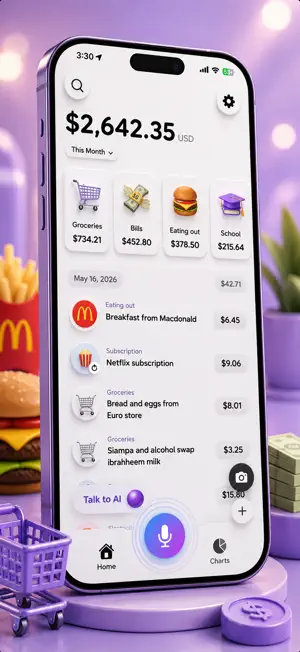

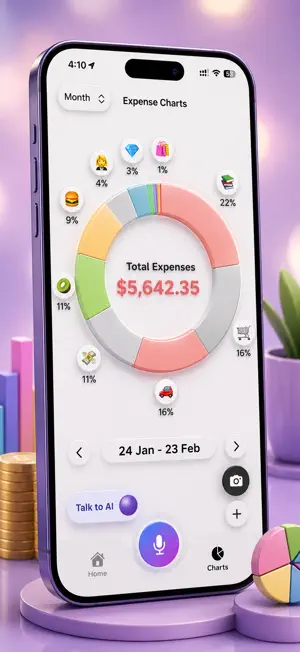
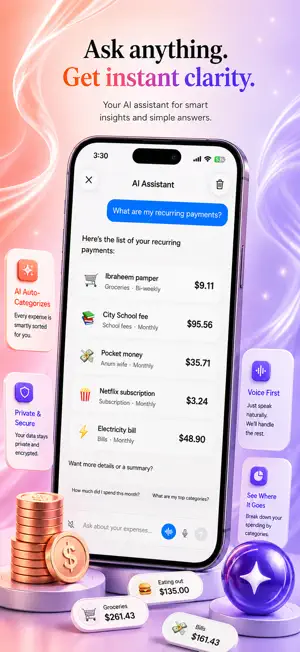
About SpendMind: AI Expense Tracker
Track expenses by just speaking. SpendMind uses AI to instantly extract the amount, category, and date from your voice — no typing, no fuss. Perfect for busy professionals, freelancers, and anyone serious about their finances. ——— WHY SPENDMIND? ——— Voice-Powered Logging - Just say "Spent $12 on coffee today" and SpendMind does the rest. AI extracts every detail instantly. Smart Categories & Insights - Automatically organise spending into categories like Food, Transport, Health, and more — with beautiful charts to see where your money goes. Recurring Expenses - Set up subscriptions and recurring bills once. SpendMind tracks them automatically every cycle. Home Screen Widget - Check your spending at a glance — right from your home screen, without opening the app. iCloud Sync - Your data syncs seamlessly across iPhone, iPad, and Mac. Always up-to-date, everywhere. Encrypted & Private - Your financial data is encrypted and stored securely. No account required. Export Anytime - Export your expenses as CSV for accounting, tax time, or your own analysis. ——— WHAT YOU CAN TRACK ——— • Daily Expenses — groceries, meals, coffee, transport • Bills & Utilities — electricity, water, internet, phone • Subscriptions — streaming, apps, memberships • Health & Fitness — gym, medicines, doctor visits • Business Expenses — equipment, coworking, travel • Recurring Payments — rent, insurance, loans ——— HOW IT WORKS ——— 1. Tap the microphone and speak your expense naturally 2. AI extracts the amount, category, and date 3. Review, confirm, and you're done — in seconds ——— FREE TRIAL & PREMIUM ——— SpendMind is free to try. Premium unlocks voice-powered expense entry, recurring automation, advanced analytics, and iCloud sync across all devices. Manage your subscription anytime in your Apple ID settings. Contact us: [email protected] Privacy Policy: https://www.spendmind.co/privacy-policy Terms of Use: https://www.spendmind.co/terms-and-conditions Track smarter. Spend mindfully.
What’s new
Version 1.2.7 · Updated October 4, 2026
Your Apple Pay payments are now saved for you. - Pay in a shop with Apple Pay, and SpendMind saves the expense for you. You don't need to type anything. - It saves the shop name and the amount, and picks a category for you. - Setup takes about 2 minutes. Go to Settings → Apple Pay tracking and follow the steps. - Paying in another country? The expense is saved in the currency you paid in. - If the same payment comes in twice, it is only saved once. - If a payment is not clear, it is saved for you to check, not lost. - SpendMind only sees the shop name and the amount. It never sees your card number or your bank. - This works only when you pay in a shop. Online Apple Pay payments must still be added by hand. Voice in AI chat is safer and smarter - Recording now stops on its own after 2 minutes, so it never keeps running by mistake. - If we can't hear anything, we tell you and suggest typing instead. - If you leave the app while recording, the recording stops properly. - Tapping the mic twice by mistake won't start two recordings. News from SpendMind - We can now send you news about new features and helpful tips. No spam. - We ask once, during setup, right after the microphone. If you've already set up the app, we ask once on the Home screen. - If you say no, the app still works fine. You can turn notifications on any time in iPhone Settings. - Your daily expense reminder works the same as before. Improvements & Fixes - The Apple Pay setup guide now shows what you should see after each step, and helps if a payment doesn't show up. - If another app also saves your Apple Pay payments, the guide explains how to make sure SpendMind gets them too. - The setup guide now looks like the rest of SpendMind. - A message on the Home screen can now open the Apple Pay setup guide. - Messages now show at the top of the screen, not over the bottom bar. - The app icon no longer shows as a blank square. - When you reach your daily message limit, we now tell you clearly. - Voice chats now count toward your daily message limit, just like typed messages. - You can scan up to 10 receipts every 12 hours. - Your daily message count stays correct, even if you reinstall the app. - Failed requests now retry up to 3 times.
App privacy
The developer, Wajahat Hassan, reported these privacy practices to Apple.
Data Not Collected
The developer does not collect any data from this app.
Alternatives to SpendMind: AI Expense Tracker
Looking for apps like SpendMind: AI Expense Tracker? Here are 6 similar apps on the App Store. The highest rated is Centee: AI Expense Tracker (5.0/5), and all 6 are free to download.
-
 Fiscify: Smart Expense Tracker
-
 Expense Whisper
-
 Fienly: AI Money Tracker
-
 Kasso — AI Expense Tracker
-
 Centee: AI Expense Tracker
5.0
Centee: AI Expense Tracker
5.0
-
 Expense Tracker Spending
| App | Rating | Price | Last updated | Compare |
|---|---|---|---|---|
| SpendMind: AI Expense Tracker | 5.0 / 5 (1 rating) | Free | October 4, 2026 | |
| Fiscify: Smart Expense Tracker | – | Free | Sep 15, 2026 | Compare |
| Expense Whisper | – | Free | May 19, 2026 | Compare |
| Fienly: AI Money Tracker | – | Free | May 14, 2026 | Compare |
| Kasso — AI Expense Tracker | – | Free | Sep 13, 2026 | Compare |
| Centee: AI Expense Tracker | 5.0 / 5 (1) | Free | Oct 4, 2026 | Compare |
| Expense Tracker Spending | – | Free | Sep 11, 2026 | Compare |