

Centee: AI Expense Tracker
依欢 孙 Finance iPhoneiPadiPod touch
Centee: AI Expense Tracker is a free Finance app for iPhone and iPad by 依欢 孙. Rated 5.0/5 from 1 ratings. Requires iOS 17.0. Updated October 21, 2026.
- Rating
- 5.0
- 1 ratings
- Price
- Free
- on the App Store
- Size
- 31 MB
- Age 4+
- Updated
- Oct 21
- 2026 · v1.1.16
Screenshots

About Centee: AI Expense Tracker
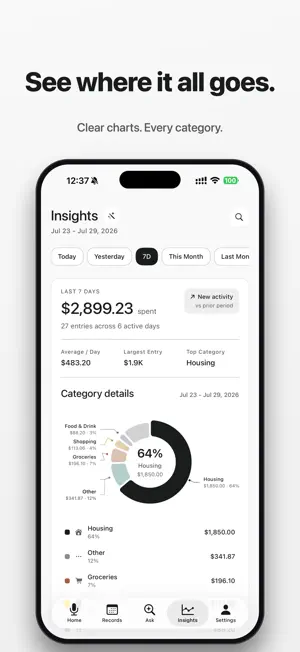
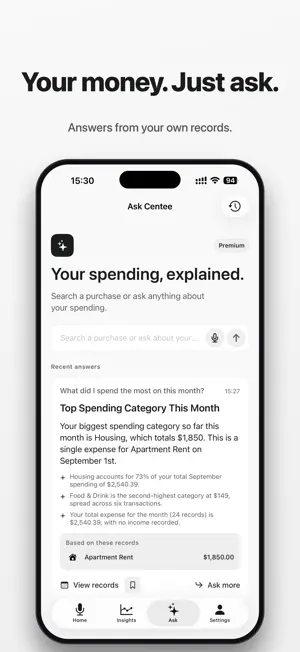
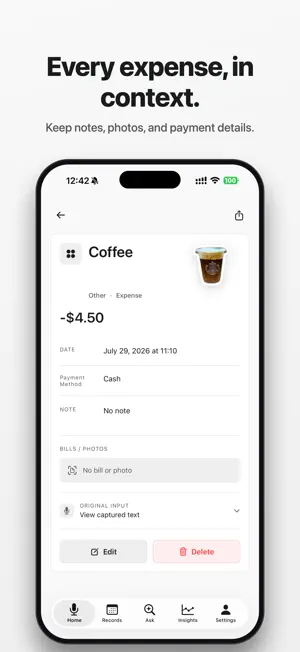
Speak an expense or scan a receipt. Centee helps extract the details so you can review, save, and track your spending—without linking a bank account. Add a purchase in the quickest way for you. Centee helps recognize the item, amount, date, and category, then you review every detail before saving. Capture every expense in seconds No ads, account registration, bank connection, or long forms. Speak naturally, for example: “I bought a coffee this morning for $5.” Centee recognizes the item, amount, and time, then turns your words into a record you can review before saving. Keep receipts, bills, and payment screens together Store receipts, invoices, payment screens, and bills with each expense. Scan a photo and let AI help extract key details before you save. Track how you paid Record cash, cards, digital wallets, bank transfers, and other payment methods alongside each expense. Ask your ledger with AI When your ledger has enough history, search a purchase or ask a question about spending. Centee bases answers on your saved titles, amounts, categories, dates, and notes—not generic financial advice. Receipt photos are not shared for these answers. Review AI results before acting. Capture faster with Back Tap Set up Centee Shortcuts and assign them to Back Tap in iPhone Settings. Double-tap to send a screenshot of a receipt or payment screen to Centee. Triple-tap to enter and save an expense through Quick Add without opening the app. More ways to stay on top of spending - Log expenses by voice - Scan receipts and bills - Track spending, income, subscriptions, and daily costs - Review category trends and AI summaries - Ask Centee about your ledger and spending patterns - Attach photos and item stickers to records - Use widgets and Shortcuts for faster capture - Export or review your history when needed Minimal by design A calm, focused interface keeps daily expense tracking simple, with no unnecessary setup. Private by design Centee does not require bank linking. AI results may need review before saving, and your records should be checked for accuracy. Centee is a personal finance tracking tool. It does not provide financial, tax, investment, credit, debt, or legal advice. Terms of Use (EULA): https://www.apple.com/legal/internet-services/itunes/dev/stdeula/ Privacy Policy: https://sunheihei.github.io/app-policie/centee-ios-privacy.html Terms of Use: https://sunheihei.github.io/app-policie/centee-ios-terms.html
What’s new
Version 1.1.16 · Updated October 21, 2026
- Improved layouts for iPhone Duo and changing window sizes, with clearer spacing across Home, Insights, and record history. - Refined charts, calendars, and controls to make reviewing your spending more comfortable on compact and expanded screens. - Polished record lists, payment history, and month selection for smoother everyday use. - Added a video demo to the Back Tap voice guide to help you get started.
App privacy
The developer, 依欢 孙, reported these privacy practices to Apple.
Data Not Collected
The developer does not collect any data from this app.
Alternatives to Centee: AI Expense Tracker
Looking for apps like Centee: AI Expense Tracker? Here are 6 similar apps on the App Store. The highest rated is SpendMind: AI Expense Tracker (5.0/5), and all 6 are free to download.
-
 Expensaver: Expense Tracker
-
 SpendMind: AI Expense Tracker
5.0
-
 Expense Tracker - Digits AI
-
 Expense Tracker: Pockelyt
-
 Flowjar: Budget & Bill Tracker
-
 Margin: Expense Tracker
| App | Rating | Price | Last updated | Compare |
|---|---|---|---|---|
| Centee: AI Expense Tracker | 5.0 / 5 (1 rating) | Free | October 21, 2026 | |
| Expensaver: Expense Tracker | – | Free | Aug 14, 2026 | Compare |
| SpendMind: AI Expense Tracker | 5.0 / 5 (1) | Free | Oct 4, 2026 | Compare |
| Expense Tracker - Digits AI | – | Free | Sep 21, 2026 | Compare |
| Expense Tracker: Pockelyt | – | Free | Jul 18, 2026 | Compare |
| Flowjar: Budget & Bill Tracker | – | Free | Oct 2, 2026 | Compare |
| Margin: Expense Tracker | – | Free | Sep 8, 2026 | Compare |