

CoShot Go
北京绿图科技有限公司 Photo & Video iPhoneiPadiPod touch
CoShot Go is a free Photo & Video app for iPhone and iPad by 北京绿图科技有限公司. Requires iOS 15.0. Updated June 25, 2026.
- Price
- Free
- on the App Store
- Size
- 4 MB
- Age 4+
- Updated
- Jun 25
- 2026 · v1.1
Screenshots


About CoShot Go
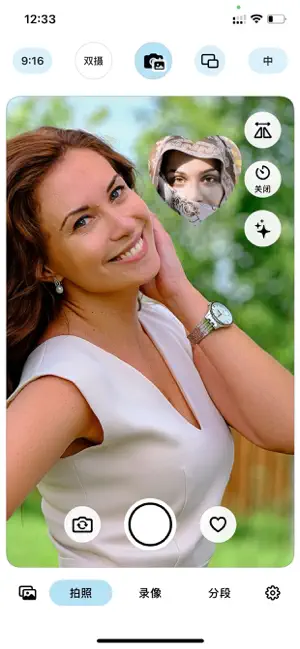
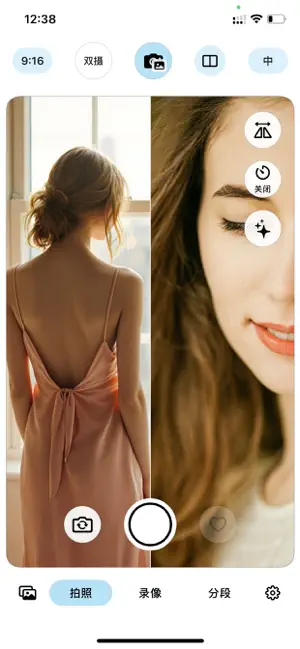
CoShotGo — Professional Split-Screen Camera, Capture Every Side 5 Split Modes for Creative Freedom Top/bottom, left/right, diagonal, picture-in-picture — combine front and rear cameras your way. PiP comes in multiple shapes (circle, square, heart, star, ellipse, rectangle), freely positioned and resized. Seamless Continuous Zoom Rear camera supports smooth zoom from 0.5x all the way to max — no lens-switching stutter. From ultra-wide to digital zoom, pinch to control framing precisely. Independent Camera Control Double-tap to switch which camera responds to pinch. Default controls the front camera (PiP); double-tap to control the rear (background); double-tap again to switch back. Both cameras zoom independently. Smart Hints, Transparent Operation Live hint overlay shows exactly which area responds to pinch. Choose from 3s / 5s / never auto-hide. Hints re-flash when you switch cameras or split modes. Simultaneous Dual-Camera Capture Front and rear cameras run at the same time, composing the frame in real time. Metal-powered rendering ensures smooth preview and recording. Beauty Filters, Naturally Flattering Adjustable beauty filter smooths skin tones while keeping a natural look. Front camera mirror toggle included. Timed Capture 3s / 10s countdown gives you time to get into position. Photo Composite, Endless Creativity Blend photos from your library with the live camera feed for unique visuals. Supports dual-photo composite (one per camera). 10 Interface Languages Chinese, English, Japanese, Korean, Russian, French, German, Italian, Spanish, Hindi. One tap to switch — built for global creators. Segmented Recording Record up to 6 segments with pauses between. All segments auto-merge into one continuous video. Instant Save Videos and photos save directly to your Photos library. No extra export steps. Perfect for: Vlogging, tutorials, interviews, product demos, social content, fitness check-ins, dance practice, and more.
What’s new
Version 1.1 · Updated June 25, 2026
Seamless Continuous Zoom Rear camera supports smooth zoom from 0.5x all the way to max — no lens-switching stutter. From ultra-wide to digital zoom, pinch to control framing precisely. Independent Camera Control Double-tap to switch which camera responds to pinch. Default controls the front camera (PiP); double-tap to control the rear (background); double-tap again to switch back. Both cameras zoom independently. Smart Hints, Transparent Operation Live hint overlay shows exactly which area responds to pinch. Choose from 3s / 5s / never auto-hide. Hints re-flash when you switch cameras or split modes. Layout refresh — Photo-composite button moved to top bar center
App privacy
The developer, 北京绿图科技有限公司, reported these privacy practices to Apple.
Data Not Collected
The developer does not collect any data from this app.
Alternatives to CoShot Go
Looking for apps like CoShot Go? Here are 6 similar apps on the App Store. The highest rated is EveryAngle Camera (5.0/5), and all 6 are free to download.
-
 EveryAngle Camera
5.0
EveryAngle Camera
5.0
-
 GotTheShot: Pre-Record Camera
-
 Lucent: Pro Video Camera, Vlog
-
 dualitycam
-
 Eclat Camera
5.0
Eclat Camera
5.0
-
 Bicameral
5.0
Bicameral
5.0
| App | Rating | Price | Last updated | Compare |
|---|---|---|---|---|
| CoShot Go | – | Free | June 25, 2026 | |
| EveryAngle Camera | 5.0 / 5 (1) | Free | Sep 30, 2026 | Compare |
| GotTheShot: Pre-Record Camera | – | Free | Sep 24, 2026 | Compare |
| Lucent: Pro Video Camera, Vlog | – | Free | Oct 21, 2026 | Compare |
| dualitycam | – | Free | Oct 7, 2026 | Compare |
| Eclat Camera | 5.0 / 5 (1) | Free | Mar 30, 2026 | Compare |
| Bicameral | 5.0 / 5 (1) | Free | Aug 24, 2026 | Compare |
Compare CoShot Go with the top alternatives: ratings, updates, ASO score and keyword gaps →