

Bicameral
Andrew Carlson Photo & Video iPhoneiPadiPod touch
Bicameral is a free Photo & Video app for iPhone and iPad by Andrew Carlson. Rated 5.0/5 from 1 ratings. Requires iOS 26.0. Updated August 24, 2026.
- Rating
- 5.0
- 1 ratings
- Price
- Free
- on the App Store
- Size
- 7 MB
- Age 4+
- Updated
- Aug 24
- 2026 · v1.9
Screenshots


About Bicameral
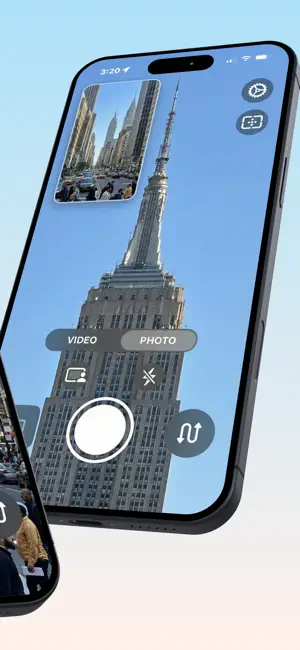
Recording stays on while the screen stays awake. The display no longer auto-locks while the camera is open, so a hands-off take on a tripod or stand records until you stop it. This matches the behavior of the built-in Camera app. Simpler controls while recording. Only the controls that work during a take stay on screen: the camera-swap button steps aside for the photo button while you record, and buttons that would end your take early are dimmed. Everything returns when the recording stops. A more dependable record button. Tapping record twice in quick succession could confuse the app — the controls stayed on their idle look while a take was actually rolling, and recording could stay stuck until you relaunched. Starts are now handled once, and the on-screen controls always match what's being recorded. Sharper picture-in-picture. The inset is now filtered when it's scaled, so its edges look smoother in recordings while the main image stays pixel-sharp. Better fit with Display Zoom and larger text. If you use Display Zoom or a larger text size, the on-screen controls now fit the screen: the storage readout no longer runs under the Settings button, and the recording controls stay centered instead of spilling off the right edge. More consistent on-screen controls. The recording-time and storage indicators now match the rest of the live-preview chrome. Better bug reports. If you report an issue, the diagnostic log now includes the previous session too, so problems that happened before a relaunch can actually be investigated. Plus fixes for the horizon level near upside-down, the exposure slider unlocking focus, taps on the letterbox bars, and the self-timer after rapid taps.
What’s new
Version 1.9 · Updated August 24, 2026
Recording stays on while the screen stays awake. The display no longer auto-locks while the camera is open, so a hands-off take on a tripod or stand records until you stop it. This matches the behavior of the built-in Camera app. A more dependable record button. Tapping record twice in quick succession could confuse the app — the controls stayed on their idle look while a take was actually rolling, and recording could stay stuck until you relaunched. Starts are now handled once, and the on-screen controls always match what's being recorded. Sharper picture-in-picture. The inset is now filtered when it's scaled, so its edges look smoother in recordings while the main image stays pixel-sharp. Better fit with Display Zoom and larger text. If you use Display Zoom or a larger text size, the on-screen controls now fit the screen: the storage readout no longer runs under the Settings button, and the recording controls stay centered instead of spilling off the right edge. More consistent on-screen controls. The recording-time and storage indicators now match the rest of the live-preview chrome. Better bug reports. If you report an issue, the diagnostic log now includes the previous session too, so problems that happened before a relaunch can actually be investigated. Plus fixes for the horizon level near upside-down, the exposure slider unlocking focus, taps on the letterbox bars, and the self-timer after rapid taps.
App privacy
The developer, Andrew Carlson, reported these privacy practices to Apple.
Data Not Collected
The developer does not collect any data from this app.
Alternatives to Bicameral
Looking for apps like Bicameral? Here are 6 similar apps on the App Store. The highest rated is SplitRig: Dual Camera Recorder (5.0/5), and all 6 are free to download.
-
 BiCam - Front & Back Camera
4.7
BiCam - Front & Back Camera
4.7
-
 SplitCam Dual Camera Recorder
4.8
SplitCam Dual Camera Recorder
4.8
-
 Dual Camera: Front & Back Cam
4.5
Dual Camera: Front & Back Cam
4.5
-
 DualCapture: Dual Camera Video
4.5
DualCapture: Dual Camera Video
4.5
-
 SplitRig: Dual Camera Recorder
5.0
SplitRig: Dual Camera Recorder
5.0
-
 DualTake: Dual Camera Recorder
4.4
DualTake: Dual Camera Recorder
4.4
| App | Rating | Price | Last updated | Compare |
|---|---|---|---|---|
| Bicameral | 5.0 / 5 (1 rating) | Free | August 24, 2026 | |
| BiCam - Front & Back Camera | 4.7 / 5 (62) | Free | Sep 2, 2026 | Compare |
| SplitCam Dual Camera Recorder | 4.8 / 5 (13) | Free | Oct 23, 2026 | Compare |
| Dual Camera: Front & Back Cam | 4.5 / 5 (11) | Free | Oct 29, 2026 | Compare |
| DualCapture: Dual Camera Video | 4.5 / 5 (57) | Free | Oct 27, 2026 | Compare |
| SplitRig: Dual Camera Recorder | 5.0 / 5 (39) | Free | Oct 10, 2026 | Compare |
| DualTake: Dual Camera Recorder | 4.4 / 5 (18) | Free | Oct 26, 2026 | Compare |
Compare Bicameral with the top alternatives: ratings, updates, ASO score and keyword gaps →