

Sculpt — Scan to 3D Print
Mitaanshu Agarwal Graphics & Design iPad
Sculpt — Scan to 3D Print is a free Graphics & Design app for iPad by Mitaanshu Agarwal. Requires iOS 18.0. Updated September 26, 2026.
- Price
- Free
- on the App Store
- Size
- 6 MB
- Age 4+
- Updated
- Sep 26
- 2026 · v1.2
Screenshots



About Sculpt — Scan to 3D Print
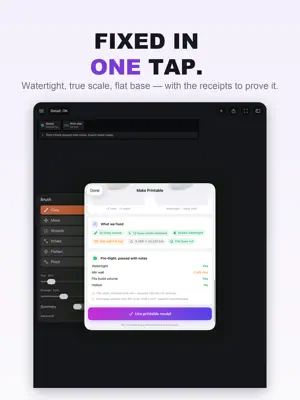
Sculpt turns a 3D scan into a model your printer can actually print - watertight, true to real-world size, and checked for wall thickness - right on your iPad. No Blender. No Meshmixer. No desktop relay race. SCAN ANYTHING, MAKE IT PRINTABLE - One tap: Make Printable closes holes, removes floating fragments, and verifies your mesh is a watertight, manifold solid - with a pre-flight report that proves it - True millimeter scale, so the part fits the first time - Wall-thickness and overhang checks flag thin walls and unsupported areas before you waste filament or resin - Works with scans from any app or scanner: import OBJ, STL, PLY, glTF, USDZ FIX IT BEFORE YOU PRINT IT Scans are never perfect. Smooth bumps, fill gaps, flatten bases, and clean up your model with touch-first tools designed for fingers and Apple Pencil - the cleanup step every other scanning app sends you to desktop software for. EXPORT IS ALWAYS FREE Your models are yours. Export STL, 3MF, OBJ, USDZ, and GLB free, forever - no export paywall. PRINT-READY WORKFLOW - Seats your part on the build plate and checks it fits resin or FDM build volumes - Hollowing with drain holes saves resin on big prints (Pro) - Pre-flight report: watertight check, wall thickness, overhangs PRIVATE BY DESIGN No account required. Your scans are processed on your device and never leave it unless you share them. No ads, no trackers. FREE VS PRO: PAY ONCE Free: every demo, mesh repair, all sculpt brushes, basic print-prep, one project of your own, and unlimited free export. Sculpt Pro Lifetime is one payment, not a subscription: unlimited projects, hollowing with drain holes, and starter shapes with bend, twist and taper, yours to keep. Apple shows your local price before you buy. Questions? Tap App Support below - we read every message. Terms of Use (EULA): https://www.apple.com/legal/internet-services/itunes/dev/stdeula/
What’s new
Version 1.2 · Updated September 26, 2026
What's new in 1.2: - Make Printable: one tap repairs a scan and shows a before/after with exactly what was fixed. - Send to your slicer: one-tap export presets for Bambu Studio, OrcaSlicer, PrusaSlicer, Cura and Lychee. - Real-scan demos (a marble bust, a garden gnome, a rubber duck) to try it on. - Sculpt Pro Lifetime now costs much less: one payment, no subscription, yours to keep. - Your 1.1 projects and crash-safe saving come with you.
App privacy
The developer, Mitaanshu Agarwal, reported these privacy practices to Apple.
Data Linked to You
The following data, which may be collected and linked to your identity, may be used for the following purposes:
- Purchases: Purchase History
- Contact Info: Physical Address, Name
- User Content: Other User Content
- Identifiers: User ID
Used for: App Functionality
Alternatives to Sculpt — Scan to 3D Print
Looking for apps like Sculpt — Scan to 3D Print? Here are 6 similar apps on the App Store. The highest rated is Project Medusa (5.0/5), and all 6 are free to download.
-
 Project Medusa
5.0
-
 Model3D: AI 3D Model Maker
-
 Materializr
2.3
-
 3D Paint - Draw In 3D
5.0
-
 Meld - 3D Modeling
3.6
-
 Mixos: 3D Creative Suite
5.0
| App | Rating | Price | Last updated | Compare |
|---|---|---|---|---|
| Sculpt — Scan to 3D Print | – | Free | September 26, 2026 | |
| Project Medusa | 5.0 / 5 (1) | Free | May 28, 2026 | Compare |
| Model3D: AI 3D Model Maker | – | Free | Jul 15, 2026 | Compare |
| Materializr | 2.3 / 5 (3) | Free | Oct 26, 2026 | Compare |
| 3D Paint - Draw In 3D | 5.0 / 5 (1) | Free | Aug 14, 2026 | Compare |
| Meld - 3D Modeling | 3.6 / 5 (5) | Free | Oct 29, 2026 | Compare |
| Mixos: 3D Creative Suite | 5.0 / 5 (2) | Free | Oct 16, 2026 | Compare |