

TodoLock
JACOB RYAN DAVIS Productivity iPhoneiPadiPod touch
TodoLock is a free Productivity app for iPhone and iPad by JACOB RYAN DAVIS. Requires iOS 17.0. Updated October 1, 2026.
- Price
- Free
- on the App Store
- Size
- 3 MB
- Age 4+
- Updated
- Oct 1
- 2026 · v1.1
Screenshots



About TodoLock
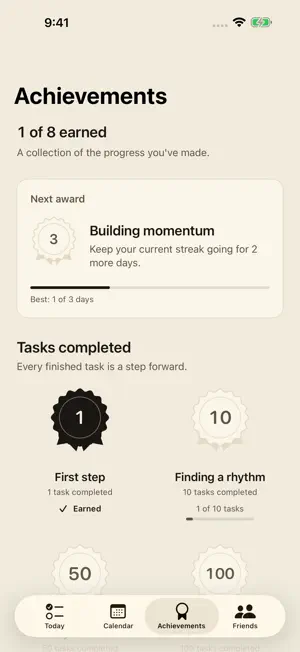
Finish what matters before opening what distracts you. TodoLock connects a simple daily task list with app blocking. Choose distracting apps, set a daily completion goal, and make time for your priorities. A DAILY LIST THAT STAYS SIMPLE Add one-time tasks or make a task repeat every day. Rename tasks, mark them complete, and choose when your day resets. Set a daily quota and decide whether shorter lists should count toward your goal. SUPER LOCK: YOUR APPS, ON YOUR SCHEDULE Choose a separate app list and the days and times to block it. Start with weekdays from midnight to 4 p.m., or set your own schedule, including overnight windows. Task completion, snoozes, and Vacation Mode do not end an active Super Lock. You can edit or disable it in Settings. Other active blocking rules can keep an app blocked after the schedule ends. CHOOSE YOUR LEVEL OF COMMITMENT Hard lock keeps your daily-goal apps shielded until you meet your goal. Reminder mode offers a short snooze when permitted. A cooldown between check-offs helps you take your list one task at a time. Night mode adds a nightly window, and Vacation Mode pauses ordinary task and night blocking. SEE YOUR PROGRESS Track activity streaks and calendar history, earn eight task and streak achievements, and add Home Screen or Lock Screen widgets to keep today's progress nearby. One completed task earns an activity day. OPTIONAL FRIENDS SHARING Invite people you choose to view a small progress summary through iCloud: your chosen name, current and best streaks, today's completion count, and update information. Sharing is off until you enable it. Invitations are private and read-only; accepting one does not share your own progress back. Friends requires an iCloud account. PRIVATE TASKS Your task titles, full task history, settings, and selected apps stay on your device. Optional Friends summaries use Apple's private and shared iCloud storage. No ads or third-party analytics. TodoLock requires your permission to use Apple's Screen Time controls for app blocking. Notifications are optional. You remain in control of permissions and settings.
What’s new
Version 1.1 · Updated October 1, 2026
Meet Super Lock: choose apps and lock them on a repeating schedule, with custom weekdays and overnight windows. This update also adds calendar activity streaks, eight achievements, optional private progress sharing with Friends, and a more welcoming introduction. We improved task checkbox touch targets, accessibility, and error recovery.
App privacy
The developer, JACOB RYAN DAVIS, reported these privacy practices to Apple.
Data Not Collected
The developer does not collect any data from this app.
Alternatives to TodoLock
Looking for apps like TodoLock? Here are 6 similar apps on the App Store. The highest rated is Ritua: Routines & App Blocking (5.0/5), and all 6 are free to download.
-
 Intentional Planner
-
 TaskGate: App Blocker & To-Do
-
 Enough for Now: App Blocker
-
 App Blocker & Focus: ARCO
-
 LifeBlocks: Daily Calendar
-
 Ritua: Routines & App Blocking
5.0
Ritua: Routines & App Blocking
5.0
| App | Rating | Price | Last updated | Compare |
|---|---|---|---|---|
| TodoLock | – | Free | October 1, 2026 | |
| Intentional Planner | – | Free | Jun 4, 2026 | Compare |
| TaskGate: App Blocker & To-Do | – | Free | Oct 23, 2026 | Compare |
| Enough for Now: App Blocker | – | Free | Jul 31, 2026 | Compare |
| App Blocker & Focus: ARCO | – | Free | Oct 24, 2026 | Compare |
| LifeBlocks: Daily Calendar | – | Free | Mar 12, 2026 | Compare |
| Ritua: Routines & App Blocking | 5.0 / 5 (1) | Free | Oct 20, 2026 | Compare |
Compare TodoLock with the top alternatives: ratings, updates, ASO score and keyword gaps →