

CommandDeck: Remote for Mac
Rassul Kainazarov Utilities iPhoneiPadiPod touch
CommandDeck: Remote for Mac is a free Utilities app for iPhone and iPad by Rassul Kainazarov. Requires iOS 26.5. Updated July 18, 2026.
- Price
- Free
- on the App Store
- Size
- 12 MB
- Age 4+
- Updated
- Jul 18
- 2026 · v1.0.4
Screenshots
About CommandDeck: Remote for Mac
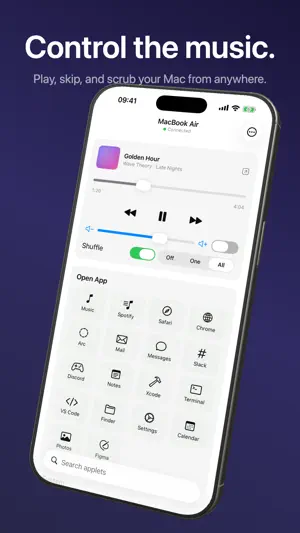
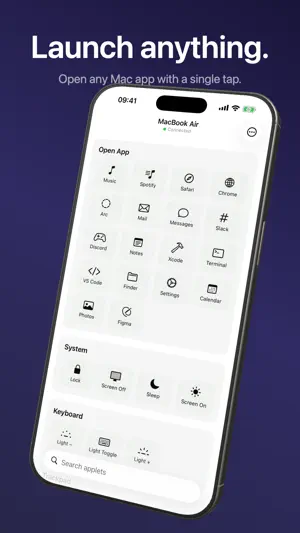
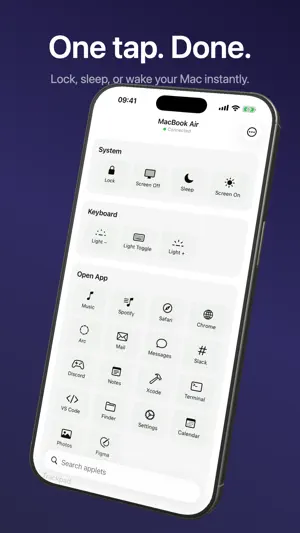
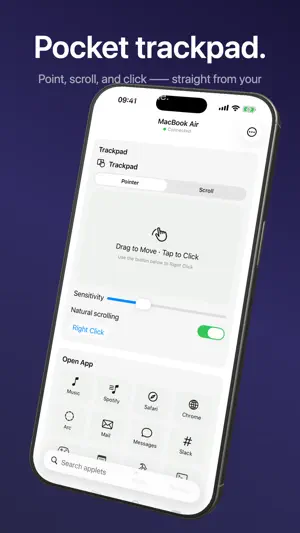
CommandDeck turns your iPhone into a remote control for your Mac. Adjust the volume, play or pause media, skip tracks, launch apps, and keep your Mac awake — straight from your phone, over your own local network. Your iPhone and Mac talk to each other directly on your Wi-Fi. Commands do not travel through our servers. Pairing is a one-time 6-digit PIN shown on your Mac. WHAT YOU CAN DO FOR FREE • Pair your iPhone with your Mac • Try basic volume and media controls • Confirm that CommandDeck works on your own network before upgrading COMMANDDECK PRO Pro unlocks the full Mac remote: • Volume — set or mute your Mac's output from your phone • Media — play, pause, skip, seek, shuffle, and repeat in the apps you already use • Apps — launch your Mac apps with a tap • Keep awake — stop your Mac from sleeping while it works • Lock screen, display sleep/wake, Shortcuts, and more system controls • Widgets and extras — run Mac actions from your iPhone faster • More controls — add new ones anytime with community packages COMMUNITY PACKAGES Controls are modular. Beyond the built-ins, you can install community packages to add new buttons, toggles, and sliders — no app update required. Browse and add them right from the app. PRICING Start with basic controls for free. CommandDeck Pro includes a 7-day free trial, then $29.99/year or $2.99/month. A one-time $79.99 lifetime unlock is also available. No ads, no account sign-up. PRIVATE BY DESIGN Everything runs on your local network. Your Mac and iPhone connect directly; control commands stay on your Wi-Fi and are not routed through us. No account required, nothing to sign up for. REQUIREMENTS • An iPhone and a Mac on the same local network • The free CommandDeck Mac app (menu-bar app — a quick free download) • That's the entire install — every control, including lock screen, sleep, media keys, Shortcuts, and scripts, works right away, no separate helper app needed CommandDeck has no ads and no AI — it just controls your Mac. Download CommandDeck for Mac: https://commanddeck.meoa.space/download Terms of Use: https://commanddeck.meoa.space/terms
What’s new
Version 1.0.4 · Updated July 18, 2026
Fixed widget actions that could fail to run after tapping. Widget action selection and Mac connection reliability have also been improved.
App privacy
The developer, Rassul Kainazarov, reported these privacy practices to Apple.
Data Not Collected
The developer does not collect any data from this app.
Alternatives to CommandDeck: Remote for Mac
Looking for apps like CommandDeck: Remote for Mac? Here are 6 similar apps on the App Store. The highest rated is Custom Font Designer (4.7/5), and 5 of the 6 are free to download.
-
 TouchLink: Trackpad & Keyboard
-
 Pulse for Mac
-
 Custom Font Designer
4.7
Custom Font Designer
4.7
-
 Coast: Macros & Trackpad
-
 Mak Commander-Input Controller
-
 System & Network Monitor
4.1
System & Network Monitor
4.1
| App | Rating | Price | Last updated | Compare |
|---|---|---|---|---|
| CommandDeck: Remote for Mac | – | Free | July 18, 2026 | |
| TouchLink: Trackpad & Keyboard | – | Free | Jun 29, 2026 | Compare |
| Pulse for Mac | – | Free | Mar 30, 2026 | Compare |
| Custom Font Designer | 4.7 / 5 (3) | Free | Jul 29, 2026 | Compare |
| Coast: Macros & Trackpad | – | Free | Sep 10, 2026 | Compare |
| Mak Commander-Input Controller | – | Free | Dec 1, 2025 | Compare |
| System & Network Monitor | 4.1 / 5 (334) | 1.99 USD | Oct 19, 2026 | Compare |