

Pulse for Mac
InGyu Rho Utilities iPhoneiPadiPod touch
Pulse for Mac is a free Utilities app for iPhone and iPad by InGyu Rho. Requires iOS 17.0. Updated March 30, 2026.
- Price
- Free
- on the App Store
- Size
- 1 MB
- Age 4+
- Updated
- Mar 30
- 2026 · v1.1
Screenshots
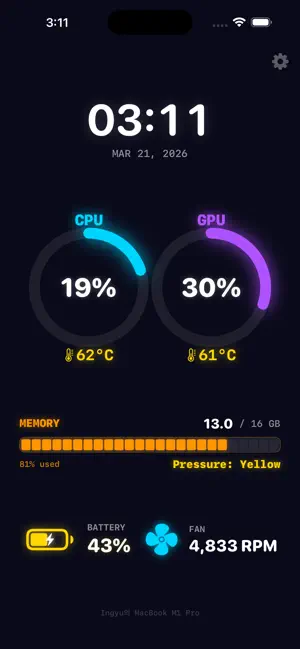
About Pulse for Mac
Monitor your Mac's system performance in real-time from your iPhone. Pulse for Mac displays CPU usage, GPU usage, temperatures, memory pressure, battery level, and fan speed — all streamed live over your local Wi-Fi network. Features: • Real-time CPU & GPU usage with temperature • Memory usage and pressure indicator • Battery level and charging status • Fan speed monitoring • Auto-discovery via Bonjour • Portrait and landscape layouts • Keep Screen On option for desk display Requirements: • MacPulse Server running on your Mac (free download at GitHub) • iPhone and Mac on the same Wi-Fi network
What’s new
Version 1.1 · Updated March 30, 2026
• Security: New devices must be approved on your Mac before connecting • Improved connection stability and automatic reconnection • Optimized polling for better battery life
App privacy
The developer, InGyu Rho, reported these privacy practices to Apple.
Data Not Collected
The developer does not collect any data from this app.
Alternatives to Pulse for Mac
Looking for apps like Pulse for Mac? Here are 6 similar apps on the App Store.
-
 System Rx
-
 Sanivo Device Monitor
-
 Nexus Telemetry
-
 BatteryCtrl for SwitchBot Plug
-
 Connectivty Rx
-
 CommandDeck: Remote for Mac
| App | Rating | Price | Last updated | Compare |
|---|---|---|---|---|
| Pulse for Mac | – | Free | March 30, 2026 | |
| System Rx | – | Free | May 23, 2026 | Compare |
| Sanivo Device Monitor | – | Free | Sep 2, 2026 | Compare |
| Nexus Telemetry | – | Free | Jun 14, 2026 | Compare |
| BatteryCtrl for SwitchBot Plug | – | Free | Sep 25, 2026 | Compare |
| Connectivty Rx | – | Free | May 23, 2026 | Compare |
| CommandDeck: Remote for Mac | – | Free | Jul 18, 2026 | Compare |
Compare Pulse for Mac with the top alternatives: ratings, updates, ASO score and keyword gaps →