

DooSpend
Apiwat Pengjam Finance iPhoneiPadiPod touch
DooSpend is a free Finance app for iPhone and iPad by Apiwat Pengjam. Requires iOS 18.0. Updated October 20, 2026.
- Price
- Free
- on the App Store
- Size
- 25 MB
- Age 4+
- Updated
- Oct 20
- 2026 · v2.10.0
Screenshots


About DooSpend
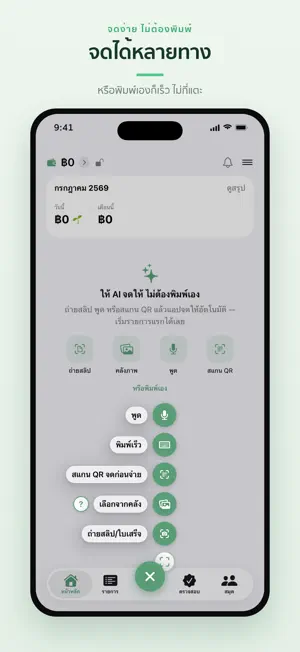
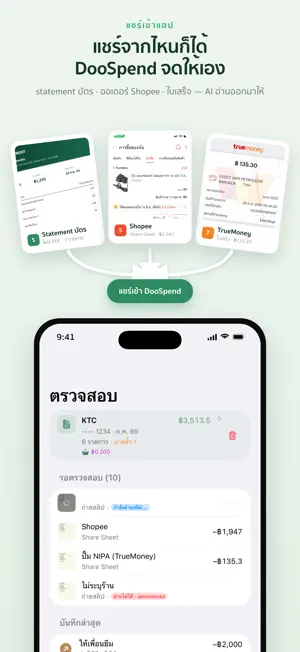
DooSpend — 5 ways to log · what's left to spend today · which card pays most before you swipe · yearly money in vs tax thresholds Too lazy to track your spending? Not sure which card earns the most where? ① 5 ways to log — type it · snap a slip · pick a photo/screenshot · scan a QR before paying · say it (AI logs it) ② What's left today — your budget spread across the days, for everyday discipline ③ About to pay? One tap shows which card earns the most — more points and cashback ④ Savings — money set aside stays out of what's safe to spend + a savings chart you tick off ⑤ Instalments & debts — next payment, what's left, reminders before it's due ⑥ Money in by year — compared with the thresholds banks must report to the Revenue Department ⑦ Shared pockets — split with friends + "who owes whom" + PromptPay QR to pay back ⑧ On your device + your own iCloud — no bank linking, no SMS reading ■ Shared Pockets • Split costs with friends, partner, or family — even on different Apple IDs • Invite with a link you can paste into any chat • Per-pocket budgets + category breakdowns ■ Credit-card assistant • Ranked by reward rules you set up yourself once • Co-brand card rules — store-specific (e.g. a Shopee card) or store exclusions (dining promos that skip delivery) • Track the cashback / points / miles you actually earn • 0% installments with interest worked out for you • Statement-cycle and due-date reminders ■ The full picture • Share slips straight from your bank app, Shopee or Lazada · import a whole card statement in one go • Auto-categorize, learn your merchant renames, flag duplicates • Early warning if your pace will overshoot the budget, plus a morning nudge — works on cash & transfers too • This month's overview — card bills, instalments, recurring payments and money you borrowed, sorted by date or on a calendar · card bills follow the real statement cycle, so you see how many days past due and what this bill comes to • Budgets you can start on your salary day • Keep debt/loan payments out of your spending totals — flag them "not counted" (they still hit your balance) • Automatic subscription tracking + price-hike alerts • Tags — several per entry, with totals by tag • Multi-currency, backup/restore, CSV/PDF export ■ Genuinely private • No ads or tracking SDKs · nothing sold • When you use AI, only the image or text you choose is sent (via our proxy) to Anthropic Claude to read it, tagged with a random per-device id for the usage quota — never your name, email, or Apple ID Free: unlimited manual entries · 5 AI scans/month · card rules + Best Card for 1 category · reward tracking · 1 savings goal · CSV/Excel import (first card statement free) · 3 accounts · 1 budget · 1 tag DooSpend Pro: • Daily "safe to spend" + early overshoot warning + morning nudge • Best Card for every category, store chips, and alerts before a reward cap fills • Unlimited card-statement imports (PDF) • Savings chart you tick off box by box + multiple goals • Create shared pockets (joining one is free) • Money in by year: combine accounts at the same bank, compare with the Revenue Department thresholds, export an explanation file (PDF/CSV) • Loan interest, worked out for you · net-worth trend • CSV/PDF export · 150 AI scans/month • Unlimited accounts, budgets & tags Pro is ฿69/month or ฿590/year (your local price is shown at purchase). It's an auto-renewing subscription — payment is charged to your Apple ID within 24 hours before the period ends and renews automatically until canceled. Cancel anytime in Settings > Apple ID > Subscriptions. Terms of Use (EULA): https://doospend.com/terms.html Privacy Policy: https://doospend.com/privacy.html
What’s new
Version 2.10.0 · Updated October 20, 2026
See your month-end balance ahead: set your salary as recurring income, or add income you expect ahead of time · the "Month" slot shows Net today and Month-end net (Pro) so you can plan your spending to the end of the month Link entries to a bill's rounds: link what you log to a round of a recurring bill or income · the rounds page shows which are paid and which are waiting Customize the entry screen: bring the rows you use most onto it and drag to reorder · drag to reorder accounts in Wallet Budgets mark "today" so you can see how far into the period you are Search on Transactions by merchant, note, category or account · all filters in one sheet · quick ranges Quick add by voice or text: it reads it for you when you finish speaking, then review and save in the same sheet Instalment plans: a new page · paid in total · several missed instalments all counted · shows when a plan closed early The "possible duplicate" strip checks amount, date, income/expense and account · tap to dismiss Pockets look like budgets Savings goals: edit your saving history Safe to spend today sets your bills aside before splitting by day · tap to see the formula · turn off "Count bills in this budget" per budget Type it fast: put an account name in the text, e.g. "coffee 65 KTC" Debts: the repayment button shows the amount · payment history is easier to read Many small display polishes Bug fixes and performance improvements
App privacy
The developer, Apiwat Pengjam, reported these privacy practices to Apple.
Data Not Linked to You
The following data, which may be collected but is not linked to your identity, may be used for the following purposes:
- User Content: Photos or Videos, Other User Content
- Identifiers: Device ID
Used for: App Functionality
Alternatives to DooSpend
Looking for apps like DooSpend? Here are 6 similar apps on the App Store. The highest rated is Piggipo Go Credit card tracker (5.0/5), and all 6 are free to download.
-
 TradeDee - จดบันทึกการเทรด
-
 Love Save - จดรายจ่ายคู่รัก
-
 Lumpsum : วางแผนการเงิน
-
 Hi Monday: Portfolio Dashboard
-
 Pocketbird: Daily Budget
-
 Piggipo Go Credit card tracker
5.0
Piggipo Go Credit card tracker
5.0
| App | Rating | Price | Last updated | Compare |
|---|---|---|---|---|
| DooSpend | – | Free | October 20, 2026 | |
| TradeDee - จดบันทึกการเทรด | – | Free | Oct 18, 2026 | Compare |
| Love Save - จดรายจ่ายคู่รัก | – | Free | Oct 18, 2026 | Compare |
| Lumpsum : วางแผนการเงิน | – | Free | Aug 6, 2025 | Compare |
| Hi Monday: Portfolio Dashboard | – | Free | Oct 23, 2026 | Compare |
| Pocketbird: Daily Budget | – | Free | Oct 20, 2026 | Compare |
| Piggipo Go Credit card tracker | 5.0 / 5 (2) | Free | Aug 31, 2026 | Compare |
Compare DooSpend with the top alternatives: ratings, updates, ASO score and keyword gaps →