

Pocketbird: Daily Budget
Nattapong Pallawal Finance iPhoneiPadiPod touchApple Watch
Pocketbird: Daily Budget is a free Finance app for iPhone and iPad by Nattapong Pallawal. Requires iOS 26.0. Updated October 20, 2026.
- Price
- Free
- on the App Store
- Size
- 74 MB
- Age 4+
- Updated
- Oct 20
- 2026 · v1.8.0
Screenshots


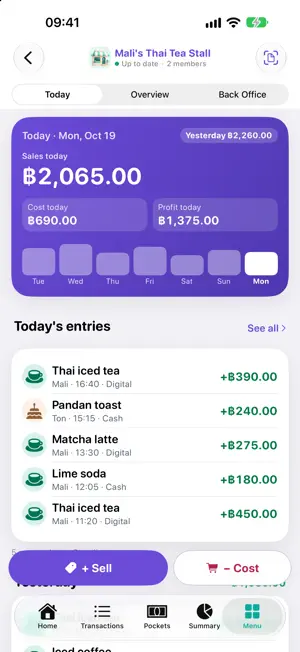
About Pocketbird: Daily Budget
Pocketbird is a private, offline-first money tracker that keeps your everyday finances sorted — built for Thailand and the baht (฿). Log income and expenses in seconds, see exactly where your money goes, and know your daily safe-to-spend at a glance. Your data lives on your device first; cloud sync is optional and only happens with your consent. WHY POCKETBIRD • Offline-first — after you sign in once, it works without a connection; your financial data stays on your phone • Private by design — built around Thailand's PDPA, with consent you control • Bilingual — full Thai and English • iPhone and iPad — on iPad, lists and details can sit side by side, with pointer and keyboard support TRACK EVERY BAHT • Fast income & expense logging with categories and subcategories • Daily safe-to-spend so you always know what's left • Clear summaries and spending insights PLAN AHEAD • Set category budgets and get gentle nudges before you overspend • Savings pockets to set money aside for goals • Track debts and watch them shrink • Recurring rules for bills and regular income • When can I buy it? — see the month a car, a home or anything else becomes affordable, estimated from your own income and spending LESS TYPING • Scan payment slips with your camera — amounts are read on-device • Import transactions from CSV files (bank statement exports) — Settings › Import from CSV • Compare an account with a statement file you choose — CSV, or a supported bank's PDF (password-protected too), read on your device • Add expenses hands-free with Siri • Home and Lock Screen widgets for your balance and safe-to-spend SHARE THE BILL • Split bills with friends and settle up in groups • Save toward a shared goal — each member plans their own share STAY SECURE • Lock the app with Face ID • Optional encrypted cloud sync to back up and restore across your devices Download Pocketbird and get your money sorted — one baht at a time.
What’s new
Version 1.8.0 · Updated October 20, 2026
Apple Watch, pockets you can share, a new Menu, redesigned Recurring and Shop screens, and everything built since 1.6.0. ON YOUR WRIST Pocketbird on Apple Watch shows what you can spend today and your own Quick Log buttons, so a regular expense is one tap. A complication keeps today's figure on your watch face. POCKETS YOU CAN SHARE Turn on Share with others when you create a pocket and invite family or friends with a link. Members have roles, put money in, and can borrow from the pocket and pay it back. Personal and shared pockets live in one list, and a pocket can be left out of Safe to Spend and reports. A NEW MENU AND A SIMPLER SETTINGS More is now Menu: your profile, live money tiles, your tools and every screen in one place. Settings is grouped into a few pages, with search. RECURRING AND SHOP, REDESIGNED Recurring groups your bills by when they are due, with each bill's logo and history, and you can mark one paid, skip it or snooze it from the list. Shops get a Today tab, an Overview with profit by period, a Back Office for the team, quicker logging of sales and costs, and a card on Home with the last 7 days. INVITE FRIENDS Share your code from My Profile. When a friend you invite logs 10 transactions in their first 7 days, you each get one ลูกนกน้อย, saved to your account. My Profile also shows your logging days and streak, and Owed to You can make a link that reminds a friend what they owe. MADE AROUND YOU Tell Pocketbird how you get paid and it arranges Home to match. A new entry suggests a category, account and tags from the day, time and amount you usually spend, and says why. Choose the voice of your cycle recap. TAXES AND REPORTS Tax deductions estimates your Thai personal income tax deductions from what you already log. It is an estimate, not tax advice. Export a year-end report as Excel, PDF or CSV. DEBTS, CARDS AND INSTALMENTS Debt repayments no longer count as spending. Every debt shows when it ends, a payment can record its interest, and Cost of borrowing adds up the interest and fees you pay. Card instalment plans follow how the issuer bills them, and a card statement shows instalments not yet billed. Pay Bills pays loans and card bills too, and a top-up with a bonus (pay 500, get 600) is one step. RECEIPTS, SLIPS AND STATEMENTS A receipt with many items is kept as one bill, with discounts as their own rows. Receipts scan more reliably, slips keep the time they print, and Compare with statement matches entries logged a few days off. ALSO Your investments count in your net worth. Every entry can carry the time of day. Coming Up has a month calendar and knows when your salary has arrived. Summary steps back through past cycles. Automation rules can have exceptions. Ask Pocketbird has a new look. Negative amounts now read −฿, and screens load with a gentle shimmer.
App privacy
The developer, Nattapong Pallawal, reported these privacy practices to Apple.
Data Linked to You
The following data, which may be collected and linked to your identity, may be used for the following purposes:
- Financial Info: Other Financial Info
- Usage Data: Product Interaction
- Diagnostics: Performance Data
- Location: Precise Location
- Contact Info: Email Address, Name
- User Content: Photos or Videos, Other User Content
- Identifiers: User ID, Device ID
Used for: Analytics, App Functionality
Data Not Linked to You
The following data, which may be collected but is not linked to your identity, may be used for the following purposes:
- Diagnostics: Crash Data
Used for: App Functionality