

Local Budget: Statement Scan
Triplet Notes LLC Finance iPhoneiPadiPod touch
Local Budget: Statement Scan is a free Finance app for iPhone and iPad by Triplet Notes LLC. Rated 5.0/5 from 2 ratings. Requires iOS 17.0.
- Rating
- 5.0
- 2 ratings
- Price
- Free
- on the App Store
- Size
- 6 MB
- Age 4+
- Updated
- Oct 19
- 2026 · v1.4
Screenshots


About Local Budget: Statement Scan
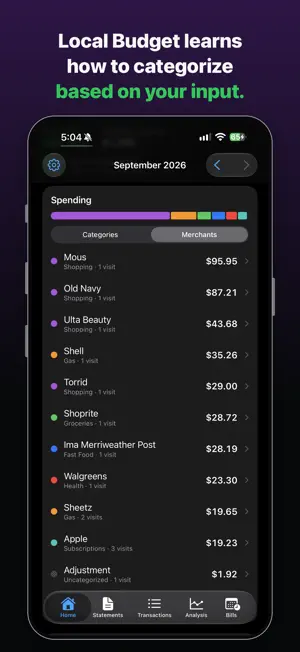
Local Budget reads credit card statements on your iPhone and builds a budget from them. Input is the PDF or CSV your card issuer provides, or Apple Card through Apple Wallet. There is no account, no bank login and no server: parsing, storage and analysis all run on the device, and statement import works offline. INPUT • PDF statements, including scanned paper statements saved as PDF, read with on device text recognition • CSV exports. Column layouts are detected and remembered per card • Password protected PDFs • Import from the Statements tab, or the Share sheet in Files, Safari and Mail • Duplicate transactions are skipped if you import the same statement twice • Card payments are detected and left unticked, so paying the bill isn't counted as money in • The parsed total can be checked against the statement's printed total APPLE CARD (US) • Reads booked Apple Card transactions through Apple Wallet, with your permission • Syncs each time the app opens. Pending transactions are added once they settle • Apple Card only. Apple Cash and Savings are not read • Card payments are not stored. Refunds and statement credits are • Dates already covered by an imported Apple Card statement are not added again • Revoke access in Settings and the app deletes its Apple Card data CATEGORIES • One category per transaction. Labels are separate, any number per transaction, for grouping across categories such as a trip or a project • New transactions are categorized in this order: your rules, your past choices for that merchant, a built in list of over 250 common merchants, then Apple Card's merchant type. No match means no category • The import preview shows every category before anything is saved. Change any of them, or undo after • A category you set is never overwritten • Categorize by Merchant groups uncategorized spending by merchant, largest first. One choice covers every transaction from that merchant and adds a rule for future imports • When nothing else knows a merchant, a word in its name (restaurant, parking, pharmacy) gives a suggestion. Suggestions from the name are never applied without a tap ANALYSIS • Home: the latest month's total, categories and merchants, compared with the previous month and your average • Spending by day, week, month or year over a range you choose • Saved filters, compared over time • Category, merchant and budget figures open the transactions behind them • Home screen widget BUDGETS AND BILLS • Monthly budgets by category or label, with optional rollover • Savings goals with the monthly amount needed • Recurring charges detected from your history, with reminders before the due date • Income, net worth and 17 currencies DATA AND SECURITY • Optional Face ID or Touch ID lock. No ads, no analytics, no tracking • Backups are encrypted with 256 bit AES (GCM). The key is derived from your password with PBKDF2 at 210,000 iterations and a new random salt for every file. Passwords are at least 12 characters • The backup password is kept in iCloud Keychain, so a new iPhone opens your backups without typing it, or on this iPhone only. Your choice • CSV export for spreadsheets (not encrypted), and delete all data in one step Free for the first 150 transactions. Local Budget Pro removes the limit, monthly or yearly, and the price for your region is shown before you buy. Subscriptions renew automatically unless cancelled at least 24 hours before the period ends. Manage or cancel in your App Store settings. A statement didn't import correctly? Email [email protected] with the card issuer's name. Don't attach the statement, and never send account or card numbers. Terms of Use (EULA): https://www.apple.com/legal/internet-services/itunes/dev/stdeula/ Privacy Policy: https://localbudget-app.netlify.app/privacy
What’s new
Version 1.4 · Updated October 19, 2026
Categories • More merchants get a suggested category. When the app doesn't recognize a merchant, a word in its name (restaurant, steakhouse, parking, pharmacy, insurance) suggests one. These are suggestions only: you tap to accept, and they are never applied on import • Suggestions use your own category names. If you have Restaurants or Fuel, that is what is suggested, not a second Dining or Gas category Statements • Report a statement that didn't import right, from the import preview or the summary after importing. The button is always there and leads with Report This Statement when the rows don't add up to the statement's printed totals, including payments and credits. It opens an email with your app version and one technical line about the statement's layout, such as how many rows were read. Nothing from the statement itself is in it, and you see the whole email before you send it • The Out and In lists in the import preview, and in the Share sheet, fold to one line with their count and total Fixes • A page header could be read as a transaction, and the first charge on that page was lost when it was in a foreign currency. Seen on Capital One; the fix covers every statement layout • Merchant names with a "*" prefix (GLF*GolfNow) keep their full name • Open in Local Budget from the Share sheet now opens the app • A backup restore no longer overlaps an Apple Card sync • When payments and credits didn't match the statement, the summary could still say the import matched its total Email [email protected] with the card issuer's name if a statement doesn't import correctly. Don't attach the statement, and never send account or card numbers.
App privacy
The developer, Triplet Notes LLC, reported these privacy practices to Apple.
Data Not Collected
The developer does not collect any data from this app.
Alternatives to Local Budget: Statement Scan
Looking for apps like Local Budget: Statement Scan? Here are 6 similar apps on the App Store. The highest rated is AI Spend Tracker: RetroBudget (3.0/5), and all 6 are free to download.
-
 AI Spend Tracker: RetroBudget
3.0
AI Spend Tracker: RetroBudget
3.0
-
 SpendScopio AI Expense Tracker
-
 Tally: Budget Tracker
-
 Fiscify: Smart Expense Tracker
-
 Budget Planner App: Tally
-
 Thrust: Money Manager
| App | Rating | Price | Last updated | Compare |
|---|---|---|---|---|
| Local Budget: Statement Scan | 5.0 / 5 (2 ratings) | Free | October 19, 2026 | |
| AI Spend Tracker: RetroBudget | 3.0 / 5 (2) | Free | Aug 18, 2026 | Compare |
| SpendScopio AI Expense Tracker | – | Free | Jul 15, 2026 | Compare |
| Tally: Budget Tracker | – | Free | Jun 10, 2026 | Compare |
| Fiscify: Smart Expense Tracker | – | Free | Oct 21, 2026 | Compare |
| Budget Planner App: Tally | – | Free | Sep 26, 2026 | Compare |
| Thrust: Money Manager | – | Free | Oct 2, 2026 | Compare |