

Nook Money - Budget & Expenses
Fhranz Alimorong Finance iPhoneiPadiPod touch
Nook Money - Budget & Expenses is a free Finance app for iPhone and iPad by Fhranz Alimorong. Rated 5.0/5 from 3 ratings. Requires iOS 18.0.
- Rating
- 5.0
- 3 ratings
- Price
- Free
- on the App Store
- Size
- 135 MB
- Age 4+
- Updated
- Oct 11
- 2026 · v1.1.2
Screenshots

About Nook Money - Budget & Expenses
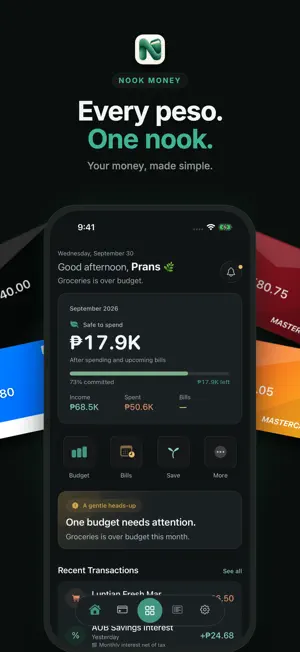
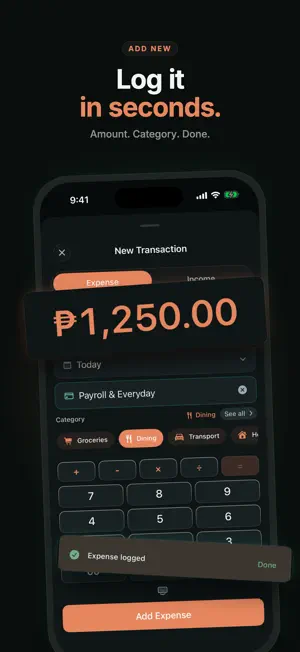
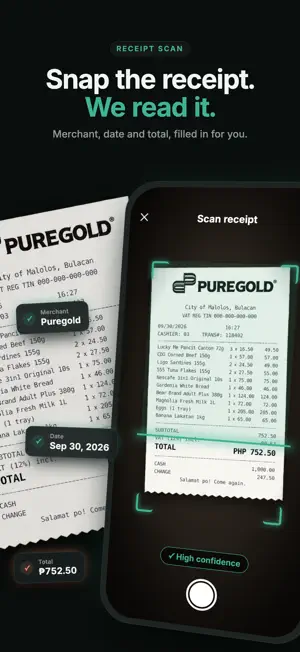
A calmer way to manage your money. Nook Money is a beautifully designed personal finance app that helps you track expenses, create budgets, save for goals, manage bills, and understand your finances—all in one place. Whether you’re budgeting your monthly income, tracking daily spending, planning for future purchases, or simply trying to build healthier financial habits, Nook Money makes managing money feel simple, intentional, and stress-free. Unlike traditional finance apps that overwhelm you with complexity, Nook Money focuses on clarity, thoughtful design, and tools you’ll actually use every day. Why Nook Money? Managing money shouldn’t feel intimidating. Nook Money is built around the idea that small, consistent habits create lasting financial confidence. Every feature is carefully designed to help you make better decisions without adding unnecessary complexity. Meet Nooky, our red panda companion. Red pandas are known for being calm, curious, and thoughtful—qualities that inspired the heart of Nook Money. Throughout your journey, Nooky celebrates milestones, encourages healthy financial habits, and makes managing money feel more approachable. Whether you’ve stayed within budget, reached a savings goal, or simply logged today’s expenses, Nooky is there to cheer you on. Features Track Expenses, Income & Transfers Quickly record expenses, income, and account transfers with categories, merchants, notes, and a fast custom number pad. Multiple Accounts Organize checking, savings, cash, credit cards, investments, and more in one unified dashboard. Monthly Budgets Create category budgets, monitor spending in real time, and know exactly how much you have left before the month ends. Bills & Recurring Payments Stay ahead of subscriptions, rent, utilities, loans, and recurring expenses with reminders so you never miss an important payment. Savings Goals Plan for emergencies, vacations, gadgets, or your next big purchase with beautiful visual progress tracking. Analytics & Insights Discover spending trends, category breakdowns, merchant history, monthly comparisons, and personalized financial insights to better understand your money. Calendar View Browse your financial history day by day with an interactive calendar that makes reviewing transactions effortless. Credit Card Management Track credit card balances, statements, payment due dates, available credit, and spending in one place. AI Assistant (Premium) Ask questions about your finances, understand spending patterns, and receive personalized financial guidance powered by AI. Receipt Scanning (Premium) Scan receipts to automatically capture transaction details and reduce manual data entry. View balances and important financial updates directly from your Home Screen, Lock Screen, and Dynamic Island. Privacy First Your financial information belongs to you. Protect your data with Face ID or Touch ID, hidden balances, privacy blur, and secure local storage. Your financial information is never sold to advertisers. Designed for Everyday Life Whether you’re a student managing allowances, a professional budgeting your paycheck, a family organizing monthly expenses, or someone taking control of their finances for the first time, Nook Money adapts to your journey. No clutter. No complicated setup. Just thoughtful tools that help you spend smarter, save consistently, and build confidence with every financial decision. Nook Money Premium Unlock even more with Premium: • AI Financial Assistant • AI Receipt Scanning • Unlimited Budgets • Unlimited Savings Goals • iCloud Sync across your Apple devices • Advanced insights and future premium features Your money deserves clarity—not complexity. Download Nook Money today and discover a calmer, more mindful way to manage your finances. Privacy Policy: https://nookmoney.app/privacy Terms of Use (EULA): https://www.apple.com/legal/internet-services/itunes/dev/stdeula/
What’s new
Version 1.1.2 · Updated October 11, 2026
This update brings a more personal setup experience, better ways to organize your money, and a refreshed look throughout Nook Money. A better way to get started Onboarding has been redesigned to help Nook Money understand your financial priorities, preferred currency, accounts, and money snapshot — giving you a setup that feels more relevant from day one. Organize transactions with tags You can now add reusable tags to transactions, making it easier to organize things like trips, projects, reimbursements, and everyday spending. We’ve also added more category icons and improved transaction details, histories, and transfers. Improved receipt scanning Receipt scanning is smoother from capture to review, with clearer itemized purchases, better photo importing, improved editing, and more helpful error states. Refreshed accounts, bills & dashboard Accounts are now easier to scan and customize, with improved balance history, grouping, sync status, color controls, and previews. Recurring bills have clearer due-date sections and summaries, while cash flow, quick actions, recent transactions, and dashboard interactions have all been refined. More personality throughout Nook New illustrations, refreshed themes, savings goal artwork, and gentler animations bring more character to Nook Money without adding clutter. And more We’ve also improved iCloud and Apple Wallet sync presentation, currency handling, accessibility, localization, animation stability, performance, and overall reliability. Thanks for using Nook Money.
App privacy
The developer, Fhranz Alimorong, reported these privacy practices to Apple.
Data Not Linked to You
The following data, which may be collected but is not linked to your identity, may be used for the following purposes:
- Usage Data: Product Interaction
Used for: Analytics, App Functionality
Alternatives to Nook Money - Budget & Expenses
Looking for apps like Nook Money - Budget & Expenses? Here are 6 similar apps on the App Store. The highest rated is Kura Money: Expense Tracker (5.0/5), and 5 of the 6 are free to download.
-
 Anty Budget Tracker
-
 Kura Money: Expense Tracker
5.0
-
 Penni: Expense Tracker
5.0
-
 UangRumah: Expense Tracker
-
 Manilo: AI Expense Tracker
5.0
-
 Obelus: Budget & Expense AI
| App | Rating | Price | Last updated | Compare |
|---|---|---|---|---|
| Nook Money - Budget & Expenses | 5.0 / 5 (3 ratings) | Free | October 11, 2026 | |
| Anty Budget Tracker | – | 1.99 USD | Jul 3, 2026 | Compare |
| Kura Money: Expense Tracker | 5.0 / 5 (1) | Free | Jul 29, 2026 | Compare |
| Penni: Expense Tracker | 5.0 / 5 (1) | Free | Aug 27, 2026 | Compare |
| UangRumah: Expense Tracker | – | Free | Dec 11, 2025 | Compare |
| Manilo: AI Expense Tracker | 5.0 / 5 (2) | Free | Oct 20, 2026 | Compare |
| Obelus: Budget & Expense AI | – | Free | Oct 7, 2026 | Compare |