

Kura Money: Expense Tracker
Anatolii Sheshenin Finance iPhoneiPadiPod touch
Kura Money: Expense Tracker is a free Finance app for iPhone and iPad by Anatolii Sheshenin. Rated 5.0/5 from 1 ratings. Requires iOS 18.0.
- Rating
- 5.0
- 1 ratings
- Price
- Free
- on the App Store
- Size
- 16 MB
- Age 4+
- Updated
- Jul 29
- 2026 · v1.10.10
Screenshots


About Kura Money: Expense Tracker
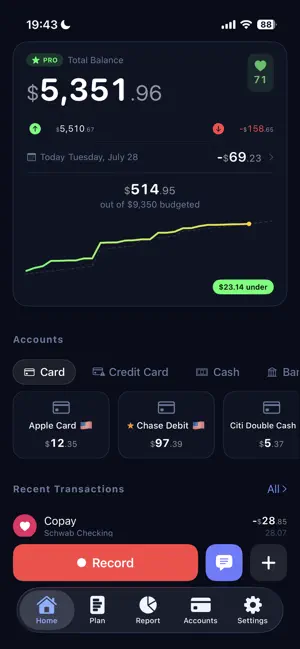
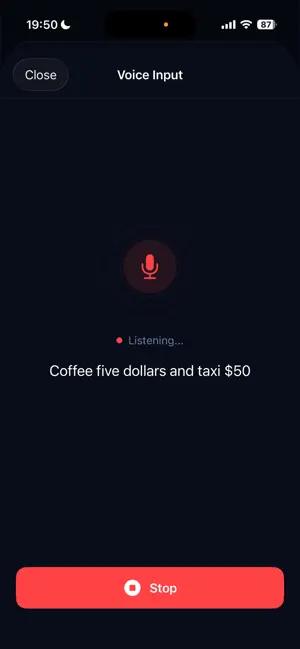
JUST SAY IT — KURA DOES THE REST "Bought coffee for $10, croissant at the café for $20, taxi for $8" — Kura creates all three transactions instantly. No tapping through menus, no typing. AI recognition works out of the box — no setup, no API keys, nothing to configure. CONNECT YOUR BANK Link your US bank accounts and credit cards, securely powered by Plaid. Transactions and balances import automatically and stay up to date, with smart category matching. Access is read-only — Kura can see your transactions, never touch your money. RECEIPT & SCREENSHOT RECOGNITION Attach a screenshot from your bank or payment app — Kura reads the amount, card, and merchant automatically. Smart recognition is built in, and a local parser keeps working even fully offline. BUILT FOR MULTI-CURRENCY LIFE Travel, work abroad, or simply hold money in different currencies. Kura tracks everything and converts at real rates. UNDERSTAND YOUR SPENDING Beautiful analytics show exactly where your money goes — by category, currency, and time period. Budgets now include a forecast curve, so you see where the month is heading before it ends. YOUR DATA STAYS YOURS No account required to get started. Your manual records live on your device and sync only through your own iCloud — never on our servers. Bank connections are optional, protected with bank-grade encryption, and you can disconnect at any time. ICLOUD SYNC Switch between iPhone and iPad seamlessly. Lost your phone? Your data is safe in your iCloud. Terms of Use: https://www.apple.com/legal/internet-services/itunes/dev/stdeula/
What’s new
Version 1.10.10 · Updated July 29, 2026
A faster start Setup is two screens instead of eight. Pick your currency, add an account, and you're in — budgets, reminders and the demo transaction are all optional now, with a clear Skip on each. See the free limit coming Your home screen badge shows how many free transactions are left, and a quiet heads-up appears before you reach the limit — no more hitting a wall mid-entry. Numbers that look right where you live Amounts now follow your region: $1,234.56 in the United States, 1.234,56 € in Germany. Prefer something else? Symbol position and number format are both yours to set in Settings → Currency. Help where you actually need it A new "How it works" section answers the common questions, and short one-time hints appear on the screens they describe. CSV import came out of hiding into its own row in Settings. Clearer about what's paid The upgrade screen now lists only what Premium actually unlocks — unlimited transactions and bank connections. Voice input, AI recognition and reports stay free, and we say so plainly. Bank connections, easier to find Connecting a bank is now reachable straight from Accounts and the home screen. Signing in is explained as part of the flow instead of standing in front of it, and errors tell you what to do rather than showing a raw code. Smaller and tidier The old on-device AI model is gone — the app is lighter, and any model files left on your iPhone are cleaned up automatically, freeing several gigabytes. Empty screens now offer the button instead of describing where to find it.
App privacy
The developer, Anatolii Sheshenin, reported these privacy practices to Apple.
Data Used to Track You
The following data may be used to track you across apps and websites owned by other companies:
- Purchases: Purchase History
- Identifiers: Device ID
Data Linked to You
The following data, which may be collected and linked to your identity, may be used for the following purposes:
- Purchases: Purchase History
- Identifiers: Device ID
Used for: Developer’s Advertising or Marketing, Analytics
Data Not Linked to You
The following data, which may be collected but is not linked to your identity, may be used for the following purposes:
- Usage Data: Product Interaction
- Diagnostics: Crash Data, Performance Data
Used for: Analytics
Alternatives to Kura Money: Expense Tracker
Looking for apps like Kura Money: Expense Tracker? Here are 6 similar apps on the App Store. The highest rated is Saverly Money (5.0/5), and all 6 are free to download.
-
 Tipid Expense Calendar
-
 Saverly Money
5.0
Saverly Money
5.0
-
 Receiptly AI: Receipt Scanner
-
 Class Action Claim Settlements
-
 Finik: Secure Budget
-
 Expenses — Spending Tracker
| App | Rating | Price | Last updated | Compare |
|---|---|---|---|---|
| Kura Money: Expense Tracker | 5.0 / 5 (1 rating) | Free | July 29, 2026 | |
| Tipid Expense Calendar | – | Free | Sep 1, 2026 | Compare |
| Saverly Money | 5.0 / 5 (8) | Free | Sep 2, 2026 | Compare |
| Receiptly AI: Receipt Scanner | – | Free | May 12, 2026 | Compare |
| Class Action Claim Settlements | – | Free | Aug 27, 2026 | Compare |
| Finik: Secure Budget | – | Free | Aug 25, 2026 | Compare |
| Expenses — Spending Tracker | – | Free | Feb 11, 2026 | Compare |