

BleControlsPi
Normand Frenette Utilities iPhoneiPadiPod touch
BleControlsPi is a free Utilities app for iPhone and iPad by Normand Frenette. Requires iOS 17.0. Updated July 8, 2026.
- Price
- Free
- on the App Store
- Size
- 8 MB
- Age 4+
- Updated
- Jul 8
- 2026 · v1.0
Screenshots


About BleControlsPi
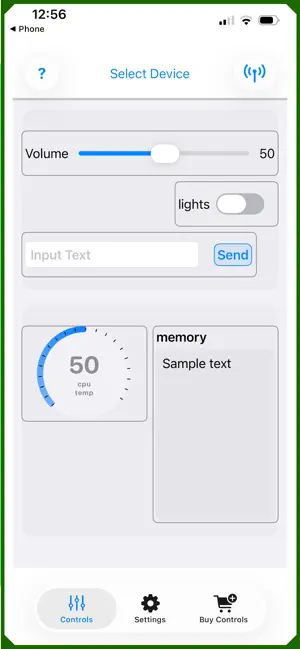
The BLEControlsPi App allows to create various iOS controls such as Button,Toggle, Sliders, Steppers, Pickers (color, date, options) to Control a Raspberry Pi. Manipulating these controls sends their value to the Raspberry Pi (or linux device) in real time over Bluetooth Low Energy(BLE). You can also define Display controls such as Gauges and Text Displays, to create a Dashboard, where the Raspberry Pi sends info to the iPhone/iPad also in real time over Bluetooth. You can create, edit, size, and positions the controls in the app without being connected to a Raspberry Pi. However, before you can connect to, and control the Raspberry Pi you must instal the Python code (see below). IMPORTANT: You must install the free companion Python Software on the Raspberry Pi - where you define your own handlers (callback) functions that take actions on the Raspberry Pi, or fetch data on the Raspberry Pi to send to the iPhone/iPad. The code is provided with an automated installer for the Raspberry Pi. See https://github.com/bluepieapps/blecontrolspi-python and the README. The app provides 2 free controls. These can be created , deleted and re-created as often as you wish, allowing you to test any configuration, or run a simple control scheme. If you need more controls, you can use In-App Purchases to buy Control Packs (in quantity 1,3,5 or 9) for a small fee. This is not a subscription. Once you own the pack - it is yours to use. Packs allow the creation of any controls offered in the app, and any such controls can be edited, deleted and re-created at will. You can install the app on multiple iPhones/iPads that all use the same Apple ID. Controls Packs, and Controls you define on one device are synchronized to the other devices on app restart. Add a new control on your iPhone, and it will show up on your iPad. delete a controls from your iPad, and it will be deleted from your iPhone. See a video of the app at: https://youtu.be/8y3t2luLw3k See the documentation at: https://bluepieapps.com/Control-Pi-over-bluetooth/ - There is docs on how the controls, working which type of controls are available. - There is also an explanation of how you create handlers in the Python Code on the Raspberry Pi to have the RPi react to the controls you have defined.
App privacy
The developer, Normand Frenette, reported these privacy practices to Apple.
Data Not Collected
The developer does not collect any data from this app.
Alternatives to BleControlsPi
Looking for apps like BleControlsPi? Here are 6 similar apps on the App Store. The highest rated is PixelTrace (5.0/5), and all 6 are free to download.
-
 Docker Monitor
-
 SysPulse - Linux Monitor & SSH
-
 HDF5 Viewer · File Reader
-
 PixelTrace
5.0
-
 SysScope
5.0
-
 ChipLog Pro - IC Chip Scanner
5.0
| App | Rating | Price | Last updated | Compare |
|---|---|---|---|---|
| BleControlsPi | – | Free | July 8, 2026 | |
| Docker Monitor | – | Free | Jun 15, 2026 | Compare |
| SysPulse - Linux Monitor & SSH | – | Free | May 31, 2026 | Compare |
| HDF5 Viewer · File Reader | – | Free | Oct 23, 2026 | Compare |
| PixelTrace | 5.0 / 5 (1) | Free | Sep 14, 2026 | Compare |
| SysScope | 5.0 / 5 (2) | Free | Sep 7, 2026 | Compare |
| ChipLog Pro - IC Chip Scanner | 5.0 / 5 (1) | Free | Apr 25, 2026 | Compare |
Compare BleControlsPi with the top alternatives: ratings, updates, ASO score and keyword gaps →