

SysScope
Roy Nakdimon Utilities iPhoneiPadiPod touch
SysScope is a free Utilities app for iPhone and iPad by Roy Nakdimon. Rated 5.0/5 from 2 ratings. Requires iOS 26.4. Updated September 7, 2026.
- Rating
- 5.0
- 2 ratings
- Price
- Free
- on the App Store
- Size
- 9 MB
- Age 4+
- Updated
- Sep 7
- 2026 · v3.0
Screenshots


About SysScope
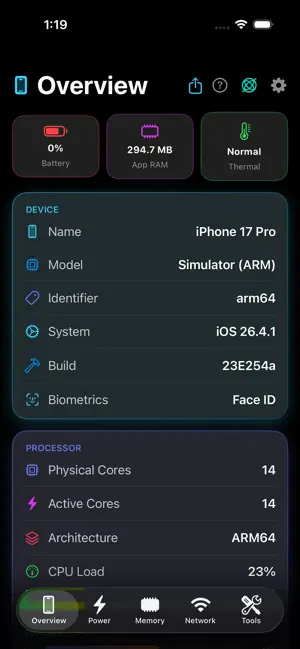
SysScope is your iPhone's complete diagnostic dashboard — real-time vitals, powerful network tools, motion sensors, and home screen widgets in one beautifully designed app. OVERVIEW See your device name, model, hardware identifier, iOS version, and build number. Monitor CPU load across every core with a live per-core breakdown and up to 2 hours of CPU history. Check uptime, timezone, language, locale, orientation, and IPv6 address. POWER Track battery level with animated gauges, charging state, and low power mode. Get live discharge and charge rate estimates with predicted time-to-empty and time-to-full. Monitor thermal state from Normal to Critical, and view screen brightness and refresh rate in real time. MEMORY See your app's RAM usage alongside total system RAM, with a full memory breakdown — wired, active, inactive, compressed, and free — shown as a color-coded bar. Storage is covered too: total, used, and free space at a glance. NETWORK TOOLS A complete toolkit for network analysis: • Live WiFi details — SSID, BSSID, signal strength • Cellular carrier and radio technology (4G/5G) • Internal and external IP, subnet mask, and gateway • Download and upload speed tests • Ping latency measurement • DNS lookup and Whois query • Custom ping to any host • Visual traceroute • Port scanner with 22 common service labels • LAN device browser • Wake-on-LAN sender All results are saved to a scrollable network history log. SENSORS Live motion data — gravity, user acceleration, rotation rate, magnetometer readings, barometric pressure, and relative altitude. Track pitch, roll, and compass heading in real time. Monitor microphone input level and scan for nearby Bluetooth devices with signal strength ratings. TOOLS Generate audio tones at any frequency for speaker or hearing tests. Track GPS coordinates with altitude, speed, course, and accuracy. WIDGETS Add a home screen widget to surface your key stats without ever opening the app. ALERTS Set custom thresholds for battery level and storage. Enable thermal state alerts. DeviStats notifies you when your device needs attention. EXPORT Share a full device stats snapshot as plain text — useful for support tickets, diagnostics, or device reports. All metrics refresh every second. Battery, CPU, and RAM history is preserved for up to 2 hours and persists across sessions. Supports dark, light, and system theme.
What’s new
Version 3.0 · Updated September 7, 2026
See every device on your network, and find out what your charging actually costs. NEW — Network Devices Most network scanners only show you the devices that announce themselves. SysScope now sweeps your whole network and finds the rest too — routers, printers, NAS drives, cameras, computers, iPhones and iPads — and tells you what each one is, how fast it responded, and which ports it has open. A typical home network scans in seconds. NEW — Charging History Every charge is now logged: how long it took, how much it gained, and how fast. A seven-day summary gives you your averages at a glance, and any charge that ran hot is flagged — heat while charging is what really ages a battery. FASTER • History charts redraw far more smoothly, especially over 24 hours • Port scans finish in a fraction of the time, and now report closed and filtered ports separately • Live readings no longer pause while you scroll MORE ACCURATE • Corrected the connector type shown for iPhone 14 Pro and 14 Pro Max • Battery, CPU and memory history now sample correctly on the 2-second and 5-second refresh settings • Traceroute is now called Path Check, and explains what it actually measures • Widgets refresh when your battery, thermal state or Low Power Mode changes, instead of waiting for the next scheduled update ACCESSIBILITY • VoiceOver now reads the gauges, meters, signal bars and memory breakdown • Text throughout scales with Dynamic Type, including the largest accessibility sizes Also: history is stored more reliably and carries over from previous versions, and permission prompts now show the app's correct name.
App privacy
The developer, Roy Nakdimon, reported these privacy practices to Apple.
Data Not Collected
The developer does not collect any data from this app.
Alternatives to SysScope
Looking for apps like SysScope? Here are 6 similar apps on the App Store. The highest rated is Umbra Browser (1.0/5), and all 6 are free to download.
-
 Redirect Websites
-
 Coding Keyboard
-
 BetterCast: Second Monitor
-
 One Tool Box
-
 Umbra Browser
1.0
Umbra Browser
1.0
-
 Pane Browser
| App | Rating | Price | Last updated | Compare |
|---|---|---|---|---|
| SysScope | 5.0 / 5 (2 ratings) | Free | September 7, 2026 | |
| Redirect Websites | – | Free | Oct 15, 2026 | Compare |
| Coding Keyboard | – | Free | Aug 18, 2026 | Compare |
| BetterCast: Second Monitor | – | Free | Oct 17, 2026 | Compare |
| One Tool Box | – | Free | Sep 22, 2026 | Compare |
| Umbra Browser | 1.0 / 5 (1) | Free | Oct 17, 2026 | Compare |
| Pane Browser | – | Free | Jul 3, 2026 | Compare |
Compare SysScope with the top alternatives: ratings, updates, ASO score and keyword gaps →