

Voice Recorder AI
Seiya.k Business iPhoneiPadiPod touch
Voice Recorder AI is a free Business app for iPhone and iPad by Seiya.k. Requires iOS 17.0. Updated October 11, 2026.
- Price
- Free
- on the App Store
- Size
- 9 MB
- Age 4+
- Updated
- Oct 11
- 2026 · v1.2.1
Screenshots



About Voice Recorder AI
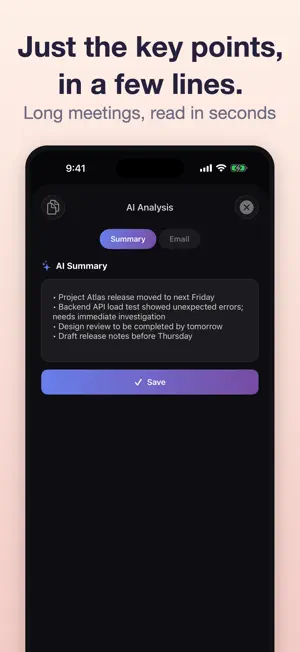
Just record. Apple Intelligence turns it into a summary and an email draft. Meetings, sales calls, lectures, interviews: stop scrubbing through audio and get something you can read. Transcription, summary, and a ready-to-send email draft, all generated on your device. Nothing is uploaded to a server. --- What you can do --- - One-tap recording: start instantly, with background recording support - Transcription: turn your recording into text automatically (22 languages and regions) - AI summary: key points as a short bulleted list, even for long meetings - Email draft: turn the summary into a polite business email you can share right away - AI title: recordings are named from their content, so they're easy to find later - Search: find past recordings by title or content - Markdown export: export summary, email draft, and transcript in one file (Pro) --- Great for --- - Sharing meeting notes the moment the meeting ends - Capturing ideas by voice on the go and reading them back later - Organizing interviews and research conversations - Reviewing just the key points of a lecture or training session - Writing daily reports when typing isn't convenient --- Privacy --- Transcription and AI processing happen on your device. Your recordings, transcripts, and summaries are never sent to a server. Works without an internet connection. --- Requirements for AI features --- AI summaries, email drafts, and AI titles are generated with Apple Intelligence. They require iOS 26 or later on an iPhone or iPad that supports Apple Intelligence (iPhone 15 Pro or later, iPhone 16 series or later, iPad with M1 or later, and so on), with Apple Intelligence turned on in Settings. Recording and transcription work on all supported devices. Languages supported for AI summaries: English, Japanese, Chinese (Simplified and Traditional), Korean, German, French, Spanish, Italian, Portuguese, Dutch, Danish, Norwegian, Swedish, Turkish, and Vietnamese. --- Pricing --- Free: - Save up to 5 recordings - Up to 10 AI analyses per month - Includes ads Pro (one-time purchase, yours forever): - No ads - Unlimited saved recordings - Unlimited AI analyses - Markdown export Privacy Policy: https://fillapps.com/privacy/ Terms of Use: https://www.apple.com/legal/internet-services/itunes/dev/stdeula/
What’s new
Version 1.2.1 · Updated October 11, 2026
Minor improvements and stability fixes.
App privacy
The developer, Seiya.k, reported these privacy practices to Apple.
Data Linked to You
The following data, which may be collected and linked to your identity, may be used for the following purposes:
- Identifiers: Device ID
- Usage Data: Advertising Data
Used for: Third-Party Advertising
Data Not Linked to You
The following data, which may be collected but is not linked to your identity, may be used for the following purposes:
- Identifiers: Device ID
- Usage Data: Product Interaction
- Diagnostics: Crash Data
Used for: Analytics
Alternatives to Voice Recorder AI
Looking for apps like Voice Recorder AI? Here are 6 similar apps on the App Store.


| App | Rating | Price | Last updated | Compare |
|---|---|---|---|---|
| Voice Recorder AI | – | Free | October 11, 2026 | |
| ShiftRoster | – | Free | Jun 2, 2026 | Compare |
| Ear Recorder | – | Free | Oct 27, 2026 | Compare |
| Master CMO | – | Free | Jul 15, 2026 | Compare |
| Budget Planner App AI | – | Free | Jul 24, 2026 | Compare |
| Subscription Manager - Track | – | Free | Oct 28, 2026 | Compare |
| Readervcard | – | Free | Jul 31, 2026 | Compare |
Compare Voice Recorder AI with the top alternatives: ratings, updates, ASO score and keyword gaps →