

BestShot: Photo from Video
Saigen inc. Photo & Video iPhoneiPadiPod touch
BestShot: Photo from Video is a free Photo & Video app for iPhone and iPad by Saigen inc. Requires iOS 26.0. Updated July 19, 2026.
- Price
- Free
- on the App Store
- Size
- 5 MB
- Age 4+
- Updated
- Jul 19
- 2026 · v1.0.5
Screenshots
About BestShot: Photo from Video
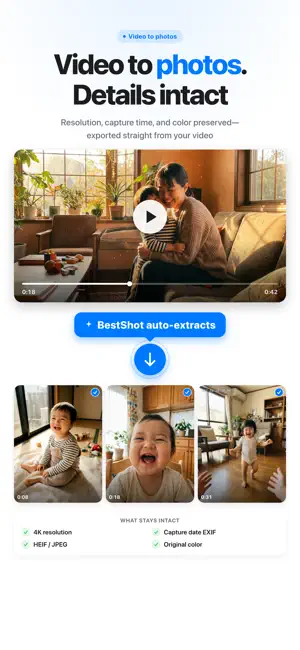
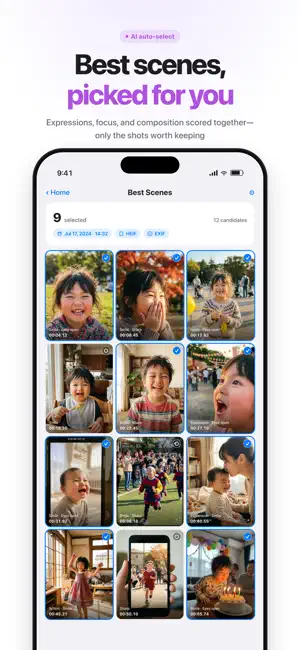
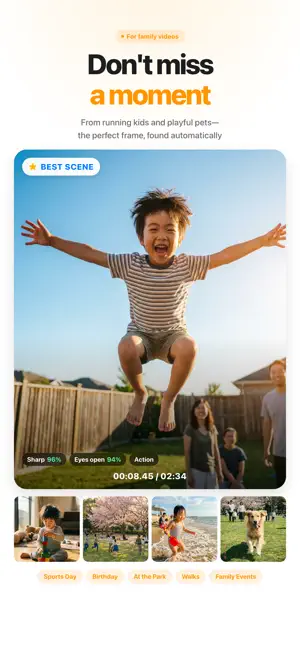
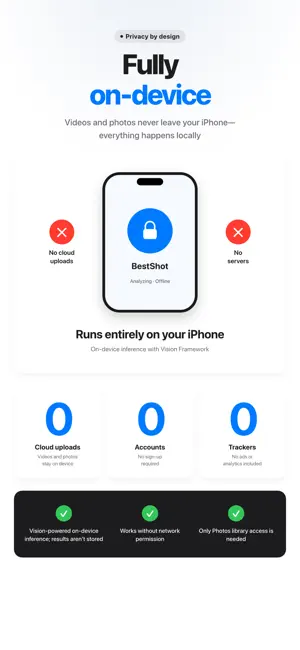
Turn videos into the perfect photo. AI picks the keepers. BestShot finds the best moments in your videos and exports them as still photos. Fully on-device with Apple Vision. Original capture date preserved. Zero cloud uploads. WHO IT'S FOR - Parents who shoot a lot of kid and pet video - Anyone chasing the perfect moment at birthdays, sports days, the park - People who hate manually scrubbing through video to grab a still - Anyone who wants a high-res photo for prints, gifts, or social posts AI THAT PICKS THE KEEPERS Powered by Apple's Vision Framework. BestShot scores every candidate frame on facial expression, eye openness, face sharpness, focus, and composition. Blurry frames, blinks, and bad framing are filtered out automatically. EXIF TIMESTAMP PRESERVED — THE DETAIL THAT MATTERS Most apps stamp today's date on the photos they export from video. BestShot writes the original capture time into EXIF DateTimeOriginal, so the exported photos sit right next to the original video in your Photos library, in chronological order. Location and camera metadata are preserved too. 100% ON-DEVICE — ZERO CLOUD - Videos and photos never leave your device - No sign-up, no account, no servers - No trackers, no ads, no analytics - Only Photos library access is needed Everything runs locally on Apple's Vision Framework. Your memories stay yours. KEY FEATURES - AI auto-selection with score breakdown - Manual frame picker for total control - Adjustable extract count (2–20, or auto by video length) - HEIF or JPEG output - 4K resolution and color profile preserved - Original capture date written to EXIF - iPhone and iPad universal, Dark Mode supported Stop shooting more photos. Start picking better ones. Paid plans BestShot Pro is optional and paid. Subscriptions renew automatically until canceled in your App Store settings. A free trial, if offered, converts to a paid subscription unless canceled before it ends. A one-time purchase may also be available. Terms of Use - https://dkit.jp/en/terms/ Privacy Policy - https://dkit.jp/en/privacy-policy/
What’s new
Version 1.0.5 · Updated July 19, 2026
We've refreshed the video picker. • Videos you've already extracted photos from now show an “Extracted” badge. • A cleaner, easier-to-use Home screen. • More reliable video importing.
App privacy
The developer, Saigen inc., reported these privacy practices to Apple.
Data Not Collected
The developer does not collect any data from this app.
Alternatives to BestShot: Photo from Video
Looking for apps like BestShot: Photo from Video? Here are 6 similar apps on the App Store. The highest rated is Frame Grabber: Best Shots (5.0/5), and all 6 are free to download.
-
 Useful Video Best Shot
-
 Hikarista – Best Video Moments
-
 Video to Photo: Best Shot AI
1.0
Video to Photo: Best Shot AI
1.0
-
 Frame Grabber: Best Shots
5.0
Frame Grabber: Best Shots
5.0
-
 STIL.
STIL.
-
 Best Shot - AI Photo Selector
3.5
Best Shot - AI Photo Selector
3.5
| App | Rating | Price | Last updated | Compare |
|---|---|---|---|---|
| BestShot: Photo from Video | – | Free | July 19, 2026 | |
| Useful Video Best Shot | – | Free | Jul 1, 2026 | Compare |
| Hikarista – Best Video Moments | – | Free | Oct 22, 2026 | Compare |
| Video to Photo: Best Shot AI | 1.0 / 5 (1) | Free | May 29, 2026 | Compare |
| Frame Grabber: Best Shots | 5.0 / 5 (1) | Free | Sep 26, 2026 | Compare |
| STIL. | – | Free | May 20, 2026 | Compare |
| Best Shot - AI Photo Selector | 3.5 / 5 (2) | Free | Feb 2, 2026 | Compare |