

STIL.
Tatsuro Higuchi Photo & Video iPhoneiPadiPod touch
STIL. is a free Photo & Video app for iPhone and iPad by Tatsuro Higuchi. Requires iOS 26.4. Updated May 20, 2026.
- Price
- Free
- on the App Store
- Size
- 5 MB
- Age 4+
- Updated
- May 20
- 2026 · v1.2
Screenshots
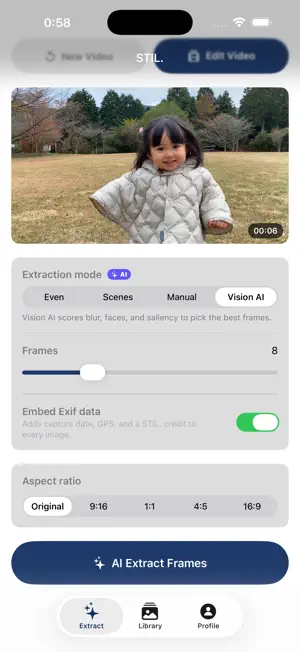


About STIL.
The best shot was in your video all along. STIL. extracts still frames from your videos and finishes them like photographs — with film looks, color grading, and AI enhancement. Everything runs inside this iPhone. Your videos and photos never leave the device, and no account is required. ■ Frame Extraction Scrub through any video and pull out the perfect moment. Vision AI scores blur, faces, and composition to pick the best frame automatically — avoiding closed-eye shots. Choose an extraction style for portraits, action, landscapes, and more. ■ Film Looks Recreate the look of Kodak, Fujifilm, Ilford, and more. Adjust grain, vignette, contrast, and color tone to give every frame its own character. ■ AI Enhancement Face-aware skin refinement, face focus, super-resolution upscaling, and automatic AI color grading — turning a video frame into a photo worth keeping. Every AI feature is free, with no usage limits. ■ What STIL. Pro Unlocks · Export without watermark · iCloud library sync · Unlimited custom presets · 4K high-resolution export · Pro film looks (expanded selection) · Exif data embedding (date, GPS) Shoot video. Keep the best frame. — Terms of Use (EULA): https://www.apple.com/legal/internet-services/itunes/dev/stdeula/ Privacy Policy: https://stil.photo/privacy
What’s new
Version 1.2 · Updated May 20, 2026
■ Rotate and straighten in Crop A ±15° tilt slider for fine adjustments and a 90° rotate button. The crop frame automatically fits inside the rotated image, so the result never includes black corners. ■ Sharper AI frame extraction Each preset now uses its own scoring formula. Portrait excludes frames without a person, and selection is distributed evenly across the video timeline — switching styles now produces noticeably different picks. ■ Refined AI enhancement Straighten direction has been corrected. Portrait blur sharpens the edge around people, and skin smoothing keeps the eyes and lips precisely intact. Adjusting a slider after applying cleanly replaces the previous result instead of stacking.
App privacy
The developer, Tatsuro Higuchi, reported these privacy practices to Apple.
Data Not Collected
The developer does not collect any data from this app.
Alternatives to STIL.
Looking for apps like STIL.? Here are 6 similar apps on the App Store. The highest rated is Video to Photo: Best Shot AI (1.0/5), and all 6 are free to download.
-
 Video to Photo: Best Shot AI
1.0
Video to Photo: Best Shot AI
1.0
-
 AMSIL
AMSIL
-
 OshiKoma: Video to Photo
-
 Useful Video Best Shot
-
 BestShot: Photo from Video
-
 Framr: Video Highlights AI
| App | Rating | Price | Last updated | Compare |
|---|---|---|---|---|
| STIL. | – | Free | May 20, 2026 | |
| Video to Photo: Best Shot AI | 1.0 / 5 (1) | Free | May 29, 2026 | Compare |
| AMSIL | – | Free | Sep 2, 2026 | Compare |
| OshiKoma: Video to Photo | – | Free | Aug 17, 2026 | Compare |
| Useful Video Best Shot | – | Free | Jul 1, 2026 | Compare |
| BestShot: Photo from Video | – | Free | Jul 19, 2026 | Compare |
| Framr: Video Highlights AI | – | Free | Apr 20, 2026 | Compare |
Compare STIL. with the top alternatives: ratings, updates, ASO score and keyword gaps →