

Drivo · CarJi
建华 张 Photo & Video iPhoneiPadiPod touch
Drivo · CarJi is a free Photo & Video app for iPhone and iPad by 建华 张. Rated 5.0/5 from 1 ratings. Requires iOS 17.0. Updated October 27, 2026.
- Rating
- 5.0
- 1 ratings
- Price
- Free
- on the App Store
- Size
- 27 MB
- Age 4+
- Updated
- Oct 27
- 2026 · v1.1.0
Screenshots



About Drivo · CarJi
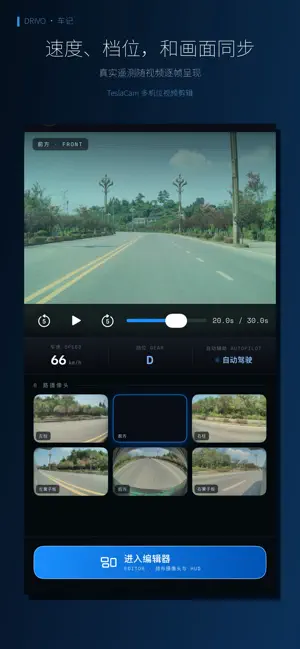
Drivo is an independent, local dashcam video editor. Play back recordings from up to six cameras in sync, arrange your footage, add vehicle telemetry, and export the moments you want to share. Import accessible, compatible footage from your device or external storage through the system file picker. Core editing and export do not require you to sign in to a Tesla account in Drivo or pair Drivo with a vehicle. External storage must be compatible with your iPhone or iPad and its operating system. SIX VIEWS, IN SYNC Work with front, rear, left/right pillar and left/right repeater footage. Choose single-view, multi-view, picture-in-picture or 1+2+2+1 layouts. Zoom and move each view independently. DATA WITH YOUR VIDEO Display speed, gear, steering angle, brake, accelerator and driver-assistance status when included in your recordings. Add telemetry styles, G-force, a mini-map, timelines, timestamps, text, stickers and images to show changes throughout your drive. Available data depends on the vehicle, software version and source footage; not every recording includes every data field. Some data components and visual themes require Pro, as detailed below. PATH VISUALIZATIONS Add a path overlay generated from available recorded data and choose its visual theme. The path is an editor-generated visual effect, not the vehicle's actual planned route. Drivo does not provide navigation, driving assistance or vehicle control. LANDSCAPE OR PORTRAIT Choose 16:9, 9:16, 3:4, 4:5, 1:1 or the original aspect ratio. Trim clips, adjust speed, preview your edit and export on device. ON-DEVICE PROCESSING Video editing and export take place on your device, without uploading your video or creating a Drivo account. Maps may load map content over the internet. You can also connect to your own configured TeslaMate service if needed. Core editing and local export do not depend on these optional features. FREE AND PRO The free version includes core editing and local export, with a Drivo brand watermark by default. The standard blue path and three basic telemetry styles—Compact, OEM and Large Steering Wheel—are free to use. Pro is a one-time purchase with no subscription. It removes the brand watermark and unlocks the remaining telemetry themes and styles, additional path themes, G-force, the mini-map and timelines. COMPATIBILITY AND INDEPENDENCE Import TeslaCam folders from Tesla dashcams, including Sentry, Saved and Recent recordings. Importing footage does not require Pro. Drivo is an independent third-party app and is not affiliated with, partnered with, sponsored by or endorsed by Tesla, Inc. Tesla and related names are used only to describe recording-file compatibility.
What’s new
Version 1.1.0 · Updated October 27, 2026
New see-through view. iPhone Duo support and other fixes.
App privacy
The developer, 建华 张, reported these privacy practices to Apple.
Data Not Collected
The developer does not collect any data from this app.
Alternatives to Drivo · CarJi
Looking for apps like Drivo · CarJi? Here are 6 similar apps on the App Store. The highest rated is CamCut: Dashcam for Tesla (5.0/5), and all 6 are free to download.
-
 行车记录仪-AI前车驶离提醒
-
 CamCut: Dashcam for Tesla
5.0
CamCut: Dashcam for Tesla
5.0
-
 HLG to HDR
-
 Videotify: Video editor
-
 Dualify: Dual Camera Recorder
-
 TesCam Studio for Tesla
4.7
TesCam Studio for Tesla
4.7
| App | Rating | Price | Last updated | Compare |
|---|---|---|---|---|
| Drivo · CarJi | 5.0 / 5 (1 rating) | Free | October 27, 2026 | |
| 行车记录仪-AI前车驶离提醒 | – | Free | Sep 3, 2026 | Compare |
| CamCut: Dashcam for Tesla | 5.0 / 5 (33) | Free | Sep 24, 2026 | Compare |
| HLG to HDR | – | Free | Oct 25, 2026 | Compare |
| Videotify: Video editor | – | Free | Aug 24, 2026 | Compare |
| Dualify: Dual Camera Recorder | – | Free | Aug 17, 2026 | Compare |
| TesCam Studio for Tesla | 4.7 / 5 (29) | Free | Oct 27, 2026 | Compare |
Compare Drivo · CarJi with the top alternatives: ratings, updates, ASO score and keyword gaps →