

TesCam Studio for Tesla
Paper AI Photo & Video iPhoneiPadiPod touchMac
TesCam Studio for Tesla is a free Photo & Video app for iPhone and iPad by Paper AI. Rated 4.7/5 from 27 ratings. Requires iOS 17.0.
- Rating
- 4.7
- 27 ratings
- Price
- Free
- on the App Store
- Size
- 143 MB
- Age 4+
- Updated
- Oct 27
- 2026 · v3.1.2
Screenshots



About TesCam Studio for Tesla
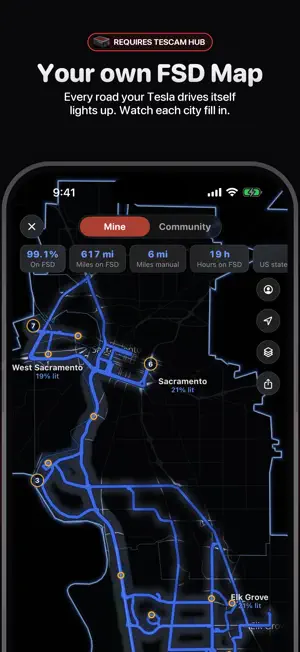
The ultimate way to view, edit and share your Tesla dashcam footage. Transform your TeslaCam recordings into stunning videos with real-time telemetry overlays. Watch all 6 camera angles in perfect sync, see your exact speed, steering inputs and route on an interactive map, all extracted directly from your Tesla's embedded data. VIDEO EDITOR - 9 multi-camera layouts including Interior View - 360 video layout - Portrait and Landscape modes - Save projects to keep editing your videos later - Add your own music, a video's soundtrack or voice narration (Pro) - Side-by-side compare exports - Drag-and-drop telemetry overlays and brand new telemetry widgets - Minimap, timestamp, watermark and social handles - Save custom templates and trim to export only what you need - Live Activity shows export progress on your Lock Screen and Dynamic Island DIRECTOR MODE Cut between camera angles like a film editor. Tap any of your 6 cameras at any moment in the timeline to create a cut. Your cuts are saved per clip and export with the video. SPOTLIGHT Mark the moments that matter with named annotations, now with text and audio, rendered as overlays on your video. Syncs across devices with iCloud. INTERIOR VIEW See the road through a transparent car interior with your steering wheel turning in real time, blinkers flashing and gear displayed, with automatic day/night detection. REAL-TIME TELEMETRY - Speed, steering wheel, brake and accelerator indicators - Gear position, turn signals, Autosteer/FSD status - FSD version badge and G-force bubble plot INFOTAINMENT WIDGET Recreate your Tesla's center screen on your footage: Speed, Energy, Battery, Map, Self-Driving Path and Status in one widget. DRIVE ANALYSIS Speed profiles, G-force meter, FSD state tracking, hard braking markers with reaction times and a smoothness score. HYPERLAPSE, MAPS AND TESLASCOPE Speed up segments into cinematic hyperlapses, follow your route on a satellite map, and overlay live vehicle data from Teslascope (2 free weeks included). FSD MAP Every FSD drive lights up your own map and adds to the community map at thefsdmap.com, where TesCam drivers light up the world together. See how much of each city is lit, collect passport stamps, explore your FSD stats, climb the leaderboard and join community contests like Supercharger Day. Requires TesCam Hub. TESLA TOOLS FOR EVERYONE Lock Sounds, Wraps, Light Shows, License Plates (with custom cropping) and Summon Sounds. Browse the community gallery, publish under your username and like your favorites. Send them to your car wirelessly through TesCam Hub, or save to a USB drive. TESCAM HUB Import clips straight from your Tesla over Wi-Fi. No more pulling USB drives. Learn more at tescamstudio.com. CLIP MANAGEMENT - Browse Recent, Saved and Sentry recordings, and long press to select clips - Auto tags flag Hard Brake, Hard Accel, Hard Corner and FSD Off on every clip, even on your hub - Back up clips to iCloud Drive or Google Drive, straight from your hub without filling your phone - Sentry Mode Recap montages of Sentry events - Search clips by location and merge adjacent clips - Stream or download from iCloud Drive - Import any video from Camera Roll MADE FOR IPHONE DUO Unfold your Duo for TesCam Today beside your home screen, clips beside the player and an editor with your video on one side and its controls on the other. Fold mid-edit and keep going. WORKS EVERYWHERE Designed for iPhone, iPad and Mac. Connect a USB drive, pair with TesCam Hub, or use iCloud. FREE TO USE, PRO TO UNLOCK MORE Free to download with full playback and editing. Upgrade to Pro for $5.99 (one-time, no subscription) to remove the watermark, add music and voice narration, and unlock the Infotainment widget and Teslascope integration. Already bought v1? Pro is yours free. No account required. No internet needed for playback. Your footage stays on your device. TesCam Studio is an independent app and is not affiliated with or endorsed by Tesla, Inc.
Ratings & reviews
4.7
27 ratings
What’s new
Version 3.1.2 · Updated October 27, 2026
Trick-or-Treat on FSD: your Candy Bucket, $5 cash finds and a $50 prize for the most candy.
App privacy
The developer, Paper AI, reported these privacy practices to Apple.
Data Linked to You
The following data, which may be collected and linked to your identity, may be used for the following purposes:
- Location: Coarse Location
- User Content: Audio Data, Other User Content
- Identifiers: User ID
- Usage Data: Other Usage Data
- Diagnostics: Other Diagnostic Data
- Other Data: Other Data Types
Used for: App Functionality
Alternatives to TesCam Studio for Tesla
Looking for apps like TesCam Studio for Tesla? Here are 6 similar apps on the App Store. The highest rated is CamCut: Dashcam for Tesla (5.0/5), and all 6 are free to download.
-
 CamCut: Dashcam for Tesla
5.0
CamCut: Dashcam for Tesla
5.0
-
 Auto Photo: Clap Camera Timer
4.8
Auto Photo: Clap Camera Timer
4.8
-
 Dual Camera Recorder - DuoView
5.0
Dual Camera Recorder - DuoView
5.0
-
 Geotag Photos: Pinfoto
5.0
Geotag Photos: Pinfoto
5.0
-
 Lookout Dual Camera Recorder
3.7
Lookout Dual Camera Recorder
3.7
-
 All-Sight
5.0
All-Sight
5.0
| App | Rating | Price | Last updated | Compare |
|---|---|---|---|---|
| TesCam Studio for Tesla | 4.7 / 5 (27 ratings) | Free | October 27, 2026 | |
| CamCut: Dashcam for Tesla | 5.0 / 5 (33) | Free | Sep 24, 2026 | Compare |
| Auto Photo: Clap Camera Timer | 4.8 / 5 (4) | Free | Oct 8, 2026 | Compare |
| Dual Camera Recorder - DuoView | 5.0 / 5 (1) | Free | Jun 5, 2026 | Compare |
| Geotag Photos: Pinfoto | 5.0 / 5 (1) | Free | Oct 19, 2026 | Compare |
| Lookout Dual Camera Recorder | 3.7 / 5 (3) | Free | May 16, 2026 | Compare |
| All-Sight | 5.0 / 5 (4) | Free | Oct 13, 2026 | Compare |