

RareTap – Time Clock & Journal
Admiral Jordan Productivity iPhoneiPadiPod touch
RareTap – Time Clock & Journal is a free Productivity app for iPhone and iPad by Admiral Jordan. Requires iOS 17. Updated September 28, 2026.
- Price
- Free
- on the App Store
- Size
- 30 MB
- Age 4+
- Updated
- Sep 28
- 2026 · v1.2.7
Screenshots

About RareTap – Time Clock & Journal
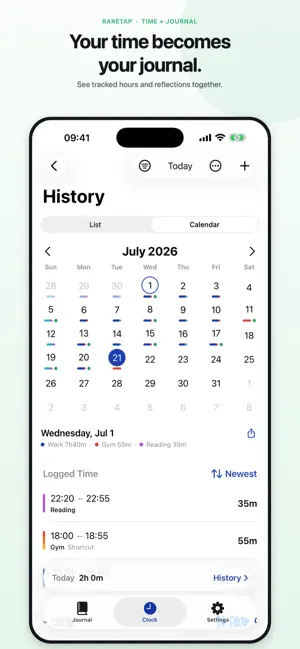
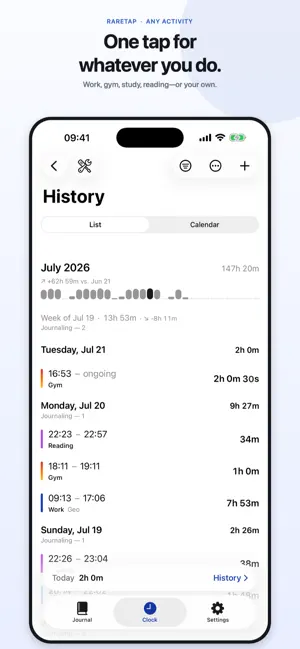
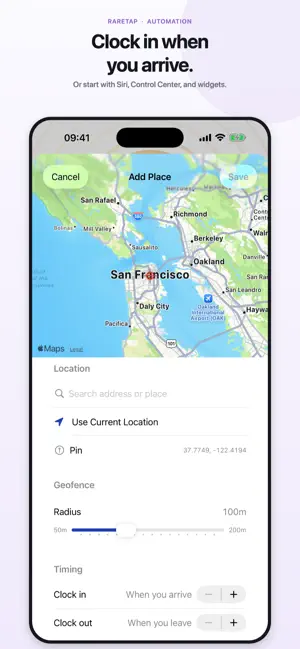
RareTap tracks the hours and keeps the story. One tap clocks a work session, a workout, a study block; tap again to stop — and the day you tracked gives your journal a head start. Export your hours and journal to an Obsidian vault you own. Most trackers lock your time in; RareTap hands it back as a date-keyed folder: a daily Markdown note, a Dataview-queryable YAML summary of where your hours went, and the journal you wrote that day, joined by date. Query it, weave it in, keep it forever. Clean CSV and JSON timesheets export too. TRACK ANYTHING - Tap to start, tap to stop — work, workouts, study, practice, chores, reading, a side gig. - Give each activity its own color and icon with Activity Profiles. - Run several timers at once — each on its own clock. IT CAN TRACK ITSELF - Geofence clocks you in on arrival; per-place time offsets match your real badge time. One place per activity is free — Premium adds more. - Siri & Shortcuts: "Hey Siri, RareTap clock in Work" starts that activity. A JOURNAL, NOT JUST A TIMER - Start blank or from today's tracking: per-activity durations and the day's total, ready for your words. - Pick an Apple Journaling Suggestion — places, music, workouts, photos, and more — and begin an entry dated to when it happened. Only what you choose is added. - After your last clock-out, RareTap can offer an entry. Schedule a gentle reminder if you want one. - Markdown renders cleanly and exports verbatim to Markdown and Obsidian. Hand-typing is free; Premium adds the formatting toolbar. - A gentle rhythm line notices your journaling days or weeks. Browse by day and week; the calendar marks days you wrote. SEE YOUR TIME - History as a grouped list or heat map — each day a proportional color bar split by activity. - Premium Insights: charts by day, month, and activity; an 8-week trend; week, month, or year totals. - Month mini bar charts, a "vs. last week/month" pace delta, and a gentle day-streak counter. - Weekly goals per activity, with progress rings. ALWAYS A GLANCE AWAY - Home and Lock Screen widgets, a live timer in the Dynamic Island, and one-tap Clock Out from the Lock Screen. - On iOS 18+, clock in or out from Control Center, a Lock Screen control, or the Action button. - A weekly goal turns the circular Lock Screen widget into a progress ring. - Share a finished session as a clean card. YOURS ALONE - No account, no login, nothing to sign up for. - RareTap collects no data — Apple's privacy label reads "Data Not Collected." - Your time and journal sync privately through your own iCloud. MAKE IT YOURS - 16 app icons: the five classics included, four rare-material hides and seven premium colorways with Premium. - Premium share-card styles in rare materials and colorways — every card keeps "Tracked with RareTap." - Premium Widget Background: one hide or colorway your widget and Live Activity always wear. - Light and dark, Dynamic Type, VoiceOver, and haptics — Apple-native, top to bottom. SHARE YOUR DAY - Touch and hold a Calendar day to share it as a card — the whole day with its activity breakdown, or one activity's day in its colorway. RARETAP PREMIUM (OPTIONAL) - Unlimited activity profiles (free includes 3), Insights, Obsidian Vault & Markdown export, multiple geofenced places, the Markdown toolbar, share-card styles, Widget Background, 11 premium icons, and premium colorways — on cards, icons, and activities. - Monthly, yearly with a 7-day free trial, or a one-time Lifetime unlock. - Everything free stays free forever — and everyone who joined before Premium is a Founder, keeping every feature free. Whether you're keeping an honest record, building a habit, or piping your life into a vault — RareTap keeps the record, and hands it back to you. Terms of Use (EULA): https://www.apple.com/legal/internet-services/itunes/dev/stdeula/ Privacy Policy: https://www.raretap.app/privacy
What’s new
Version 1.2.7 · Updated September 28, 2026
• New Premium materials for your profiles: Black Croc, Emerald Croc, Shagreen and Black Marble. A profile's material carries through its badge, the running timer, share cards, widgets and the Live Activity. • Timers that run past 24 hours keep counting on widgets and in the Live Activity instead of stopping at 24:00:00. • The Dynamic Island timer stays readable when another Live Activity shares the Island: in the narrower shared view it shows a single unit, like 13m or 20h. • Clock Out from the Live Activity is more reliable: your time is saved before the activity closes. • Better with large text: the pinned timer, the calendar, onboarding and profile symbols make better use of the space at accessibility sizes. • The iCloud sign-in banner and arrival notices no longer cover the Journal's controls, the tab bar or the pinned timer. • An idle widget keeps your profile's full color theme after you clock out.
App privacy
The developer, Admiral Jordan, reported these privacy practices to Apple.
Data Not Collected
The developer does not collect any data from this app.
Alternatives to RareTap – Time Clock & Journal
Looking for apps like RareTap – Time Clock & Journal? Here are 6 similar apps on the App Store. The highest rated is Minutely: Time Journal (5.0/5), and all 6 are free to download.
-
 Time n Tell
-
 Minutely: Time Journal
5.0
Minutely: Time Journal
5.0
-
 Wasteless -AI productivity app
-
 Tempo: Focused Time Tracking
-
 Taskity - Kanban Board
3.0
Taskity - Kanban Board
3.0
-
 Focus Pebble
| App | Rating | Price | Last updated | Compare |
|---|---|---|---|---|
| RareTap – Time Clock & Journal | – | Free | September 28, 2026 | |
| Time n Tell | – | Free | Aug 8, 2026 | Compare |
| Minutely: Time Journal | 5.0 / 5 (2) | Free | Mar 31, 2026 | Compare |
| Wasteless -AI productivity app | – | Free | Jun 26, 2025 | Compare |
| Tempo: Focused Time Tracking | – | Free | Aug 18, 2026 | Compare |
| Taskity - Kanban Board | 3.0 / 5 (1) | Free | Jul 20, 2026 | Compare |
| Focus Pebble | – | Free | Aug 28, 2026 | Compare |