

Pixel IPTV: M3U Xtream Player
Helder Daio Entertainment iPhoneiPadiPod touch
Pixel IPTV: M3U Xtream Player is a free Entertainment app for iPhone and iPad by Helder Daio. Requires iOS 17.6. Updated October 10, 2026.
- Price
- Free
- on the App Store
- Size
- 59 MB
- Age 4+
- Updated
- Oct 10
- 2026 · v2.2
Screenshots

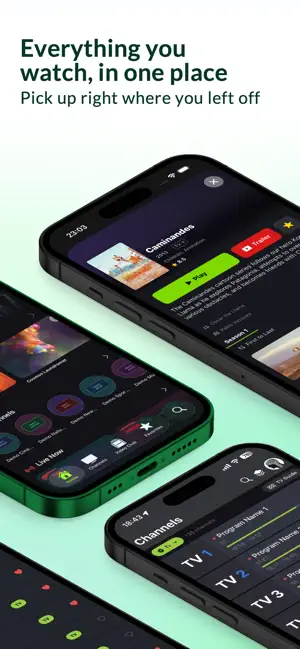


About Pixel IPTV: M3U Xtream Player
Watch your IPTV subscription on iPhone and Apple TV, with a proper programme guide, Picture in Picture, offline downloads and up to four channels at once. Pixel IPTV is a player: you bring your own M3U link or Xtream Codes login from your provider, and the app organises everything — channels, movies and series with artwork, synopses and where you left off. The app does not include, sell or host any channels or content. FEATURES • Plays M3U playlists and Xtream Codes accounts • Universal codec support via the bundled VLC engine — HLS, MPEG-TS, MP4, MKV and more • Intuitive gesture controls — swipe horizontally to zap channels, vertical drag for brightness/volume, double-tap to seek • Full Lock Screen + Control Center playback controls — play/pause, seek, scrubber, channel info and EPG programme as it changes • AirPlay + Chromecast casting (Pro) • Continue Watching across live channels, movies, and series • Series tracking with new-episode notifications (Pro) • EPG (Electronic Programme Guide) with global programme search and per-programme alerts • Catch-up "My List" — save EPG programmes once, the app routes you to live, server-side catch-up or a reminder depending on time • Siri Shortcuts — "Play C1", "Resume watching", "Search" via AppIntents (Pro) • TMDB and TVDB enrichment — posters, backdrops, synopses, and cast (Pro) • Trakt.tv scrobbling — optional, off by default • Kids Mode with PIN — hides adult-tagged categories automatically • Multiple profiles • iCloud sync — favourites, profile, watch progress and catch-up bookmarks on every device under your Apple ID • Watch statistics — your top channels, total time, and trends PRIVACY FIRST • No analytics, no tracking, no advertising identifiers • Credentials stored exclusively in the iOS Keychain • Sync uses Apple iCloud Key-Value Storage under your own Apple ID • Full Privacy Policy at https://heldaio.github.io/pixel-iptv-legal/privacy.html PRO UNLOCK Your first Pro subscription starts with 1 week free — once per Apple ID. Nothing is charged during the free week; it converts automatically into the subscription you chose unless you cancel at least 24 hours before it ends. • Pixel IPTV Pro Annual — €9.99/year, auto-renewable subscription. • Pixel IPTV Pro Monthly — €1.99/month, auto-renewable subscription. • Pixel IPTV Pro Lifetime — €29.99, one-time payment, no subscription, no renewal. Subscriptions are charged to your Apple ID and renew automatically at the same price unless cancelled at least 24 hours before the end of the current period. Renewal is charged within 24 hours before the period ends. Manage or cancel in Settings → [Your Name] → Subscriptions. Switching between Annual and Monthly is handled by Apple as a plan change within the same group. Free tier: 1 active playlist, 2 favourite channels, 2 favourite movies. Metadata enrichment (posters, synopses, cast), Picture in Picture, AirPlay, Chromecast, downloads and global search are Pro. LEGAL Pixel IPTV is a generic media player. You are responsible for ensuring your IPTV subscription is legal in your jurisdiction. We do not provide, sell, or recommend any IPTV service. Terms of Use (EULA): https://heldaio.github.io/pixel-iptv-legal/terms.html Privacy Policy: https://heldaio.github.io/pixel-iptv-legal/privacy.html SUPPORT Email: [email protected] Support: https://heldaio.github.io/pixel-iptv-legal/support.html
What’s new
Version 2.2 · Updated October 10, 2026
• New player look, in the iOS 27 style: Channels, Guide and Info rows and glass menus. • One channel, every quality — a channel's versions (SD, HD, FHD, 4K) are now a single channel. Pick the quality in the player menu, which also shows which playlist the channel comes from. • Several playlists, no repeated channels — the same channel in different playlists shows up once. The order in Manage Playlist sets the main playlist, and if its server fails the channel opens from the other one. Any playlist can be left out of the grouping. • Multiview from the player, in portrait too. We update the app regularly to fix bugs, optimize performance and improve your experience. Thank you for using Pixel IPTV.
App privacy
The developer, Helder Daio, reported these privacy practices to Apple.
Data Not Linked to You
The following data, which may be collected but is not linked to your identity, may be used for the following purposes:
- Diagnostics: Crash Data
Used for: App Functionality
Alternatives to Pixel IPTV: M3U Xtream Player
Looking for apps like Pixel IPTV: M3U Xtream Player? Here are 6 similar apps on the App Store. The highest rated is PixelPlay: IPTV M3U Xtream EPG (5.0/5), and all 6 are free to download.
-
 PixelPlay: IPTV M3U Xtream EPG
5.0
PixelPlay: IPTV M3U Xtream EPG
5.0
-
 Smarters IPTV Player Pro
4.4
Smarters IPTV Player Pro
4.4
-
 Prime IPTV
4.3
Prime IPTV
4.3
-
 Purple Playlist Player
4.6
Purple Playlist Player
4.6
-
 IPTV Smarters Pro - Live & VOD
4.5
IPTV Smarters Pro - Live & VOD
4.5
-
 XCIPTV Player
3.8
XCIPTV Player
3.8
| App | Rating | Price | Last updated | Compare |
|---|---|---|---|---|
| Pixel IPTV: M3U Xtream Player | – | Free | October 10, 2026 | |
| PixelPlay: IPTV M3U Xtream EPG | 5.0 / 5 (1) | Free | Oct 6, 2026 | Compare |
| Smarters IPTV Player Pro | 4.4 / 5 (168) | Free | Jul 31, 2026 | Compare |
| Prime IPTV | 4.3 / 5 (178) | Free | Jul 16, 2026 | Compare |
| Purple Playlist Player | 4.6 / 5 (2,042) | Free | May 27, 2026 | Compare |
| IPTV Smarters Pro - Live & VOD | 4.5 / 5 (428) | Free | Aug 8, 2026 | Compare |
| XCIPTV Player | 3.8 / 5 (38) | Free | Jun 4, 2026 | Compare |