

PixelPlay: IPTV M3U Xtream EPG
Rahul Kumar Gupta Entertainment iPhoneiPadiPod touch
PixelPlay: IPTV M3U Xtream EPG is a free Entertainment app for iPhone and iPad by Rahul Kumar Gupta. Rated 5.0/5 from 1 ratings. Requires iOS 17.0.
- Rating
- 5.0
- 1 ratings
- Price
- Free
- on the App Store
- Size
- 135 MB
- Age 4+
- Updated
- Oct 6
- 2026 · v1.2.2
Screenshots
About PixelPlay: IPTV M3U Xtream EPG
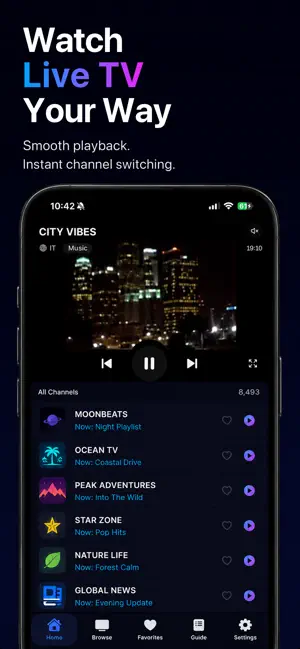
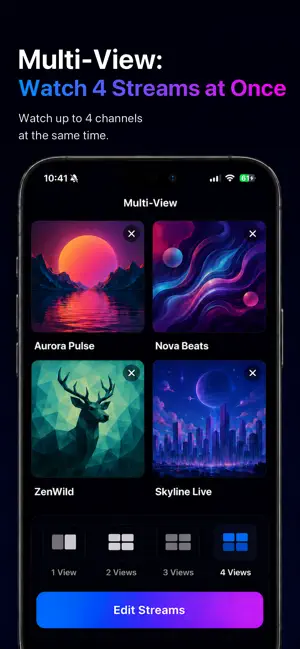
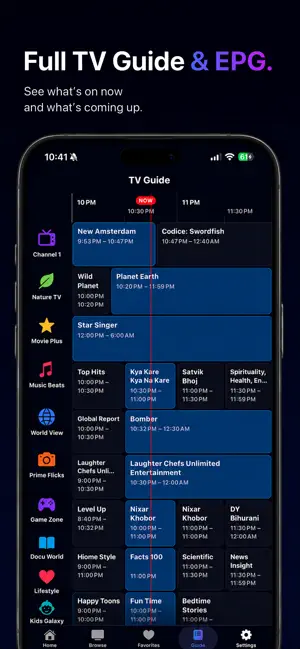
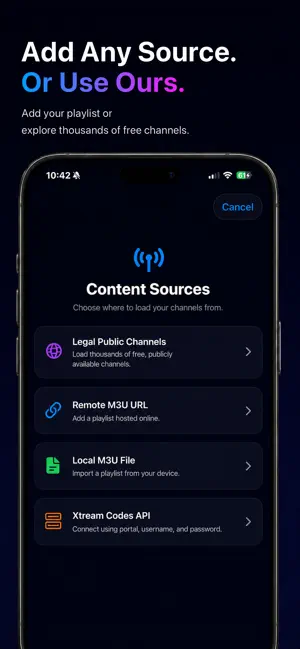
PixelPlay is a native iPhone and iPad player for IPTV streams. Bring your own M3U or Xtream playlist, or start from a free catalog of legal public channels. No ads. No tracking. PixelPlay runs two playback engines. AVPlayer handles HLS, MPEG-TS and MP4, and when it refuses a stream, VLCKit takes over, so a source that stalls in one still plays in the other. Cast to a Chromecast device or AirPlay to an Apple TV. Plug into a TV or monitor and the video moves to the big screen while the controls stay on your phone. Background audio works the way iOS users expect. WHAT YOU GET FREE - Core playback for HLS, MPEG-TS and MP4 streams - Pause and rewind live TV, or start the current program over - Catch-up: scroll back through a channel's guide and play what already aired, where your provider offers it - One content source of any type: M3U URL, M3U file, Xtream Codes API, or the free Public Catalog - Favorites, in an order you choose, plus a Recently Watched shelf on Home - Channels known to be offline sink to the bottom and carry a badge, so you stop tapping them. PixelPlay hides nothing by itself. Hide a channel yourself and it leaves every row at once - Ask Siri to play a channel, and get suggestions for the ones you watch most - Spotlight search: channels you have played are indexed into iOS system search - Chromecast (Google Cast) and AirPlay - Optional Sign in with Apple or Google to sync favorites across devices - Pinch to switch between fit and fill WHAT PIXELPLAY PRO ADDS PixelPlay Pro unlocks everything below. Buy it once and keep it for good, or subscribe yearly if you would rather try it first. - Multi-View: watch up to 4 streams at once on iPhone or iPad - Picture-in-Picture: keep watching while you use another app - Channel Lock and Category Lock, secured by Face ID, Touch ID or a PIN - Advanced TV Guide: a full EPG grid across time and channels - Unlimited content sources: separate playlists for sports, news and kids PRIVACY PixelPlay shows no ads and does not track you across apps or websites. The privacy manifest declares NSPrivacyTracking as false. Anonymous analytics are never linked to your identity. Signing in is optional. It stores the email address you provide and syncs your favorites and locks, so they follow you between devices. Your playlists and stream URLs stay on your device. DESIGNED FOR iOS PixelPlay is built with SwiftUI, StoreKit 2, SwiftData and AVKit. It is not a port of a cross-platform shell. That is why Spotlight search, Face ID locks, AirPlay, Picture-in-Picture and native iOS gestures behave the way they do in Apple's own apps. PURCHASES, RESTORES AND REFUNDS Buy Pro once and it stays yours, with nothing to cancel. The yearly plan starts with a one-week free trial, then renews each year until you cancel it in Settings. Restore Purchase, on the paywall or in Settings, brings Pro back on any device signed in to the same Apple Account. Refunds go through Apple at reportaproblem.apple.com. IMPORTANT: WHAT PIXELPLAY IS AND IS NOT PixelPlay is a media player. It does not provide, host, sell, resell or rebroadcast any TV channels, films or other media. Content is loaded from playlists and stream URLs that you supply, or from the optional free Public Catalog of openly published legal streams. You are responsible for ensuring that the content you load is lawful in your region and that you have the right to view it. PixelPlay has no affiliation with the providers of any third-party playlist or stream. Support: https://www.srstech.in/pixelplay/support/ Privacy Policy: https://www.srstech.in/pixelplay/privacy/
What’s new
Version 1.2.2 · Updated October 6, 2026
Settings has a new Talk to the Founder row. Ask for a feature and your email goes straight to the founder. New users now get an optional question during setup: where did you hear about PixelPlay? We use the answer to learn where people find the app.
App privacy
The developer, Rahul Kumar Gupta, reported these privacy practices to Apple.
Data Linked to You
The following data, which may be collected and linked to your identity, may be used for the following purposes:
- Contact Info: Email Address
- User Content: Other User Content
- Identifiers: User ID
Used for: App Functionality
Data Not Linked to You
The following data, which may be collected but is not linked to your identity, may be used for the following purposes:
- Location: Coarse Location
- Identifiers: Device ID
- Usage Data: Product Interaction, Other Usage Data
- Diagnostics: Crash Data, Performance Data
Used for: Analytics, App Functionality
Alternatives to PixelPlay: IPTV M3U Xtream EPG
Looking for apps like PixelPlay: IPTV M3U Xtream EPG? Here are 6 similar apps on the App Store. The highest rated is Timonation IPTV (5.0/5), and all 6 are free to download.
-
 Pixel IPTV: M3U Xtream Player
-
 Timonation IPTV
5.0
Timonation IPTV
5.0
-
 Vireko IPTV Player
4.9
Vireko IPTV Player
4.9
-
 Crivid IPTV Player: M3U Xtream
3.0
Crivid IPTV Player: M3U Xtream
3.0
-
 Aura - IPTV
5.0
Aura - IPTV
5.0
-
 Tifo: IPTV Player M3U & Xtream
5.0
Tifo: IPTV Player M3U & Xtream
5.0
| App | Rating | Price | Last updated | Compare |
|---|---|---|---|---|
| PixelPlay: IPTV M3U Xtream EPG | 5.0 / 5 (1 rating) | Free | October 6, 2026 | |
| Pixel IPTV: M3U Xtream Player | – | Free | Oct 19, 2026 | Compare |
| Timonation IPTV | 5.0 / 5 (1) | Free | Sep 8, 2026 | Compare |
| Vireko IPTV Player | 4.9 / 5 (44) | Free | Oct 28, 2026 | Compare |
| Crivid IPTV Player: M3U Xtream | 3.0 / 5 (2) | Free | Oct 21, 2026 | Compare |
| Aura - IPTV | 5.0 / 5 (1) | Free | Jul 1, 2026 | Compare |
| Tifo: IPTV Player M3U & Xtream | 5.0 / 5 (1) | Free | Oct 27, 2026 | Compare |