

Pagelight: Scanner OCR
Bloomwise SAS Productivity iPhoneiPadiPod touch
Pagelight: Scanner OCR is a free Productivity app for iPhone and iPad by Bloomwise SAS. Requires iOS 15.1. Updated September 18, 2026.
- Price
- Free
- on the App Store
- Size
- 46 MB
- Age 4+
- Updated
- Sep 18
- 2026 · v1.1.2
Screenshots


About Pagelight: Scanner OCR
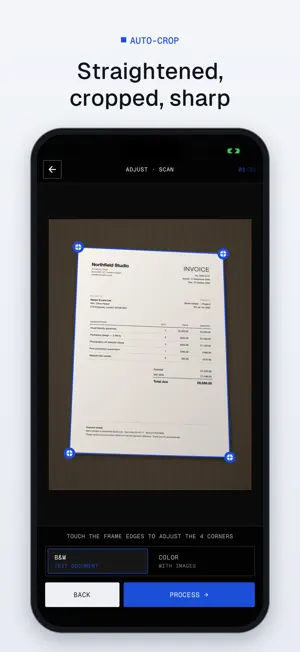
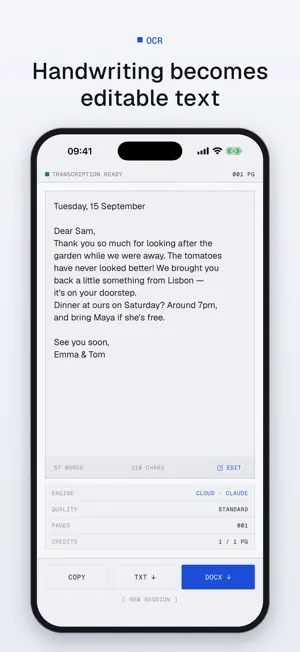
Pagelight turns any phone photo into a clean digital document — and lets you sign it. A precise scanner for printed papers, a faithful OCR for handwritten notes, a straightforward tool to sign and fill the PDFs you have to send back. Photograph a letter, a notarized deed, a school notebook or a family journal. Pagelight straightens the edges, corrects perspective and produces either a clean PDF or editable text you can review, correct and export. Got a contract to sign or a form to fill? Import the PDF, draw your signature once, place it where it belongs, done. Built for documents that matter: family memories to preserve, archives to digitize, contracts and forms to return signed. No bloated interface, no gimmicks, no ads. FEATURES • Multi-page scanner with automatic edge detection • Clean black & white or full color PDF output • Faithful OCR transcription, including cursive handwriting • Choose your engine: Cloud (fast, high accuracy) or on-device (free, offline, nothing leaves your iPhone) • Sign and fill any PDF: handwritten signature, initials, text, date, checkmarks and crosses • Save signature profiles and reuse them in one tap • Export as PDF, TXT or DOCX • History of your scans, transcriptions and signed documents, kept in the app (Premium) • Direct share, clipboard copy, gallery save WHO IT'S FOR • Anyone preserving handwritten family records • Anyone who signs and returns contracts, leases or admin forms from their phone • Privacy-conscious professionals: notaries, archivists, HR • Anyone who needs a reliable pocket scanner without tracking PRIVACY The on-device engine processes your image entirely on your iPhone — no data leaves it. In Cloud mode, images are sent encrypted and deleted after processing. No ads, no tracking. Pagelight runs on credits: scans and Cloud transcriptions use credits, signing and filling use none. Buy packs or subscribe to Pro/Premium for unlimited use — Premium also unlocks History. Terms of Use (EULA): https://bloomwise.studio/en/apps/pagelight/terms Privacy Policy: https://bloomwise.studio/en/apps/pagelight/privacy
What’s new
Version 1.1.2 · Updated September 18, 2026
• Signed and filled PDFs now display special characters such as € correctly • Cleaner transcriptions, without stray formatting marks • On-device OCR warns you when confidence is low and lets you re-crop in one tap • Clearer guidance when camera access is turned off • Improved VoiceOver and Reduce Motion support • Dates now follow your app language
App privacy
The developer, Bloomwise SAS, reported these privacy practices to Apple.
Data Not Linked to You
The following data, which may be collected but is not linked to your identity, may be used for the following purposes:
- Purchases: Purchase History
- Identifiers: User ID
Used for: App Functionality
Alternatives to Pagelight: Scanner OCR
Looking for apps like Pagelight: Scanner OCR? Here are 6 similar apps on the App Store. The highest rated is ScanOnce: PDF Doc Scanner (5.0/5), and all 6 are free to download.
-
 TableScan Studio
-
 ScanOnce
-
 Document Lens - OCR Scanner
-
 Xcelify: Scan Tables to Sheets
-
 ScanOnce: PDF Doc Scanner
5.0
ScanOnce: PDF Doc Scanner
5.0
-
 24 Hours Schedule Management
3.5
24 Hours Schedule Management
3.5
| App | Rating | Price | Last updated | Compare |
|---|---|---|---|---|
| Pagelight: Scanner OCR | – | Free | September 18, 2026 | |
| TableScan Studio | – | Free | Feb 25, 2026 | Compare |
| ScanOnce | – | Free | Apr 20, 2026 | Compare |
| Document Lens - OCR Scanner | – | Free | May 29, 2026 | Compare |
| Xcelify: Scan Tables to Sheets | – | Free | Jun 17, 2026 | Compare |
| ScanOnce: PDF Doc Scanner | 5.0 / 5 (1) | Free | Oct 3, 2026 | Compare |
| 24 Hours Schedule Management | 3.5 / 5 (4) | Free | Apr 13, 2025 | Compare |