

AI Restore Old & Faded Photos
Ihor Dzhevaha Photo & Video iPhoneiPadiPod touch
AI Restore Old & Faded Photos is a free Photo & Video app for iPhone and iPad by Ihor Dzhevaha. Rated 4.5/5 from 2 ratings. Requires iOS 17.0.
- Rating
- 4.5
- 2 ratings
- Price
- Free
- on the App Store
- Size
- 43 MB
- Age 4+
- Updated
- Jul 29
- 2026 · v2.2
Screenshots

About AI Restore Old & Faded Photos
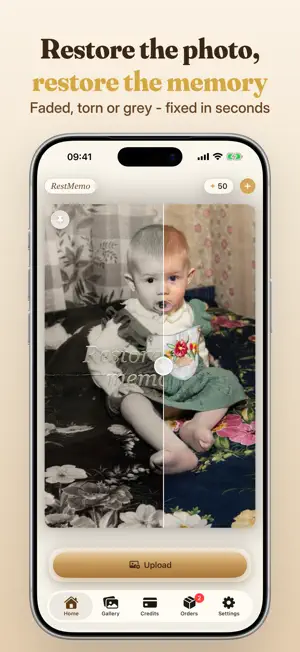
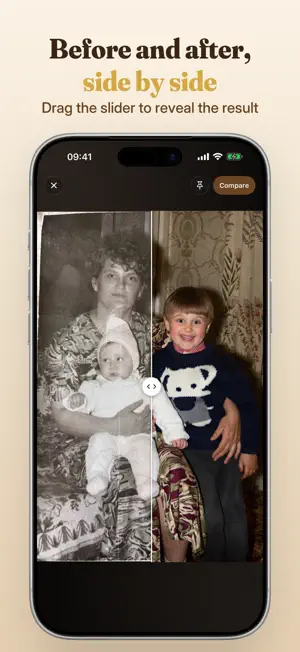
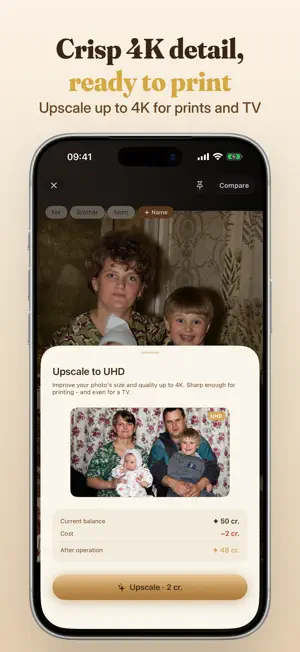
Bring your oldest, most precious photos back to life. RestMemo uses advanced AI to restore, colorize and sharpen damaged and faded pictures - in seconds, right on your iPhone. Some photos are all that's left of the people we love. RestMemo was built to give them back to you: clear, colorful and alive. THREE TOOLS IN ONE - all in a single tap, for just 1 credit: • RESTORE - Remove scratches, tears, creases, stains and water damage. Rebuild faces and lost detail. • COLORIZE - Turn black & white photos into natural, lifelike color. • ENHANCE - Fix blur, boost resolution and bring back crisp HD quality. DO MORE WITH YOUR MEMORIES • LIVE - See a loved one smile again. Animate any photo into a short, shareable video. • UHD UPSCALE - Make photos sharp and big enough for canvas prints, framed photos and your TV. • COMPARE - Slide between the original and the result to see every detail return. • CANVAS PRINTS - Order a gallery-quality canvas of a restored photo, made to order and delivered to your door (available only in some countries). WHY RESTMEMO • Highest-quality results - we obsess over keeping faces and identity true to the original, never "AI-fake". • Beautifully simple - add a photo, tap Restore, done. • Your first restore is on us. • Your memories stay private - photos are processed securely and are never sold or shared. • Keep everything in a private gallery, safely backed up and synced across your devices. HOW IT WORKS 1. Add a photo from your library - or snap a printed one with your camera. 2. Tap Restore. 3. Save, share, print - or bring it to life. Pay only for what you use with simple credits - no forced subscription. Optional cloud storage keeps your restored photos safe across all your devices. Made with love for everyone who still has a shoebox of old photos waiting to be seen again. Terms of Use: https://restmemo.app/terms Privacy Policy: https://restmemo.app/privacy
What’s new
Version 2.2 · Updated July 29, 2026
This update makes getting the perfect restoration even smoother: • A helpful tip now appears when you pick a photo from your library, so you get the cleanest result (hint: choose a photo without a white border or frame - and crop it in seconds if it has one). • Small refinements and stability improvements. Thank you for trusting RestMemo Photo to bring your memories back to life.
App privacy
The developer, Ihor Dzhevaha, reported these privacy practices to Apple.
Data Linked to You
The following data, which may be collected and linked to your identity, may be used for the following purposes:
- Usage Data: Product Interaction
- Purchases: Purchase History
- Contact Info: Physical Address, Email Address, Name, Phone Number
- User Content: Photos or Videos
- Identifiers: Device ID
Used for: Analytics, App Functionality
Data Not Linked to You
The following data, which may be collected but is not linked to your identity, may be used for the following purposes:
- Financial Info: Payment Info
Used for: App Functionality
Alternatives to AI Restore Old & Faded Photos
Looking for apps like AI Restore Old & Faded Photos? Here are 6 similar apps on the App Store. The highest rated is AI Restore Old Photos - PicFix (5.0/5), and all 6 are free to download.
-
 AI Restore Old Photos - PicFix
5.0
AI Restore Old Photos - PicFix
5.0
-
 Restore Old Photos with AI
-
 AI Photo Enhancer & Restorer
5.0
AI Photo Enhancer & Restorer
5.0
-
 Restore & Colorize Old Photos
-
 Restore Old Photos - LumiFix
4.4
Restore Old Photos - LumiFix
4.4
-
 Old Photo Restore - Aion
3.9
Old Photo Restore - Aion
3.9
| App | Rating | Price | Last updated | Compare |
|---|---|---|---|---|
| AI Restore Old & Faded Photos | 4.5 / 5 (2 ratings) | Free | July 29, 2026 | |
| AI Restore Old Photos - PicFix | 5.0 / 5 (1) | Free | Oct 10, 2026 | Compare |
| Restore Old Photos with AI | – | Free | Aug 14, 2026 | Compare |
| AI Photo Enhancer & Restorer | 5.0 / 5 (1) | Free | May 18, 2026 | Compare |
| Restore & Colorize Old Photos | – | Free | Apr 4, 2026 | Compare |
| Restore Old Photos - LumiFix | 4.4 / 5 (8) | Free | May 11, 2026 | Compare |
| Old Photo Restore - Aion | 3.9 / 5 (11) | Free | Sep 22, 2026 | Compare |