

AI To Do List Planner: Workr
Asim Can Yagiz Productivity iPhoneiPadiPod touchMac
AI To Do List Planner: Workr is a free Productivity app for iPhone and iPad by Asim Can Yagiz. Requires iOS 18.0. Updated September 21, 2026.
- Price
- Free
- on the App Store
- Size
- 38 MB
- Age 4+
- Updated
- Sep 21
- 2026 · v1.2.7
Screenshots

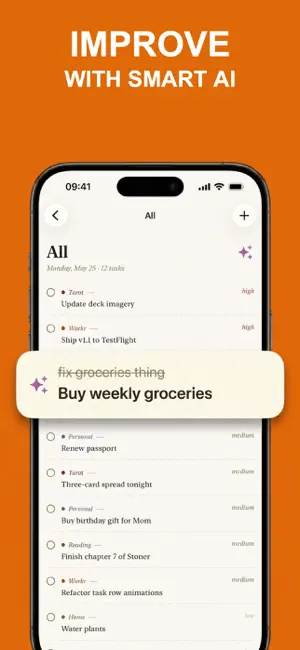

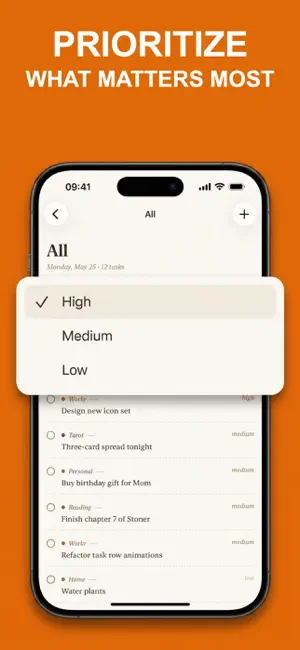
About AI To Do List Planner: Workr
Workr is a fast, beautiful task app that just works — no setup, no friction, no productivity puzzle. Built for people who want a real to-do list, not another tool to manage. Capture tasks in seconds, organize with color-coded projects, and focus on what matters today. WHY WORKR Most task apps make you do more work to feel productive. Workr does the opposite — it gets out of the way so you can actually finish what you started. — Capture instantly. One tap to add a task. Type and move on. No menus, no modals, no friction. — Focus on today. Smart filters keep tomorrow's noise out of today's list. See what matters now. — Stay organized without effort. Color-coded projects and priority tiers give every task a place. — Sync everywhere, free. Your tasks follow you from iPhone to iPad to Mac, instantly. iCloud-powered, no account to create. SMART FILTERS — All — every open task across every project — Today — what you said you'd do today, nothing else — Done — recently completed (with a 2-second grace window in case you mis-tap) COLOR-CODED PROJECTS Group tasks by project — work, side hustle, life admin, errands. Each project gets a color you choose. Priority tiers (Low / Medium / High) let you sort the urgent from the eventual without a complicated tagging system. ONE-TAP CAPTURE Hit the new task button, start typing. Press return — task saved. Hit return again — next task. The fastest way to dump everything in your head into a list you can actually trust. FREE iCLOUD SYNC Your iPhone, iPad, and Mac stay in sync automatically — no account to create, no sync service to debug. Sign in to iCloud once, and Workr just works. Native SwiftData + CloudKit under the hood. EDITORIAL DESIGN Workr looks and feels different from every other task app you've tried. Paper-inspired layout. Serif typography. Color used with restraint. Designed for long-term daily use, not Instagram screenshots. NO ADS. YOUR DATA STAYS YOURS. Workr's core is free — every task, project, smart filter, and iCloud sync feature, with no ads, and we never sell your data. On-device Apple Intelligence features are free too. An optional subscription, Workr Premium (auto-renewable, weekly or yearly), unlocks cloud-powered AI for those who want it — everything else stays free. Your tasks are yours, stored in your private iCloud database, encrypted in transit and at rest. MULTIPLATFORM, NATIVE — iPhone (iOS 18+) — iPad (iPadOS 18+) — Mac (macOS 15+) Built with SwiftUI from the ground up — fast, snappy, and feels like Apple's own apps. Not an Electron wrapper, not a web view, not a cross-platform compromise. MADE FOR DAILY USE Workr is the developer's own task app — used every day, polished every week. Bugs get fixed because they're personal. Features earn their place because they get used. No feature bloat, no abandoned half-built tabs, no quarterly redesigns chasing the latest design trend. WHAT WORKR ISN'T Not a calendar. Not a habit tracker. Not a Pomodoro timer. Not a kanban board. Not a CRM. Not a note-taking app. Workr does one thing — manage your tasks — and tries to be the best at that one thing. If you've bounced between task apps for years looking for one that doesn't fight you, give Workr a try. Get back to the work that matters. Privacy: https://asimcanyagiz.github.io/workr-pages/privacy.html Terms: https://asimcanyagiz.github.io/workr-pages/terms.html
What’s new
Version 1.2.7 · Updated September 21, 2026
Bug fix and performance improvements
App privacy
The developer, Asim Can Yagiz, reported these privacy practices to Apple.
Data Used to Track You
The following data may be used to track you across apps and websites owned by other companies:
- Identifiers: Device ID
- Usage Data: Product Interaction
Data Linked to You
The following data, which may be collected and linked to your identity, may be used for the following purposes:
- Identifiers: Device ID, User ID
- Usage Data: Product Interaction
- Contact Info: Email Address
- User Content: Other User Content
Used for: Third-Party Advertising, Developer’s Advertising or Marketing, Analytics, App Functionality
Data Not Linked to You
The following data, which may be collected but is not linked to your identity, may be used for the following purposes:
- Purchases: Purchase History
- Identifiers: Device ID
- Diagnostics: Crash Data
Used for: App Functionality
Alternatives to AI To Do List Planner: Workr
Looking for apps like AI To Do List Planner: Workr? Here are 6 similar apps on the App Store. The highest rated is To-do Color (5.0/5), and all 6 are free to download.
-
 Synctodo: Task List & Subtasks
-
 To-do Color
5.0
To-do Color
5.0
-
 Start. Work earns your rest
-
 Loqui Auris
5.0
Loqui Auris
5.0
-
 Routine Builder: Daily Planner
-
 Goal Calendar – On Fire
| App | Rating | Price | Last updated | Compare |
|---|---|---|---|---|
| AI To Do List Planner: Workr | – | Free | September 21, 2026 | |
| Synctodo: Task List & Subtasks | – | Free | Sep 8, 2026 | Compare |
| To-do Color | 5.0 / 5 (3) | Free | Mar 19, 2026 | Compare |
| Start. Work earns your rest | – | Free | Jul 14, 2026 | Compare |
| Loqui Auris | 5.0 / 5 (2) | Free | Sep 7, 2026 | Compare |
| Routine Builder: Daily Planner | – | Free | Aug 17, 2026 | Compare |
| Goal Calendar – On Fire | – | Free | Jan 26, 2026 | Compare |