

My Next: Note
Lars Bruce Productivity iPhoneiPadiPod touchApple Watch
My Next: Note is a free Productivity app for iPhone and iPad by Lars Bruce. Requires iOS 16.0. Updated September 14, 2026.
- Price
- Free
- on the App Store
- Size
- 46 MB
- Age 4+
- Updated
- Sep 14
- 2026 · v1.3.0
Screenshots


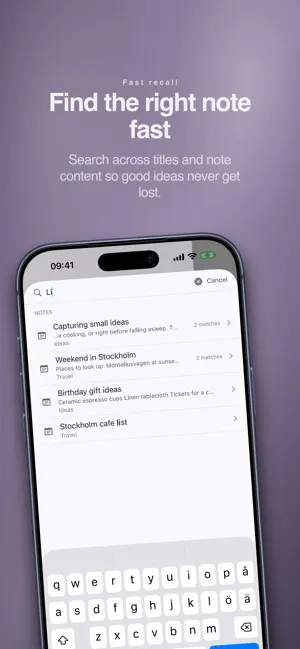

About My Next: Note
My Next: Note is a calm, private note app for your personal life — not work. Capture thoughts, ideas, and context without pressure. Just open, write, and trust that everything is saved. FAST CAPTURE Start writing immediately. Every note saves automatically as you type, when you leave the app, and when your phone locks. There is no save button because you never need one. SIMPLE RICH TEXT Format notes with Bold, Italic, and Headings using a clean inline toolbar. Enough to give your writing structure without the complexity of a word processor. ORGANIZE WITH NOTEBOOKS Group related notes into Notebooks when you want to. Or keep everything in All Notes. Pin important notes so they stay easy to find. PRIVATE BY DEFAULT No account required. No tracking. No ads. Your app content stays on your device, under your control. Back up anytime to iCloud, Files, Dropbox, or AirDrop. EXTRA WHEN YOU NEED IT Create unlimited notes for free and organize up to 3 Notebooks. Upgrade to Extra for unlimited Notebooks, advanced search, note export, biometric lock, and sharing from other apps. QUIET BY DESIGN No feeds. No social features. No gamification. Just a calm place to think, write, and keep what matters. Terms of Use (EULA): https://mynextstudio.com/my-next/note/terms/ Privacy Policy: https://mynextstudio.com/my-next/note/privacy/
What’s new
Version 1.3.0 · Updated September 14, 2026
New in 1.3.0: Note on Apple Watch. • Browse your notes and notebooks, and scroll through notes on your wrist. • Capture a thought with system dictation or available text input. • Notes created on your watch are saved in the Apple Watch notebook on your iPhone. If the devices are disconnected, saved notes wait on your watch until they can be transferred. Enable Apple Watch in Note’s settings on your iPhone. Input methods and dictation languages depend on your watch and its settings. Dictation may need an internet connection.
App privacy
The developer, Lars Bruce, reported these privacy practices to Apple.
Data Not Linked to You
The following data, which may be collected but is not linked to your identity, may be used for the following purposes:
- Purchases: Purchase History
- Identifiers: User ID, Device ID
- Usage Data: Product Interaction
Used for: Analytics, App Functionality
Alternatives to My Next: Note
Looking for apps like My Next: Note? Here are 6 similar apps on the App Store.




| App | Rating | Price | Last updated | Compare |
|---|---|---|---|---|
| My Next: Note | – | Free | September 14, 2026 | |
| Idea Notes: Quick Brain Dump | – | Free | Sep 16, 2026 | Compare |
| Notes · KurtApps | – | Free | Jul 22, 2026 | Compare |
| مفكّرة | – | Free | Jul 2, 2026 | Compare |
| MicType | – | Free | Oct 1, 2026 | Compare |
| Daboosz | – | Free | Sep 16, 2026 | Compare |
| Mement: Smart Planner | – | Free | Oct 20, 2026 | Compare |
Compare My Next: Note with the top alternatives: ratings, updates, ASO score and keyword gaps →