

PDF Scanner & Editor: SnapPDF
Gautam Singh Rathor Productivity iPhoneiPadiPod touch
PDF Scanner & Editor: SnapPDF is a free Productivity app for iPhone and iPad by Gautam Singh Rathor. Rated 4.5/5 from 4 ratings. Requires iOS 15.0.
- Rating
- 4.5
- 4 ratings
- Price
- Free
- on the App Store
- Size
- 103 MB
- Age 4+
- Updated
- Sep 24
- 2026 · v0.9.0+16
Screenshots

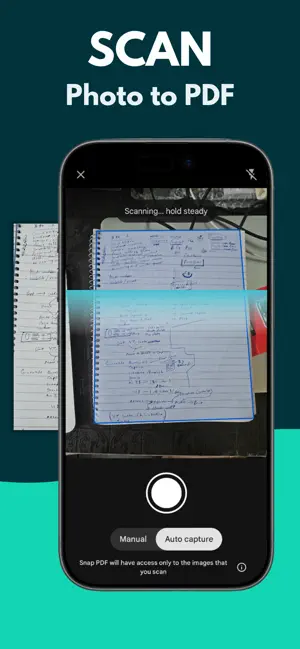
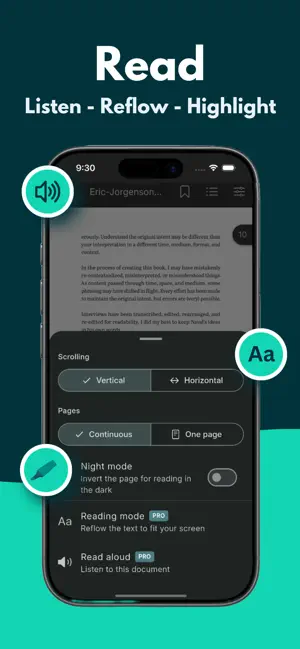

About PDF Scanner & Editor: SnapPDF
SnapPDF turns your device into a complete document workstation. Built for professionals, students, and freelancers who need to handle PDFs without subscriptions or watermarks. SCANNER Scan paper documents with auto edge detection. Apply B&W or color filters. Multi-page scans into a single PDF. Save Aadhaar cards, receipts, invoices, ID cards, and notes in seconds. CONVERTER Convert photos from your camera or gallery into PDF instantly. Convert PDFs to JPG, Word, Excel, and PowerPoint. Convert between formats without uploading to a server. EDITOR Add handwritten signatures by drawing with your finger or Apple Pencil. Insert watermarks, page numbers, and custom margins. Annotate any PDF. ORGANIZER Merge multiple PDFs into one. Split a PDF into separate files. Reorder, delete, or extract specific pages. OPTIMIZER Compress PDFs by up to 95% without quality loss. Email any file regardless of size. SECURITY Lock PDFs with AES-256 encryption. Set passwords for sensitive documents like bank statements, contracts, and tax forms. Your files never leave your phone. WHY SNAPPDF - No subscription required for core features - No watermarks on output - Works without internet - No account signup Support: [email protected] Privacy Policy : https://sites.google.com/view/snappdf-privacy/privacypolicy Terms of use : https://sites.google.com/view/snappdf-terms/terms
What’s new
Version 0.9.0+16 · Updated September 24, 2026
- Auto-scroll for reading mode, like a teleprompter, with a smooth speed slider - Bookmarks take you back to the exact lines, not just the page - Bookmarks are named by their own text — rename any of them with a long press - Bookmarks and table of contents moved into the settings menu - Long file names now scroll past in the toolbar instead of being cut off - Roomier page view: smaller, tighter toolbar buttons
App privacy
The developer, Gautam Singh Rathor, reported these privacy practices to Apple.
Data Used to Track You
The following data may be used to track you across apps and websites owned by other companies:
- Location: Coarse Location
- Identifiers: Device ID
- Usage Data: Product Interaction, Advertising Data
Data Not Linked to You
The following data, which may be collected but is not linked to your identity, may be used for the following purposes:
- Location: Coarse Location
- Identifiers: Device ID
- Usage Data: Product Interaction, Advertising Data
- Diagnostics: Crash Data, Performance Data, Other Diagnostic Data
- Purchases: Purchase History
Used for: Third-Party Advertising, Analytics, App Functionality
Alternatives to PDF Scanner & Editor: SnapPDF
Looking for apps like PDF Scanner & Editor: SnapPDF? Here are 6 similar apps on the App Store. The highest rated is PDFix: Edit, Sign, Convert PDF (5.0/5), and 3 of the 6 are free to download.
-
 PDFix: Edit, Sign, Convert PDF
5.0
PDFix: Edit, Sign, Convert PDF
5.0
-
 AlignScan – Document Scanner
3.2
AlignScan – Document Scanner
3.2
-
 PDF Print - Templates
-
 Calculator Keyboard - Faster
4.4
Calculator Keyboard - Faster
4.4
-
 Amber - Simple Markdown
5.0
Amber - Simple Markdown
5.0
-
 FlipScape
| App | Rating | Price | Last updated | Compare |
|---|---|---|---|---|
| PDF Scanner & Editor: SnapPDF | 4.5 / 5 (4 ratings) | Free | September 24, 2026 | |
| PDFix: Edit, Sign, Convert PDF | 5.0 / 5 (3) | Free | Oct 19, 2026 | Compare |
| AlignScan – Document Scanner | 3.3 / 5 (4) | Free | Oct 21, 2026 | Compare |
| PDF Print - Templates | – | 4.99 USD | Jul 17, 2026 | Compare |
| Calculator Keyboard - Faster | 4.4 / 5 (9) | 2.99 USD | Jul 22, 2026 | Compare |
| Amber - Simple Markdown | 5.0 / 5 (3) | 2.99 USD | Aug 22, 2026 | Compare |
| FlipScape | – | Free | Jan 28, 2026 | Compare |